Salesforce Partner Cloud Fundamentals: Salesforce Account Plans Explained: Guide to Native Account Plans
For years, channel sales teams have struggled with strategic account planning. Effectively managing account strategy, related goals, and stakeholder involvement is a critical task for any partner account manager looking to nurture relationships. Historically, this process meant juggling disconnected spreadsheets, presentation decks, or expensive, third-party tools. This approach often led to significant limitations, including disconnected systems, stale information, and a lack of automation capabilities.
Now, Salesforce is addressing this long-standing challenge with its native Account Plan feature available in Salesforce Partner Cloud. This is not just another custom object; it’s a dedicated, out-of-the-box workspace. It’s designed to give teams a single place to capture partner needs, analyze strengths and weaknesses, and define and track objectives with measurable metrics.
This feature provides a single source of truth for all account-based selling initiatives. By including this new functionality in the Partner Ecosystem offering at no extra cost, Salesforce is empowering customers to adopt a fully in-app solution. Teams can finally move away from static, disconnected documents and manage their most strategic accounts natively within the platform they use every day.
Anatomy of the Account Plan Record: The User’s View
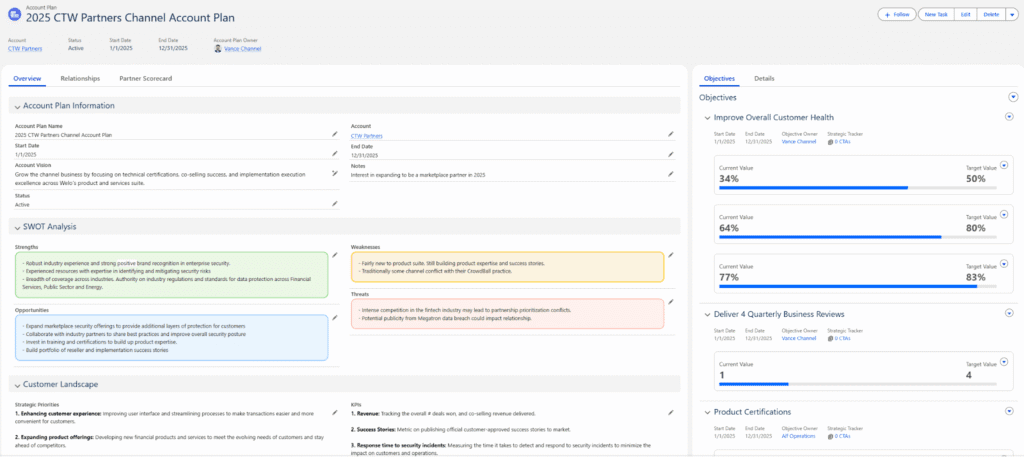
When a user opens an Account Plan, they aren’t just looking at a simple record page; they are engaging with a comprehensive workspace designed to be their home for long-term account growth strategy. This centralized hub turns scattered efforts into a unified strategy, presenting several key out-of-the-box components in one place.
Key Out-of-the-Box Components
- Account Metrics Dashboard: At the top of the record, a dynamic dashboard displays key performance indicators related to the account’s opportunities. This gives the partner managers an immediate snapshot of the pipeline, showing metrics like the number of open opportunities broken down by stage, total revenue from Closed Won deals, and the Opportunity Win Rate for the current and previous quarters.
- Strategic Analysis Sections: Below the dashboard, the Account Plan includes several built-in sections to capture and evaluate partner needs using common strategic frameworks. These fields utilize rich-text editors for detailed analysis and include:
- SWOT Analysis: A dedicated panel to identify the account’s strengths, weaknesses, opportunities, and threats.
- Partner Landscape: A section to document the account’s strategic priorities, challenges, KPIs, and relevant industry trends.
- Competitive Landscape: An area to analyze competitive strengths and weaknesses and list key competitors.
Core Functionality
A major advantage of this new feature is that Account Plans are individual Salesforce records. Because all the captured data is stored in fields, the entire plan is fully reportable using native Salesforce reports and dashboards. This is a significant enhancement, as it allows channel sales leadership to leverage this data during reviews and QBRs to track progress and dive into the latest updates.
By default, Account Plan records are private. This allows a partner manager to develop a strategy before sharing it. When ready, they can manually share their plan with other team members using the record’s standard sharing settings. If broader access is required, an admin can change this behavior by updating the organization-wide defaults for the Account Plan object.
If you find this article interesting, we also recommend checking out the previous blog post in this series ⤵️
Salesforce Partner Cloud Fundamentals: Incentive Management Explained
Making Strategy Actionable: Objectives and Execution
The Account Plan record is more than just a static analysis tool; it’s a living workspace. This section covers the “doing” part of the plan, detailing how channel sales teams can define, automate, and execute their goals directly from the record.
Defining Goals with “Objectives”
The core of any plan is its goals. From the Account Plan record, users can add Account Plan Objectives to define specific, actionable, and measurable goals for their long-term growth strategy.
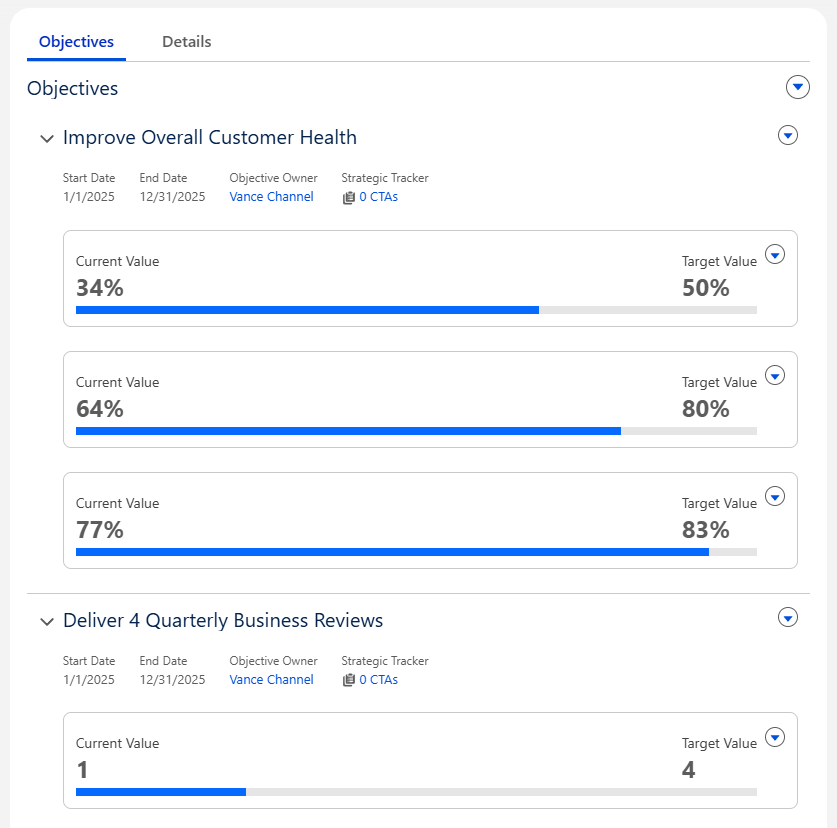
Salesforce supports two distinct types of objectives:
- Qualitative Objectives: These are contextual goals where success is measured subjectively, such as “Get executive buy-in”. These goals don’t use measurable metrics, so they don’t have a current or target value.
- Quantitative Objectives: These are measurable goals with a specific target value to achieve. When creating one, a user must specify a Target Value and its unit of measure: Currency, Percent, or Number. If a calculation definition isn’t used, it is up to the user to manually update the “Current Value” field to reflect their progress.
Automating Progress with “Objective Metrics Calculation”
This is what makes the Account Plan a truly dynamic tool. Instead of relying on manual data entry, a new feature released in Spring ’25 allows for the automatic calculation of an objective’s progress.
Here’s how it works: An admin can go to the Account Plans Setup page and create Objective Metrics Calculation Definitions. A definition can be configured to automatically:
- Sum a field (e.g., Opportunity Amount)
- Count records
- Find the Maximum or Minimum of a field
This calculation can run on related records – like Opportunities, Cases, Campaigns, or Contacts – that meet specific filter criteria .
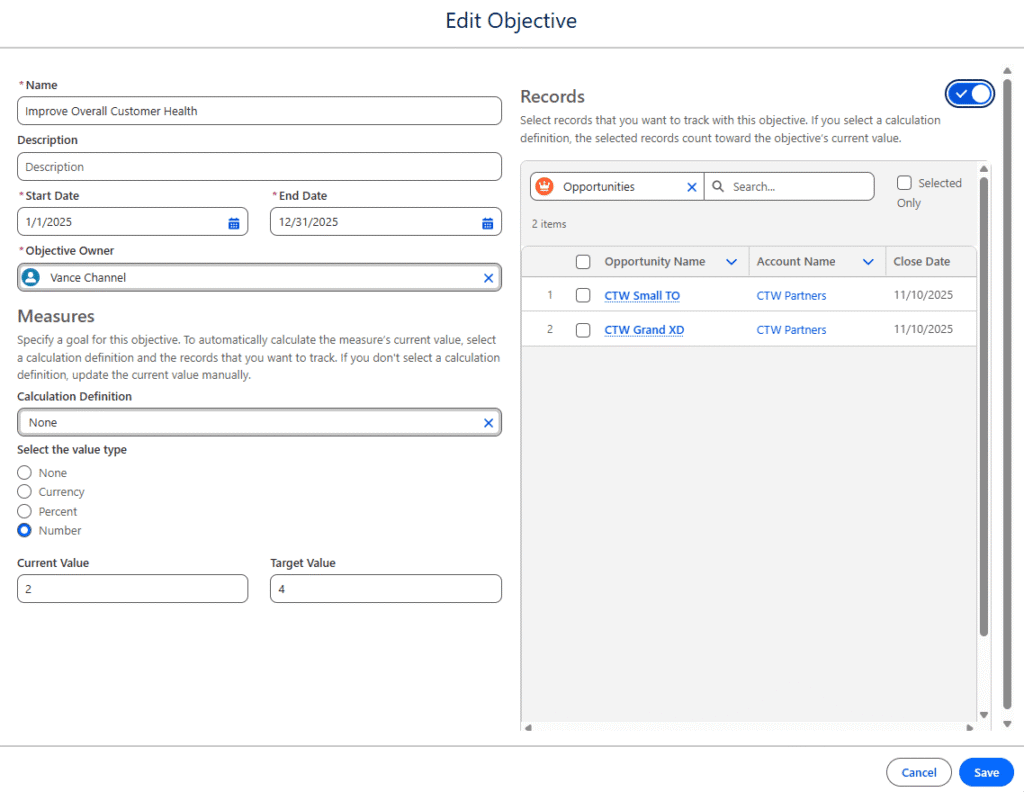
For the user, the process is simple. When creating an objective, they just select a pre-built definition (e.g., “Sum of Closed Won Opps”). The “Current Value” field then becomes read-only and updates automatically as related records are updated, providing a permanently accurate measure of progress without any manual work.
Executing Goals with the “Strategic Tracker”
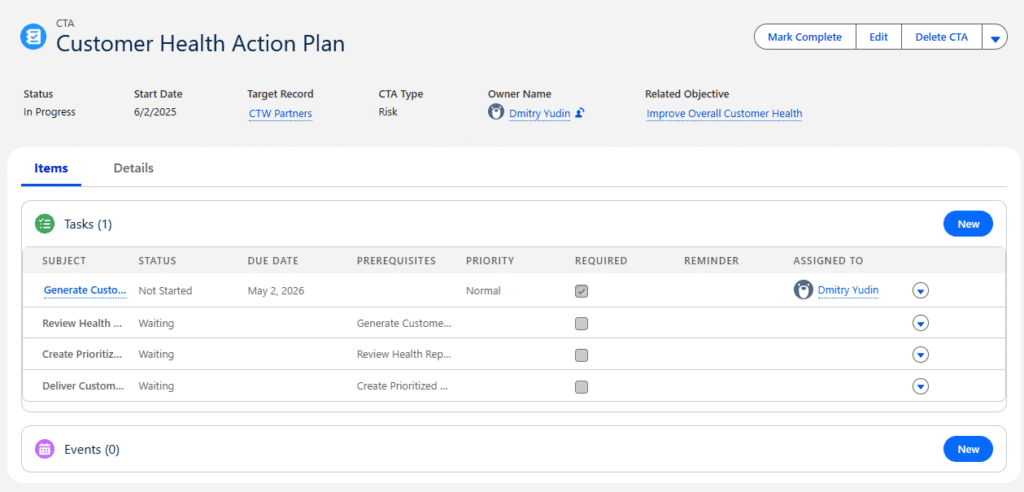
Once an objective is set, the Strategic Tracker shows how the team will achieve it. This component, which appears on the Account Plan Objective page, provides transparency and accountability for the partner manager’s activities.
The Strategic Tracker uses Action Plans to organize and display a checklist of Tasks and Events (meetings) that are linked directly to that specific objective. These action plans are created from pre-built Action Plan Templates (e.g., “New Partner Onboarding Plan”), which define a standard set of steps for achieving common use cases. This allows an organization to standardize its processes while giving partner managers a clear, step-by-step framework to track execution.
Supporting Components: Visualizing Stakeholders and Opportunities
To provide a complete 360-degree view of the account, the Account Plan workspace can be enhanced with other native Salesforce components. These optional features plug directly into the plan, adding visual context for stakeholder management and new partner opportunities.
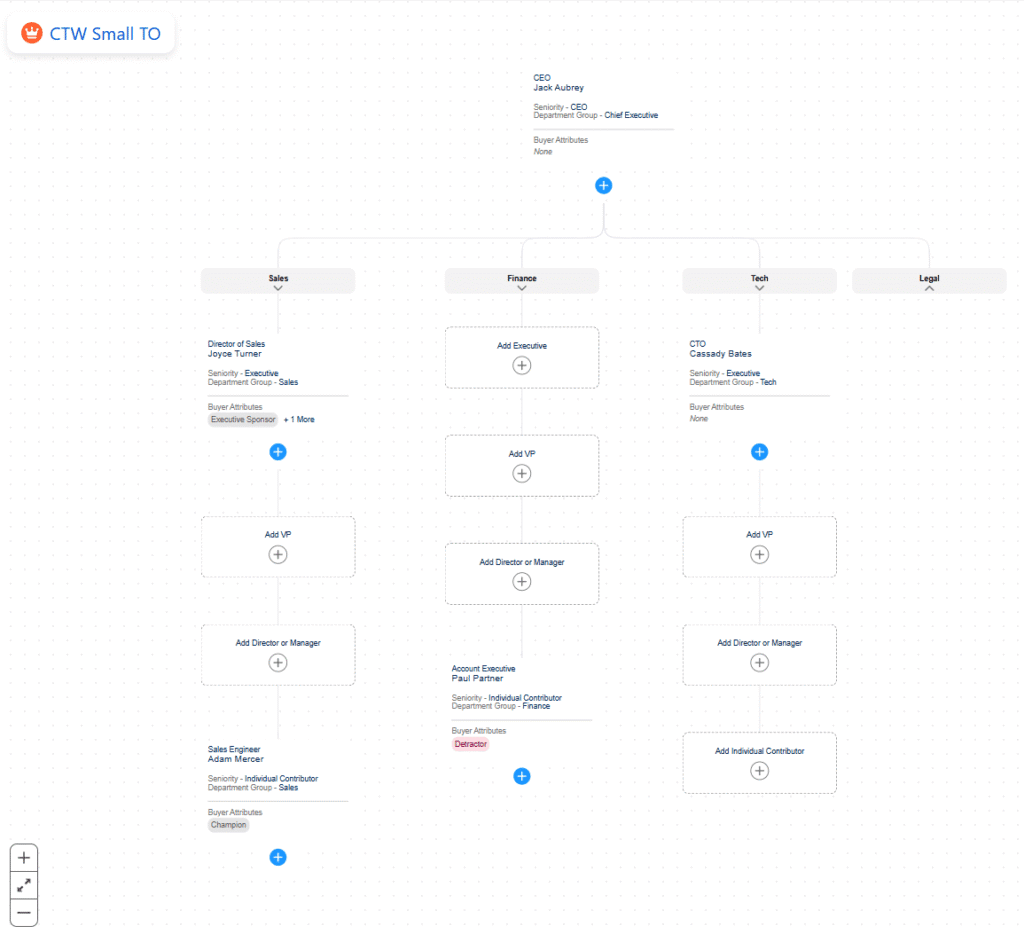
1. The Buyer Relationship Map
This is an optional but highly recommended feature to enable alongside Account Plans. It provides a fully interactive organizational chart that helps partnership teams visualize the stakeholders associated with the account. Users can map out contacts by their Influence Level or Functional Role. Most importantly, it allows the team to assign key Partner Attributes to contacts, helping to quickly identify crucial roles like Advocate, Executive Sponsor, and Technical Champion.
2. The Product Whitespace Map
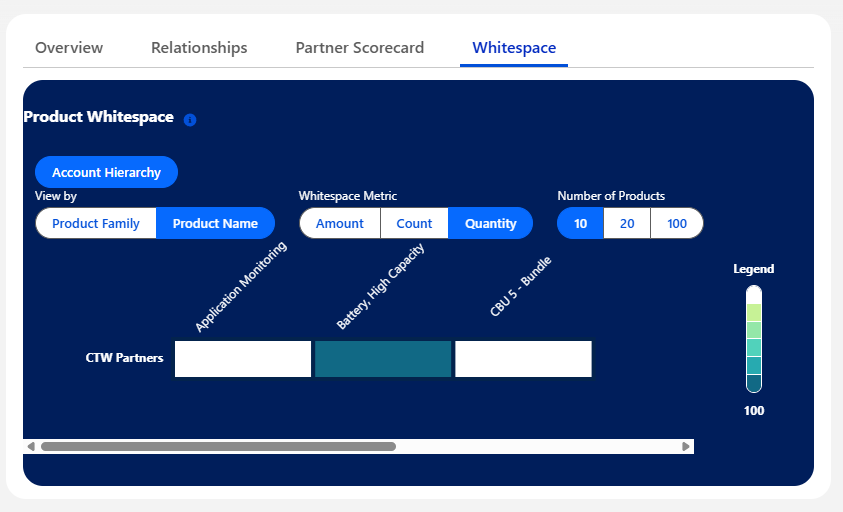
Available as of the Spring ’25 release, the Product Whitespace Map is a new component that can be added directly to the Account Plan record page. It displays a visual heat map of products from Closed Won Opportunities within the past year. The key value of this component is its ability to show this data across a full Account Hierarchy. This allows channel sales teams to instantly identify gaps and potential upsell or cross-sell areas – the “whitespace” – within the entire account family.
The Admin’s View: Setup and Advanced Customization
For Salesforce Admins, enabling and configuring Account Plans involves a few straightforward setup steps, followed by powerful customization options.
Basic Setup
Getting started with Account Plans is simple. The process begins in Setup on the “Sales Account Plans” page with a simple toggle to turn the feature on .
This action activates a set of new standard objects in your org, including:
- Account Plan
- Account Plan Objective
- Account Plan Objective Measure
- Account Plan Objective Measure Relation
By default, users (even admins) don’t have access to these new objects. You must create a new permission set to grant the appropriate object and field-level permissions (such as Read, Create, and Edit) and then assign it to your partner managers. Finally, to make the plans accessible, you must edit the Account page layout and add the new “Account Plans” related list.
Advanced Customization (The Real Power)
The true power of this feature lies in its native customization. Because these are standard Salesforce objects, admins have full control within Object Manager. You can tailor the feature to your exact business needs by adding custom fields, validation rules, and modifying page layouts.
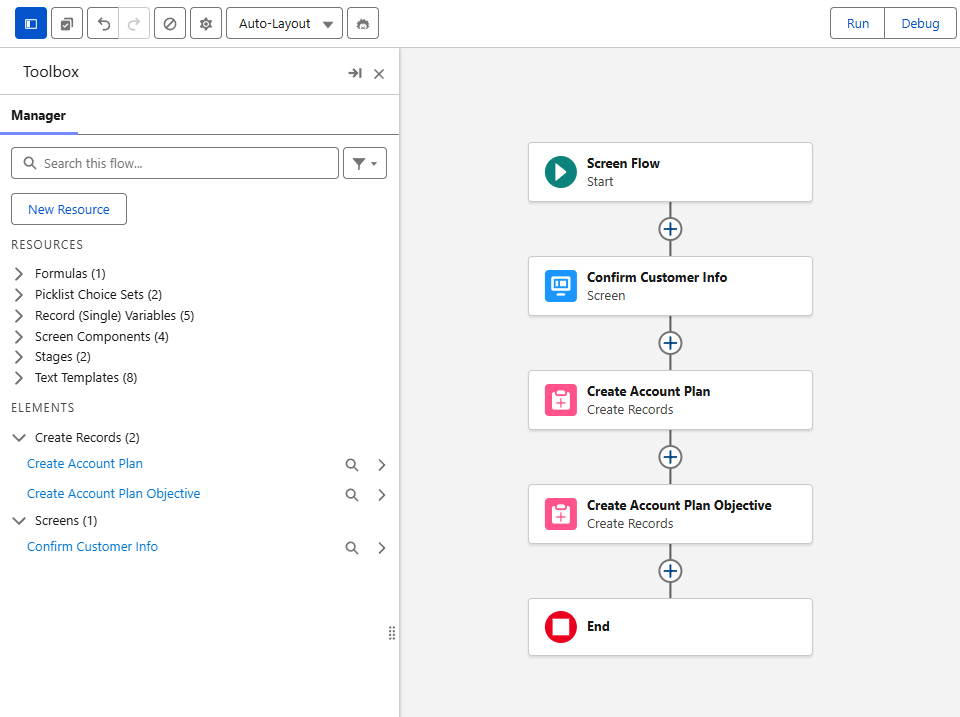
This native foundation also unlocks the full power of Salesforce automation. The Account Plan objects support Triggers and Flows, allowing you to build sophisticated processes. For example:
- You could build a record-triggered flow that automatically creates a new Account Plan record, along with a set of default objectives, as soon as an Account’s “Annual Revenue” is updated to be over a certain threshold.
- You could create a notification flow that alerts the account team via email or Slack whenever a new Account Plan is created for one of their accounts.
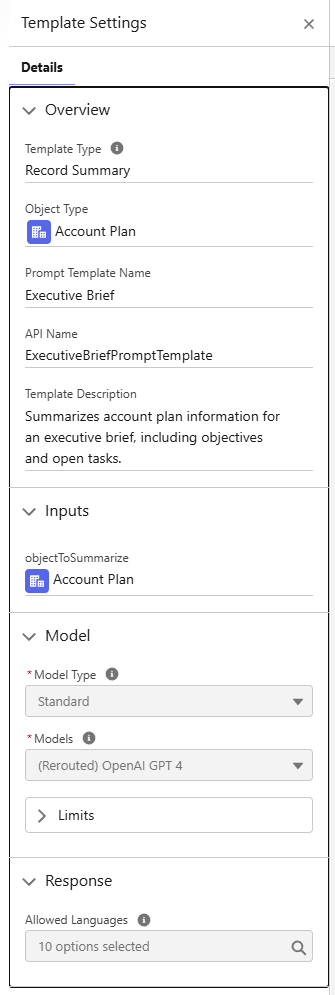
Furthermore, if your organization uses Einstein Generative AI, the Account Plan and its related lists can be used as a rich grounding resource in Prompt Builder. This allows you to create prompt templates that can, for example, summarize all strategic plans for an account, which is incredibly useful for Quarterly Business Reviews (QBRs) or when transitioning an account to a new manager.
Conclusion: The Future of Account Planning is Native
This out-of-the-box Account Plan feature is a long-awaited and powerful addition to Salesforce Partner Cloud. It finally replaces the need for channel sales teams to manage strategy in disconnected spreadsheets, slide decks, or expensive third-party tools. By providing a central, reportable, and extensible hub for strategic planning, Salesforce is putting account-based selling directly into the platform where teams already work.
By combining deep strategic analysis (like SWOT), automated objectives (using Calculation Definitions), and clear execution steps (with Action Plans) all in one place, Salesforce Account Plans finally give partner managers the native tools they need. This unified workspace allows them to effectively manage, grow, and nurture their most important partner relationships with precision and clarity.
Salesforce Partner Cloud offers many more features to enhance your experience, and we’re proud to be one of the top Salesforce partners for PRM, delivering full Partner Cloud implementations.
Reach out to us today to see how Partner Cloud can elevate your partner strategy.