Subscription Self-Service in Salesforce Revenue Cloud: What You Can Do Before Buying More Tools
If your customers are emailing support to renew the subscription, request an invoice, or downgrade a plan, you have a self-service problem. And if your team is already running on Salesforce, you may already have more of the solution than you think.
This article walks through what subscription self-service in Salesforce realistically looks like, what you can configure today, and where the practical limits tend to appear. The goal is not to oversell what is natively available, but to help you extract genuine value from what you already own before considering additional investment.
Define What “Subscription Self-Service” Means in Your Business
Before assessing what tools you need, it helps to be precise about what you are actually trying to enable. Subscription self-service is not a single feature. It is a set of customer-facing capabilities that, taken together, reduce subscription support workload and the volume of routine requests handled by your team.
In practice, this usually covers some combination of the following:
Renewals
Customers can view upcoming renewal dates, confirm intent to renew, or initiate a renewal without contacting sales. For SaaS businesses on annual or multi-year terms, this is often the highest-value self-service action.
Payment Updates
Customers can update credit card details, change billing method, or update billing contacts without opening a support ticket. This is among the most commonly requested self-service capabilities and also one of the more sensitive from a security and compliance standpoint.
Invoice Access
Customers can view and download current and historical invoices. For finance teams at customer organizations, this removes a recurring low-value request from your support queue.
Plan Changes
Customers can upgrade, downgrade, or modify their subscription tier. Depending on your business model, this may require approval logic, prorated billing calculations, or contract review before any change takes effect.
Approvals
For B2B accounts especially, subscription changes may need to go through an internal approval before being processed. A self-service layer that triggers an approval workflow, rather than routing to your team first, keeps the process moving without manual handoffs.
Admin Roles
Enterprise customers often want to designate a user within their own organization who can manage seats, add users, or handle billing on behalf of the account. Supporting this without a dedicated portal experience typically requires significant custom work.
Not all of these are equally complex to deliver. Understanding which subset matters most to your customers is the first practical step.
What You May Already Have in Salesforce
Salesforce’s current subscription and billing product is now positioned under the Agentforce Revenue Management umbrella (formerly Revenue Cloud). It brings together Salesforce Billing, Salesforce Subscription Management, and related capabilities into a unified platform for recurring revenue operations.
Depending on which products you have licensed and how your org is configured, you may already have access to meaningful building blocks for subscription self-service in Salesforce.
Experience Cloud Access
If your organization has Experience Cloud (formerly Community Cloud), you have a framework for building authenticated customer portals. Standard Experience Cloud templates allow you to expose Salesforce objects, records, and flows to external users. This is the foundation most teams use when building self-service.
Billing Views and Invoice Records
Salesforce Billing generates invoice records as standard Salesforce objects. These can be surfaced in an Experience Cloud portal with appropriate sharing rules and page layouts. Customers can view invoice status and, depending on configuration, download PDFs.
Standard Objects and Account Pages
Account, Contact, Order, and Contract objects are all native to Salesforce. Your existing data model may already capture the subscription state you want customers to interact with. The question is whether it is structured in a way that supports customer-facing exposure.
Flows and Automation
Salesforce Flow is a capable automation tool that can be used to build guided processes for customer self-service subscription changes, renewal confirmations, or approval routing. Screen Flows in particular can create multi-step customer-facing interactions that feel like form-based workflows.
Approval Processes
Native Salesforce approval processes can be triggered by record changes, including those initiated through Experience Cloud. For teams managing subscription changes that require internal sign-off, this is a workable starting point without additional software.
What Working With Your Existing Stack Actually Involves
Getting more from your existing Salesforce stack is a realistic goal. But it is worth being honest about what that effort actually involves.
It is Not Free in Effort
Configuring Experience Cloud, building flows, managing sharing rules, and designing customer-facing UX all require skilled Salesforce admin or developer time. That time has a cost, whether it is internal headcount or a consulting engagement.
It is Not Free in Admin Overhead
Custom-built self-service solutions require ongoing maintenance. As your product catalog evolves, pricing changes, or your customer base grows, someone needs to update flows, permissions, and layouts. This ongoing overhead is often underestimated at the outset.
It is Not Free in UX Trade-Offs
Standard Salesforce Experience Cloud templates are functional but not optimized for consumer-grade self-service. Achieving a clean, intuitive experience often requires custom Lightning components or significant theme customization, both of which increase project scope.
It is Not Always Scalable
A self-service setup built for 50 customers may not hold up for 500. Session volumes, sharing rule complexity, and flow performance all have practical ceilings. What works in an early configuration may require rearchitecting as the business grows.
Signs Your Current Setup is Not Enough
There is a point at which the effort required to extend a custom-built self-service environment exceeds the cost of a purpose-built solution. These are some of the signals that you may be approaching that point.
- Too many manual steps remain in processes that were meant to be automated. Customers initiate an action but your team still has to complete it.
- Adoption is weak. Customers are aware of the portal but continue to contact support for actions it theoretically supports.
- Every new product or pricing change requires a developer to update flows or page layouts. Routine changes are not routine anymore.
- You are maintaining parallel processes: a self-service path for some scenarios and a manual path for others, with no clear line between them.
- The experience is fragmented. Customers land on different pages, see inconsistent information, and cannot complete end-to-end tasks in one session.
- Your admin team spends more time troubleshooting the portal than improving it.
None of these is a reason to abandon what you have built. But they are useful indicators that the marginal cost of extending your setup may now exceed alternatives.
If those signals are familiar, it is worth knowing that a purpose-built option exists: one that sits directly on top of your existing Revenue Cloud configuration.
Filling the Gap: AC Revenue Cloud Toolkit as a Packaged Self-Service Layer
One thing worth naming directly: Salesforce Revenue Cloud is a powerful platform for managing subscriptions, billing, and recurring revenue operations, but it does not ship with ready-made UI components for customer-facing self-service. The billing logic, the subscription objects, the approval processes are all there. What is not included is a pre-built layer that exposes those capabilities to your customers on your site or portal.
That gap is precisely what the AC Revenue Cloud Toolkit was built to address.
What It Is
The AC Revenue Cloud Toolkit is a free accelerator (a collection of pre-built Experience Cloud components developed by Advanced Communities) and is designed specifically for Salesforce Revenue Cloud environments. It gives your team a practical starting point for self-service without building from scratch or buying more tools.
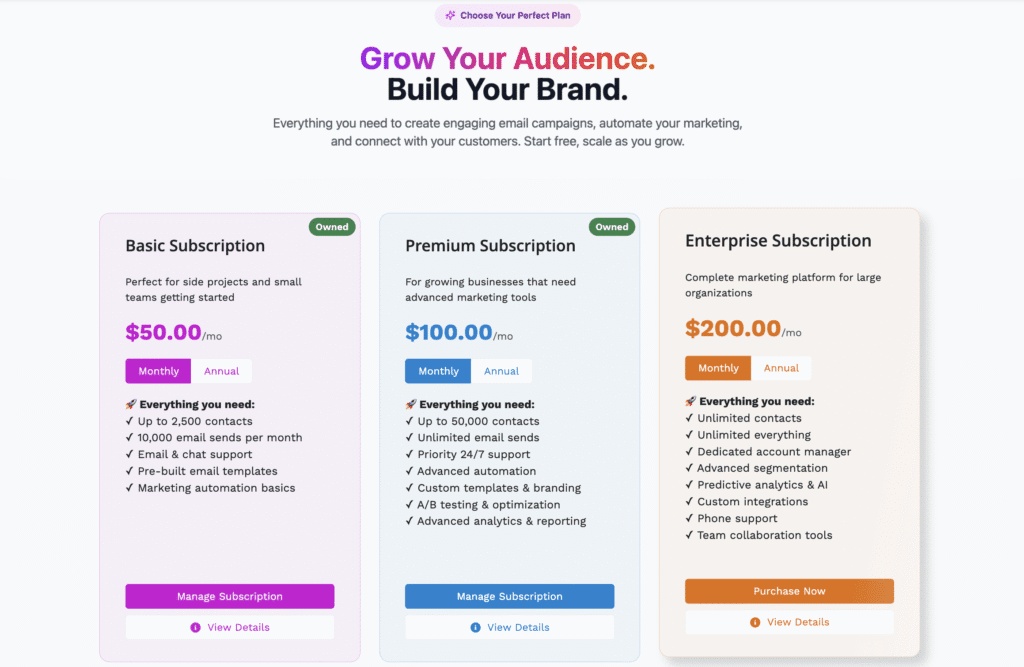
The components are purpose-built for the self-service actions that matter most to subscription businesses:
- Subscription purchase: Customers can buy directly from your portal without contacting sales
- Self-Service Renewals in Salesforce: Customers can confirm or initiate renewal before the term expires
- Upgrades and downgrades: Plan changes handled within the portal with appropriate billing logic
- Subscription editing: Customers can update quantities, seats, or other configurable parameters
- Invoice access: Customers can view and download billing history without contacting finance
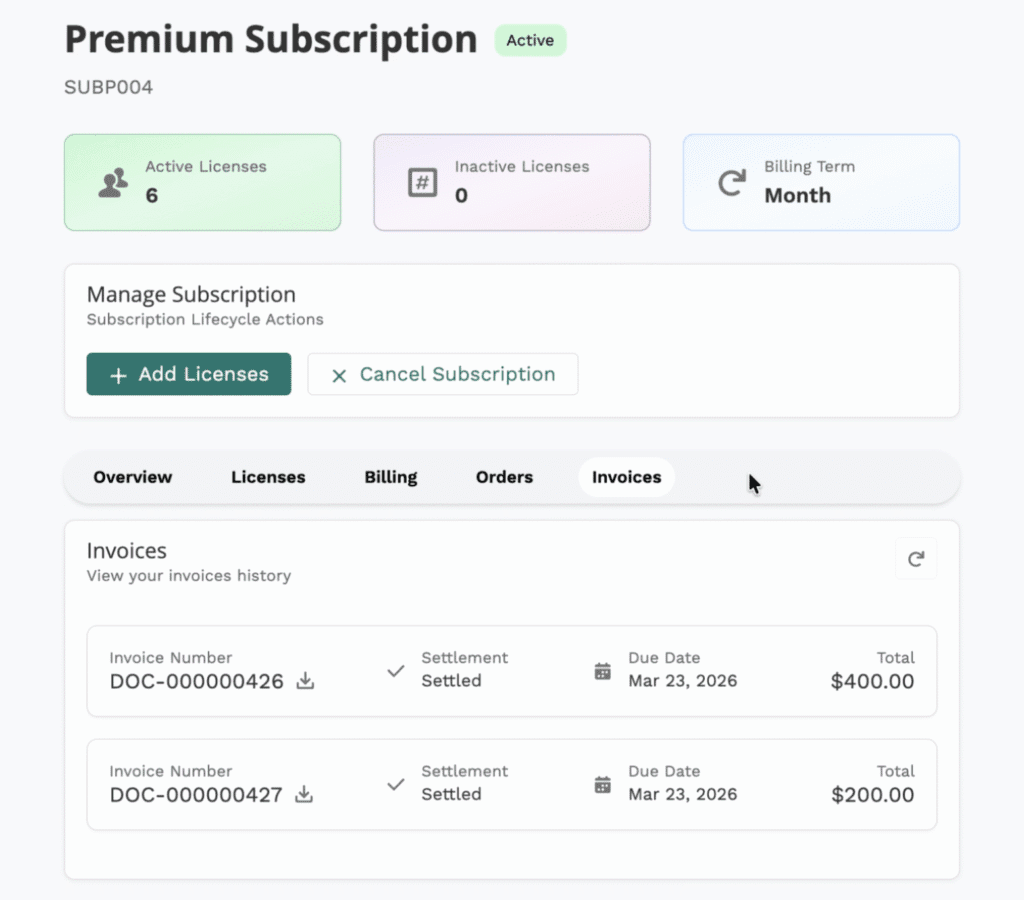
Why It Matters
The toolkit works within your existing Salesforce and Experience Cloud environment. It does not replace Revenue Cloud; it connects to it. Your data model, your billing records, your subscription objects stay exactly where they are. The components simply give your customers a clean, usable interface for interacting with them.
As of now, Advanced Communities is the only Salesforce partner offering a solution at this level of specificity for Revenue Cloud self-service. There is no equivalent component library available elsewhere on the AppExchange for this use case. For teams that have invested in Revenue Cloud and want to close the self-service gap without a multi-month custom build, this is the most direct path available.
And because it is a free accelerator, the barrier to exploring it is low. Your team can assess what it covers, how it fits your existing configuration, and what additional customization, if any, would be needed before committing to a larger implementation effort.
Need Help With Your Existing Setup?
Advanced Communities builds Salesforce-native portals and self-service solutions for SaaS and subscription-based businesses. Contact us if you’d like to talk through what your current stack can support and how to improve it. We’re happy to take a look.
FAQ
1. Can Salesforce Revenue Cloud support subscription self-service without buying more software?
Yes, to a meaningful degree. If you have Experience Cloud and either Salesforce Billing or Subscription Management, you have the building blocks for invoice access, renewal confirmation flows, and approval routing. The more complex the self-service actions required, such as real-time plan changes with prorated billing or payment method management, the more custom development or configuration is typically needed to deliver a reliable experience.
2. Do I need Experience Cloud for subscription self-service?
Yes, for any self-service that requires a customer to log in, view their account, and take action directly, Experience Cloud is the standard starting point within the Salesforce platform.
3. What can users realistically manage on their own?
With a well-configured Salesforce setup, customers can typically view and download invoices, confirm renewal intent, submit requests for plan changes (subject to approval), and update contact or billing address information. Actions that involve live payment method updates or complex subscription modifications usually require additional integration work or a more specialized portal layer.
4. When does a DIY setup stop being efficient?
The clearest signal is when routine changes to your product, pricing, or customer base consistently require developer involvement to update the self-service experience. If your team is spending more time maintaining the portal than operating through it, or if customers are bypassing it in favor of direct contact, the configuration overhead has likely exceeded what a purpose-built solution would require.