AC Events Enterprise 3.9.1: Major Features Unpacked
Event management is demanding work. Between juggling registrations, coordinating payments, communicating with participants across languages, and keeping data in sync, the operational overhead can easily overshadow the events themselves.
This release of AC Events Enterprise tackles that head-on. We’ve shipped substantial improvements, touching everything from how attendees register and pay to how managers handle approvals and calendar holds. This release is about removing friction for event managers, for attendees, and for the data that needs to flow between them.
If you’re interested in seeing more of AC Events Enterprise functionality, check our demo video ⬇️
Multilanguage Support with AI Integration
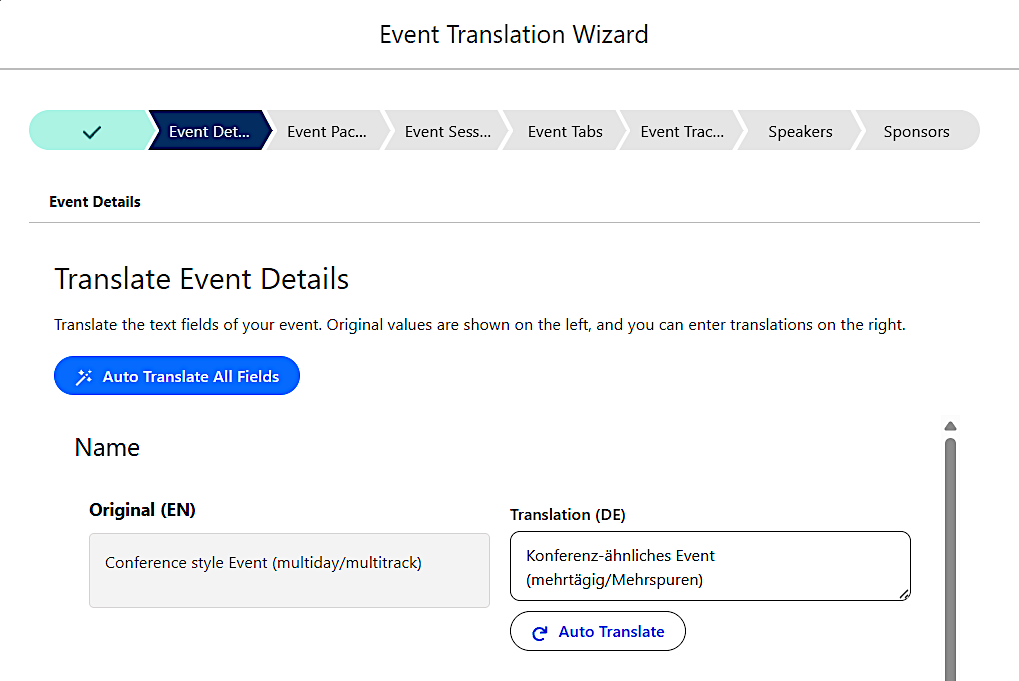
Creating multilingual events used to mean manual copy-paste and careful coordination across translation teams. Now, AC Events Enterprise integrates directly with OpenAI and Google Cloud Translation to generate translated event variations automatically. Event managers can create a single source-of-truth event and let the platform spin up language variants, dramatically cutting the time to go live in new markets or reach international audiences.
Registration Approval Process
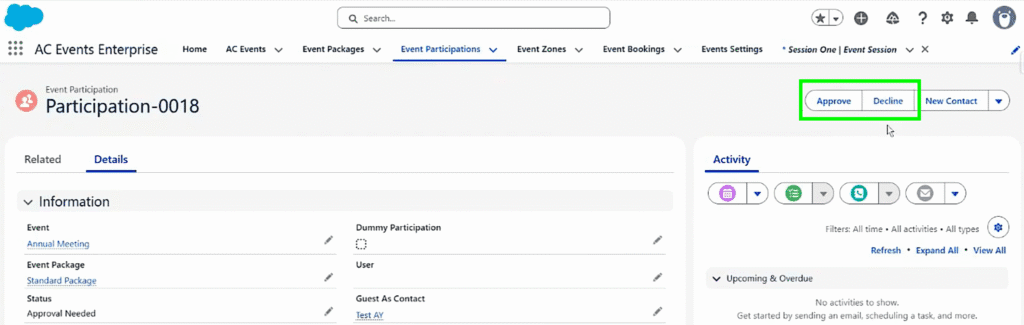
Some events require a more selective or controlled registration flow: internal sessions, invitation-only webinars, or capacity-constrained workshops. Event managers can now require approval before a registration is confirmed, configure a payment window tied to the approval decision, and manage individual approvals or declines directly from the platform. Automated email notifications keep participants informed at every step, reducing manual back-and-forth.
Corporate Event Planning in Salesforce: A Practical Guide

Campaign Member Status Mapping
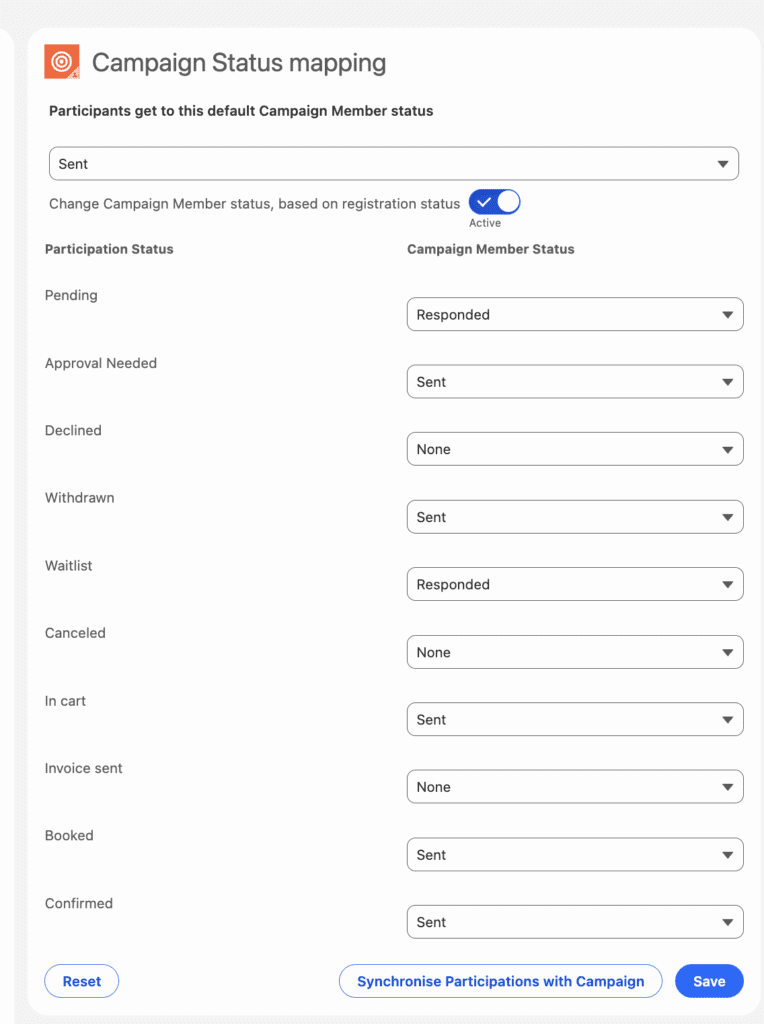
Keeping Salesforce campaign data accurate after an event often requires tedious manual updates. This release introduces the ability to map and automatically sync campaign member statuses based on actual event participation: attended, no-show, waitlisted, and more. Your CRM reflects what really happened, enabling you to personalize your communication even further.
Calendar Description Customization
Event managers can now define a custom description specifically for calendar holds, independent of the main event description. This means the text that lands in an attendee’s Google Calendar or Outlook can be tailored with practical details like dial-in links, dress code, or parking instructions, without changing what appears on the event registration page.
Recurring Registration with Impersonalized Tickets
Impersonalized ticket types (where a ticket isn’t tied to a specific named attendee) now work smoothly with the recurring registration flow. Teams running regular training sessions, monthly briefings, or standing webinars can take advantage of recurring event structures without hitting edge cases in ticket handling.
Recalculate Dates on Event Start Date/Time Change
When an event is rescheduled, all related dates (session times, reminder triggers, deadline windows) now update automatically to reflect the new schedule. This eliminates a common source of errors when events shift, and reduces the manual work of tracking down every downstream date dependency.
Minor Features
- Add to Cart for Free Packages: Free event registrations can now be added to cart through Unified Checkout.
- Adjusted Payment Step for Agenda Builder: The payment flow for agenda-based events has been enhanced, giving attendees the ability to register for paid sessions and choose their preferred payment method (card or invoice) at checkout.
- Copy Event Link Without Parameters: A new icon on the event detail page lets you copy the event URL stripped of any filters or tracking parameters, making it easy to share a clean link.
- URL Anchors for Tabs Component: Event tabs now support URL anchoring, allowing direct links to specific tabs on an event page.
- Multiday Sessions Display: Fixed an issue where end date and time were displayed incorrectly for sessions spanning multiple days. Timezone settings are now respected properly throughout.
- Integration Settings Naming: You can now assign custom names to integration keys (Stripe, Zoom, Teams), making it straightforward to distinguish between production and test environments at a glance.
- End Date Merge Field: A new merge field is now available in email templates, letting you include the event end date in automated communications.
- Refunded Status for Event and Session Participation: A dedicated “Refunded” status can now be applied to event and session participations, giving teams a cleaner way to track and report on refunded attendees.
- Other bug fixes and improvements.
Ready to Try the Updates?
All these features are available now in AC Events Enterprise. Log into your org, check the release documentation for configuration details, and reach out to our team if you’d like a guided walkthrough of anything covered here.