Salesforce Lightning Bolt Solutions: What They Are, How They Work, and When to Use Them
If you’ve been researching how to launch a Salesforce Experience Cloud portal faster, you’ve probably come across the term Lightning Bolt Solutions. But with evolving Salesforce terminology and years of outdated blog posts in search results, it’s easy to get confused about what they actually are today and whether they still matter.
They do. The concept behind Lightning Bolt Solutions remains one of the most practical frameworks for packaging, distributing, and reusing Experience Cloud templates. This guide cuts through the noise: you’ll get a clear definition, a breakdown of how the lifecycle works, what can be packaged, when to use this approach, and what to check before you go live.
Today, Lightning Bolt is best understood through the lens of Experience Cloud and Experience Builder, not the older “Community Cloud” or “Community Builder” terminology. Let’s dig in.
What Are Salesforce Lightning Bolt Solutions?
Salesforce Lightning Bolt Solutions are packaged, ready-to-deploy digital experience templates built on the Experience Cloud platform. Rather than starting a portal build from a blank canvas, a Bolt solution gives you a pre-configured starting point complete with pages, components, branding, and sometimes business logic that can be installed into an org and customized from there.
Think of it as a packaged accelerator for Experience Cloud. Instead of rebuilding common portal patterns from scratch every time, developers and partners can bundle their work into a distributable solution and share it either privately, within an organization, or publicly through AppExchange.
The core formula is simple: Theme + Pages + Components = Lightning Bolt Template
While the “Lightning Bolt” branding originated in the Salesforce Communities era, the underlying concept maps directly to how Experience Builder templates are built and distributed today. The mechanics remain the same, only the terminology has matured.
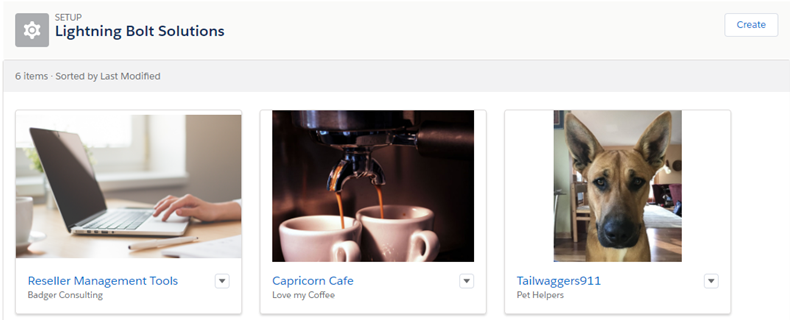
How Lightning Bolt Solutions Work
A Lightning Bolt Solution is essentially a structured package of Experience Builder assets. At its core, it brings together:
- A theme or template: the visual framework that defines the overall look and feel of the experience
- Pages: pre-built standard and custom pages that make up the site structure
- Components: reusable Lightning components (standard, custom, or a mix) that power the functionality on each page
- Optional elements: branding settings, business logic, navigation, custom objects, and other configurations that make the solution feel complete out of the box
Once packaged, the solution can be installed into any compatible Salesforce org, where the team can create a new Experience Builder site from the template, then customize it to fit their specific requirements.
In short: this is a packaged digital experience accelerator, and a reusable foundation that shortens the distance between “blank org” and “live portal.”
Lifecycle of a Lightning Bolt Solution
Every Lightning Bolt Solution follows a four-stage lifecycle: Build, Package, Share, and Launch.
1. Build
The process starts in Experience Builder, where developers create or customize a template:
- Design the experience: pages, layout, navigation, and components
- Apply branding: colors, fonts, imagery, and other visual identity elements
- Define reusable components that will travel with the solution
- Configure any supporting business logic, objects, or settings that should be part of the package
2. Package
Once the experience is ready, it gets packaged using Salesforce’s standard packaging framework:
- Create a new managed or unmanaged package, or add the template to an existing one
- Include all required dependencies, such as components, objects, static resources, and other assets
- Prepare package metadata and documentation for distribution
3. Share
A packaged Bolt solution can be distributed in several ways:
- AppExchange: publish the solution publicly for any Salesforce customer to discover and install
- Private link: share a package installation URL directly with a specific client or partner
- Internal reuse: deploy the same solution across multiple orgs within a single organization or consulting practice
4. Launch
Installation and go-live are straightforward processes:
- Install the package into the target org (use a sandbox first for large or complex orgs)
- Use the Experience Builder template to create a new site
- Customize branding, navigation, and content to match the final requirements
- Configure permissions, audiences, and visibility settings
- Test thoroughly, then publish
What Can Be Included in a Bolt Solution?
One of the practical strengths of the Lightning Bolt packaging framework is how much it can carry. A single Bolt solution can include:
- Standard and custom pages
- Object pages
- Standard and custom Lightning components
- Custom themes
- Custom objects
- Static resources
- Login pages
- Content assets
- Branding sets
- Page variations
- Navigation menus
- Custom CSS and markup
- Community/site settings
This breadth means a well-built Bolt solution can deliver a nearly complete, deployment-ready experience instead of a skeleton that still requires significant configuration work before it’s useful.
Lightning Bolt vs. Standard Experience Builder Templates
Not every Experience Cloud project needs the full Bolt packaging approach. Here’s how to think about when each option makes sense.
Standard Experience Builder templates are a good fit when:
- You’re building a one-off portal for a single org
- A Salesforce-provided template (Customer Account Portal, Partner Central, etc.) is close enough to your needs
- The project timeline allows for custom configuration without reuse requirements
A packaged Bolt-style approach makes more sense when:
- You need to deploy the same experience across multiple orgs (multi-org rollouts, franchise models)
- Your team or consultancy builds similar portals repeatedly and wants a reusable foundation
- You’re an ISV or partner building an industry-specific solution for AppExchange distribution
- Faster rollout is a priority and a pre-built template with proven architecture reduces risk
- The portal needs consistent branding and structure across client implementations
In practice, many consulting teams and ISVs treat Lightning Bolt as their internal accelerator framework, even if they never publish to AppExchange, simply because the packaging discipline forces better architecture and makes deployments more predictable.
Typical Use Cases
Lightning Bolt Solutions are particularly well-suited to recurring portal patterns:
Partner portals
PRM portals with deal registration, lead distribution, and co-marketing tools
Customer self-service portals
Support deflection, knowledge bases, and case management
Industry-specific portals
Healthcare patient communities, financial services portals, insurance agent portals, and manufacturing collaboration hubs
Accelerator-based Experience Cloud projects
When a consulting team brings a pre-built foundation rather than starting from scratch
Repeatable deployments for ISVs and consultants
Where the same core experience is adapted for many different clients
The early Lightning Bolt era produced a number of notable examples from major Salesforce partners, including industry-specific portals for insurance, banking, healthcare, and retail. These demonstrated that the packaged template model could deliver enterprise-grade experiences significantly faster than greenfield builds.
Launching a partner portal, self-service hub, or industry-specific Experience Cloud site? Advanced Communities can help with templates, Experience Cloud accelerators, migrations, and custom portal implementation.
What to Check Before You Launch
Before publishing an Experience Cloud site built on a Bolt solution, work through this checklist:
- Sandbox testing: always validate in a sandbox before pushing to production, especially for orgs with significant data volume or complex configurations
- Branding consistency: confirm fonts, colors, logos, and imagery match the final brand guidelines
- Navigation: test all navigation menus across device types and audience segments
- Permissions and visibility: verify that page and component access rules are correctly configured for each user profile and audience
- Audience targeting: confirm page variations and content are showing to the right users
- CMS and content sources: check that any connected content (CMS workspaces, knowledge articles, etc.) is properly linked
- Mobile responsiveness: test the experience on real devices, not just browser emulation
- Installation dependencies: ensure all package dependencies are installed in the correct order and that no required components are missing
Is Lightning Bolt Still Relevant Today?
Yes, but with some important context. The term “Lightning Bolt Solutions” is less prominent in Salesforce’s current marketing language than it was at launch, but the concept is alive and well. Salesforce partners and ISVs continue to build and distribute packaged Experience Cloud templates, and the underlying packaging mechanics haven’t fundamentally changed.
What has changed is the broader context. Experience Cloud has grown significantly, the template and component ecosystem is richer, and the terminology has shifted away toward Experience Cloud and Experience Builder. A modern approach to Bolt-style packaging fits naturally within that updated framework.
How Advanced Communities Can Help
Advanced Communities specializes in Salesforce Experience Cloud, from initial portal strategy through implementation, customization, and long-term optimization. Whether you’re launching a new partner portal, migrating from an older community, or looking for a faster path to a polished digital experience, we bring both the technical depth and the practical experience to deliver.
Ready to launch your Experience Cloud portal faster?
Contact us to talk through your project.
FAQ
1. What is a Lightning Bolt Solution in Salesforce?
A Lightning Bolt Solution is a packaged Experience Cloud template that bundles pages, components, themes, and other assets into a distributable format. It can be installed into a Salesforce org and used as the foundation for an Experience Builder site, significantly reducing time to launch compared to building from scratch.
2. Is Lightning Bolt the same as an Experience Builder template?
They’re closely related but not identical. An Experience Builder template is the foundation of any Experience Cloud site. A Lightning Bolt Solution is a packaged template, one that has been bundled with its dependencies and made distributable via Salesforce’s packaging framework. All Bolt solutions use Experience Builder templates, but not all templates are packaged as Bolt solutions.
3. Can Lightning Bolt solutions be distributed through AppExchange?
Yes. AppExchange supports a dedicated category for Lightning Bolt Solutions, allowing ISVs and Salesforce partners to publish and distribute their packaged templates to any Salesforce customer.
4. When should I use a packaged portal template instead of building from scratch?
A packaged approach makes the most sense when you need to deploy similar experiences across multiple orgs, when your team wants a reusable accelerator to reduce project timelines, or when you’re building a solution for AppExchange distribution. For one-off builds with highly unique requirements, a standard template or custom build may be more appropriate.
5. Are Lightning Bolt solutions still relevant for Experience Cloud projects?
Yes. While Salesforce’s terminology has evolved, the underlying concept of packaging and distributing Experience Cloud templates remains a practical and widely-used approach. ISVs and consulting partners continue to build Bolt-style solutions for AppExchange and for internal reuse across client implementations.