Salesforce Partner Cloud Fundamentals: How Partner Tracks Work
The New Way to Onboard and Upskill
Gone are the days of static spreadsheets, disconnected content libraries, and enablement programs that are difficult to track and nearly impossible to relate to revenue. For partners looking to grow their business, this old model of training – often spread across multiple formats and systems – can feel disconnected from the daily flow of work. Now, Salesforce Partner Cloud is rolling out a new way to help partners succeed.
This new feature is called Partner Enablement Programs, also known as Partner Tracks. These are guided, in-platform learning paths delivered directly to you within your Experience Cloud partner portal. Instead of just being a repository for content, these tracks are designed to accelerate your confidence, performance, and impact by delivering training within the flow of your work.
The big idea behind this new approach is a shift to outcome-based enablement. Rather than focusing on an input, like a simple checklist of content to consume, Partner Tracks are designed around achieving a specific, measurable business Outcome. Instead of just tracking content completion, these programs are built to help you improve key revenue metrics, such as decreasing ramp time, increasing deal size, or improving win rates.
What is an Outcome-Based Partner Track?
Traditional training programs often fall short of their goals for a few key reasons. First, they are frequently disconnected from a partner’s daily work, feeling like a distraction rather than a helpful tool. Content might be spread across multiple systems, requiring sellers to hunt for information. Second, and most importantly, it’s historically been difficult to track these programs and relate them directly to revenue. A manager might see that a partner completed a video, but they can’t easily connect that action to a specific business outcome, such as a shorter sales cycle or a larger average deal size.
Partner Tracks flip this traditional model. Instead of focusing on the input (a checklist of content to consume), they start with the output – the specific, measurable business impact the program is designed to generate. The entire program is then built backward from that revenue goal. This outcome-based structure consists of three main parts:
- Outcome (The Goal): This is the program’s final, most significant goal. It corresponds directly to a measurable revenue metric you want to improve, such as “Increase Deal Size, “Win More Opportunities, or shortening new rep ramp time.
- Milestones (The Path): These are the measurable, incremental goals that you complete during the program. They are the smaller, “bite-sized” achievements that build confidence and guide you toward the final outcome. Critically, milestones are tracked based on your actual, job-related activity in Salesforce, such as logging calls, booking meetings, or advancing opportunities.
- Exercises (The Content): These are the specific pieces of content you complete to build the skills needed to achieve the milestones. Exercises can include your company’s existing resources, such as videos, audio recordings, slide decks, PDFs, and rich-text lessons.
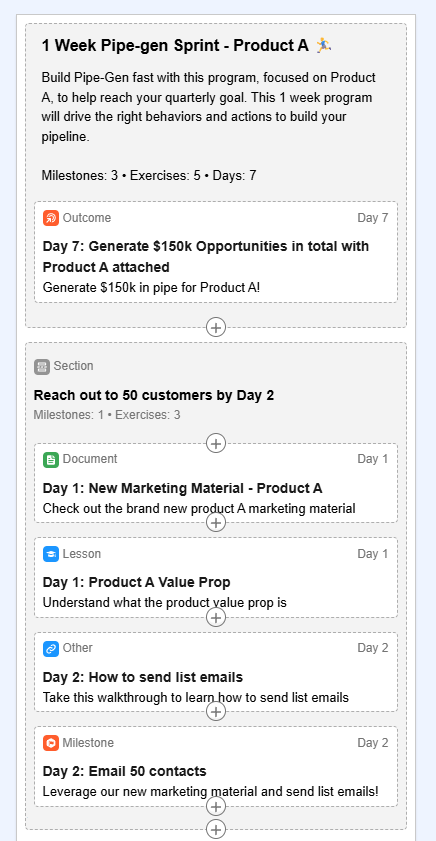
The Partner Experience: How to Find and Take a Track
Partner Enablement Programs, or Partner Tracks, are delivered to partner users directly within their Partner site, built with Experience Cloud. Partners can find and take these programs from a dedicated site page where they interact with your brand.
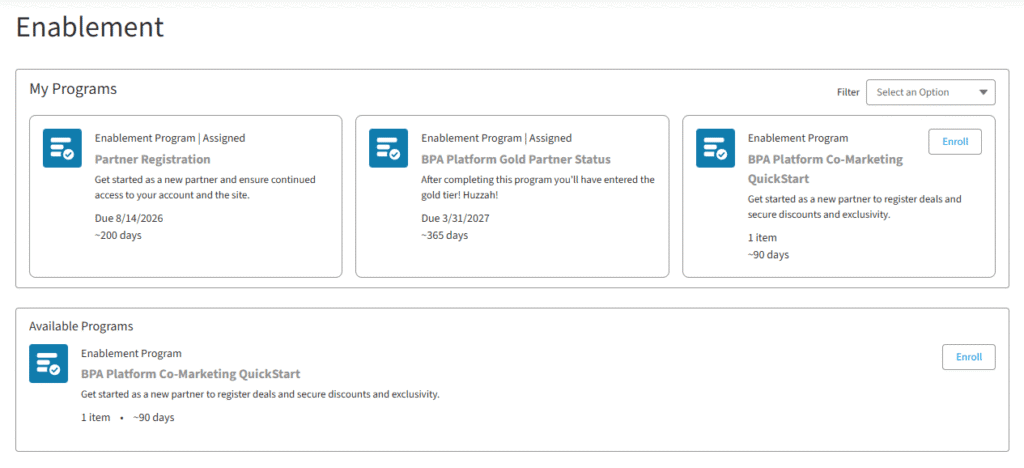
A page on the site will show all the programs that have been assigned to or shared with you. There are two primary ways to access a Partner Track:
- Assigned: An Enablement admin can assign a program directly to you. Programs that have been assigned will be clearly marked, often with an “Assigned” tag.
- Self-Enroll: Admins can also share programs, allowing you to browse, preview, and take them at your own convenience. These programs will typically show an “Enroll” button.
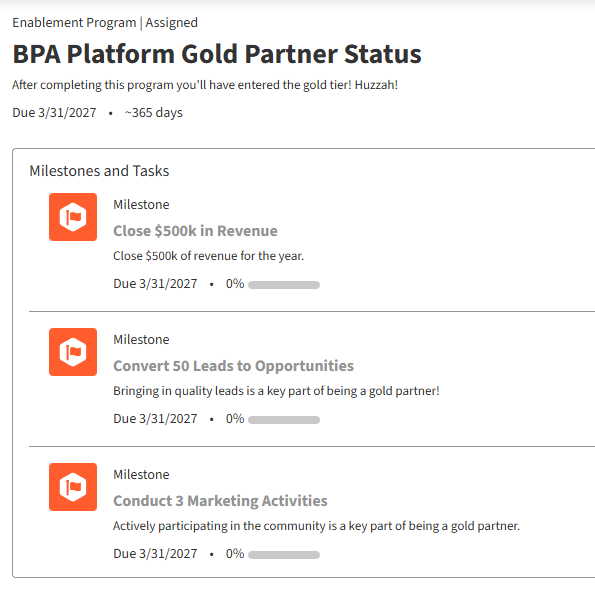
The interface for Partner Tracks allows you to filter the list of available programs by their status. You can filter to see which programs are “Assigned,” “Available to Enroll,” “In Progress,” “Self-Enrolled,” or “Completed”. Before starting, you can click on any program to preview its full structure, which shows the titles, descriptions, and due dates for the final outcome, all the incremental milestones, and every exercise within the track.
If you find this article interesting, we also recommend checking out the previous blog post in this series ⤵️
Salesforce Partner Cloud Fundamentals: Salesforce Action Plans Guide for Partners
What’s Inside a Partner Track? (The Partner’s Perspective)
A Partner Track is composed of two main types of items: Exercises, which represent the “learning” content you consume, and Milestones, which represent the “doing” and application of that knowledge.
Exercises (The “Learning”)
These are the specific pieces of content that help you build the skills needed to achieve the program’s goals. Your vendor can reuse existing resources, so you can expect to see a variety of formats, including:
- Audio Recordings
- Documents (such as PDFs, slide decks, or white papers)
- Lessons (rich-text content)
- Scheduled Events (links to webinars or conferences)
- Videos
It’s important to note that Partner Tracks in an Experience Cloud site are a unique experience. Some exercise types that are available for internal sales programs, such as Action Items, Feedback Requests, and Trailhead modules, are not supported in Partner Enablement programs.
Milestones (The “Doing”)
This is where you apply what you’ve learned. Milestones are the incremental goals that encourage you to demonstrate your proficiency in on-the-job tasks that are required to achieve the program outcome.
A milestone is not just a “Mark as Complete” checkbox. It is a measurable goal that is tied directly to your Salesforce records. For example, a milestone might be “Log 5 sales calls”. To complete this, the system automatically checks your records for tasks that meet the specific criteria of the measure, such as Task Subtype = Call and Task Status = Completed.
Tracking Your Progress
As you take a program, your progress toward its outcomes, milestones, and exercises is tracked automatically. You can see your progress as you complete each item.
- For Exercises: Progress is typically calculated in real time. Most exercises are considered complete as soon as you watch the video, finish the lesson, or follow the link
- For Milestones and Outcomes: By default, progress is calculated daily, but you can also click “Refresh Progress” to check your status on demand. To see your progress on a specific milestone, you can click its title. This will show your overall completion percentage on a progress bar and, in many cases, list the individual qualifying records (like the specific calls you logged) that are contributing to your progress.
Why Partner Tracks Are a Better Way to Grow
Partner Tracks are more than just a new interface for training; they are designed to provide a more effective way to learn, perform, and grow your business. This new outcome-based model offers several key benefits over traditional, disconnected enablement.
- Learn in the Flow of Work: All programs and content are delivered directly inside the same Partner Relationship Management (PRM) site you use every day. This means no more hunting for links in static spreadsheets or logging into separate systems; the training is available right where you work, which helps you build competencies with less disruption.
- Clarity and Motivation: The program structure gives you a clear and motivating path forward. You always know exactly what you need to do next. The journey is broken down logically: you consume content in an Exercise to build a skill, apply that skill to complete a measurable Milestone, and can see how those milestones build directly toward the program’s final Outcome.
- Prove Your Success: Your progress is based on real-world actions, not just content completion. Because milestones are tied to specific Salesforce data (like logging calls or creating opportunities), you demonstrate your capabilities and proficiency through your actual on-the-job activity. This reinforces the preferred business processes and behaviors that lead to real results.
- Faster Onboarding and Higher Revenue: These Partner Tracks are specifically designed by your vendor to help you improve the key metrics that matter most. The program templates, for example, are pre-built to target specific outcomes like “Increase Deal Size”, “Win More Opportunities”, or “Get Started as an AE” (which is designed to shorten ramp time). By focusing on these core revenue-driving metrics, the programs help you become a more effective and profitable partner faster.
Conclusion: Your New Path to Partner Success
Salesforce Partner Enablement, or Partner Tracks, represents a major step forward in partner training. It marks a significant shift away from the traditional model of a passive, disconnected content library and toward an active, guided, and measurable experience delivered exactly where you work.
By connecting specific learning exercises to real-world, measurable milestones, Partner Tracks give you the skills you need to perform. By tying all of this activity to revenue-driving outcomes, the programs provide a clear, motivating framework to help you accelerate your business, deepen your expertise, and build brand loyalty within the Salesforce ecosystem.
Salesforce Partner Cloud offers many more features to enhance your experience, and we’re proud to be one of the top Salesforce partners for PRM, delivering full Partner Cloud implementations.
Reach out to us today to see how Partner Cloud can elevate your partner strategy.