Salesforce Partner Cloud Fundamentals: Salesforce Action Plans Guide for Partners
A strategic account plan is a great start, but how do you ensure it gets executed? A bold objective is admirable, but without a clear strategic roadmap, it’s nothing more than wishful thinking. This is where Salesforce Action Plans come in.
Action Plans in Salesforce Partner Cloud are a feature designed to provide accountability, transparency, and alignment for your team. They are the bridge between a high-level goal and the daily work needed to achieve it. The feature allows you to specify the concrete tasks and events that partner managers must complete to successfully execute a strategic objective.
The core benefit of an Action Plan is its ability to break down a large, ambitious objective into focused, manageable, and measurable steps. It outlines the concrete actions your team will take to realize their goal, turning a long-term strategy into an actionable, collaborative roadmap where everyone is aligned on the path to success.
Understanding the Structure: How Action Plans Fit In
Action Plans are not standalone records; they are a key component within a clear hierarchy designed to connect your high-level strategy directly to daily activities. Understanding this parent-child structure is the key to using them effectively.
Here is the breakdown of the relationship:
- Account Plan: This is the top-level record, representing the overall strategy for a specific partner account.
- Account Plan Objective: Within the Account Plan, you create one or more objectives. This is the “what” – the specific, high-level goal you want to accomplish (e.g., “Increase EMEA Channel Sales” or “Reduce annual energy costs”).
- Strategic Tracker: Every objective record includes a section called the “Strategic Tracker”. This is the container that holds your execution plans for that specific objective.
- Action Plan: Within the Strategic Tracker, you create one or more Action Plans. This is the “how” – a milestone or specific execution plan to achieve the objective (e.g., “Improve channel sales effectiveness” or “Understand Energy Spend Drivers”).
- Tasks and Events: Finally, each Action Plan is made up of the individual “steps”. These are the actual to-do items and meetings your team needs to complete.
A key feature of Action Plans is that they uniquely support Events in addition to Tasks. This allows you to account for and track critical meetings with partners, not just follow-up activities.
When building out your plans, keep these system limits in mind:
- Each Account Plan Objective has one Strategic Tracker section.
- Each Strategic Tracker can hold multiple Action Plans.
- Each individual Action Plan can contain up to 100 tasks and 100 events.
For more details on Account Plans, we recommend checking out the previous blog post in this series ⤵️
Salesforce Partner Cloud Fundamentals: Salesforce Account Plans Explained: Guide to Native Account Plans

The Foundation: Action Plan Templates
Before a partner manager can create an individual Action Plan, an Action Plan Template must be created by an administrator. These templates are the foundation of the entire process.
An Action Plan Template is a set of repeatable, predefined tasks and events that capture a standard process for a common objective. You set it up once, and it can be updated over time as your understanding of the necessary steps evolves.
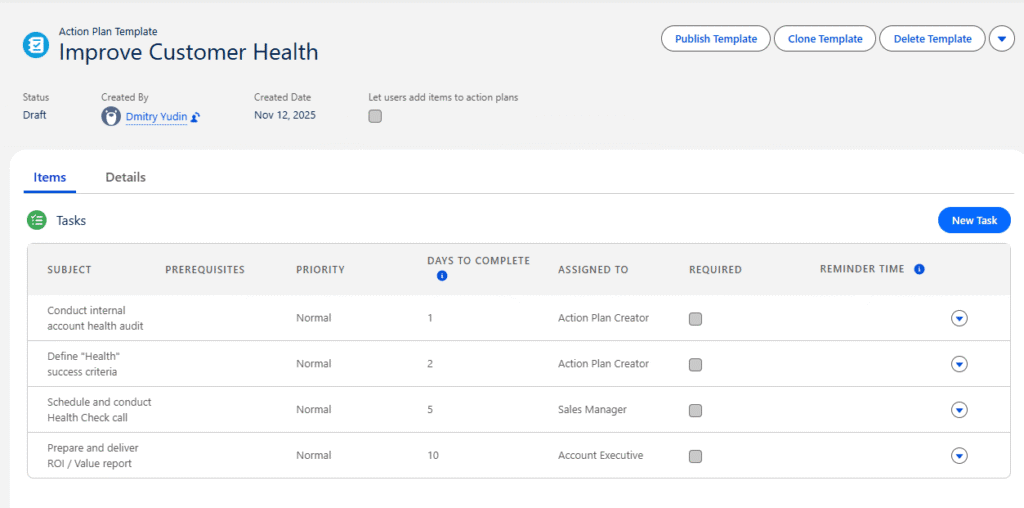
For a template to be available for use within the Strategic Tracker on an Account Plan Objective, an admin must configure it with two key settings:
- Action Plan Type: Must be set to Sales.
- Target Object: Must be set to Account Plan Objective.
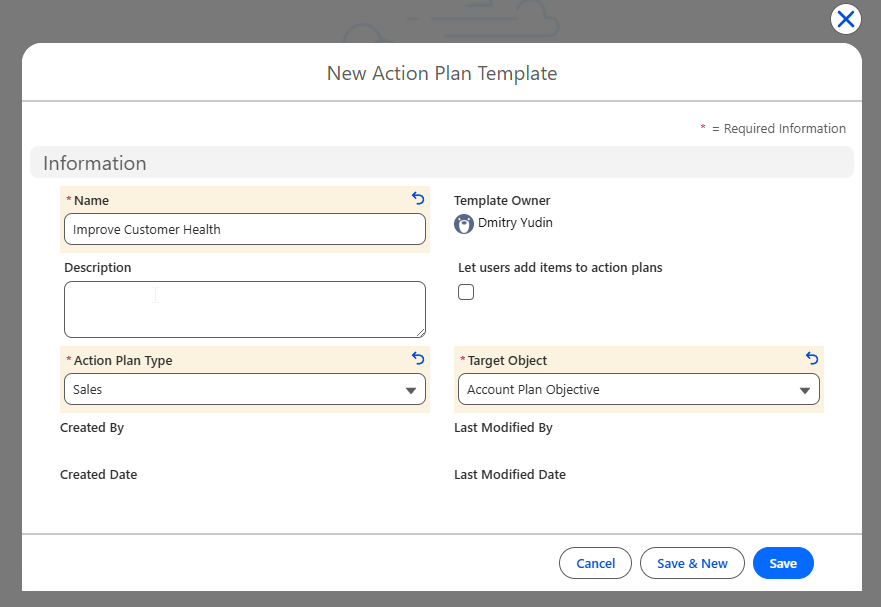
To help users get started immediately, Salesforce provides two default action plan templates that already have these values configured.
The User Experience: Creating and Using an Action Plan
For a partner manager, the process of putting a strategy into motion begins at an Account Plan Objective record. From there, the flow is straightforward:
- Within the Strategic Tracker section for that objective, the user clicks the Create Action Plan.
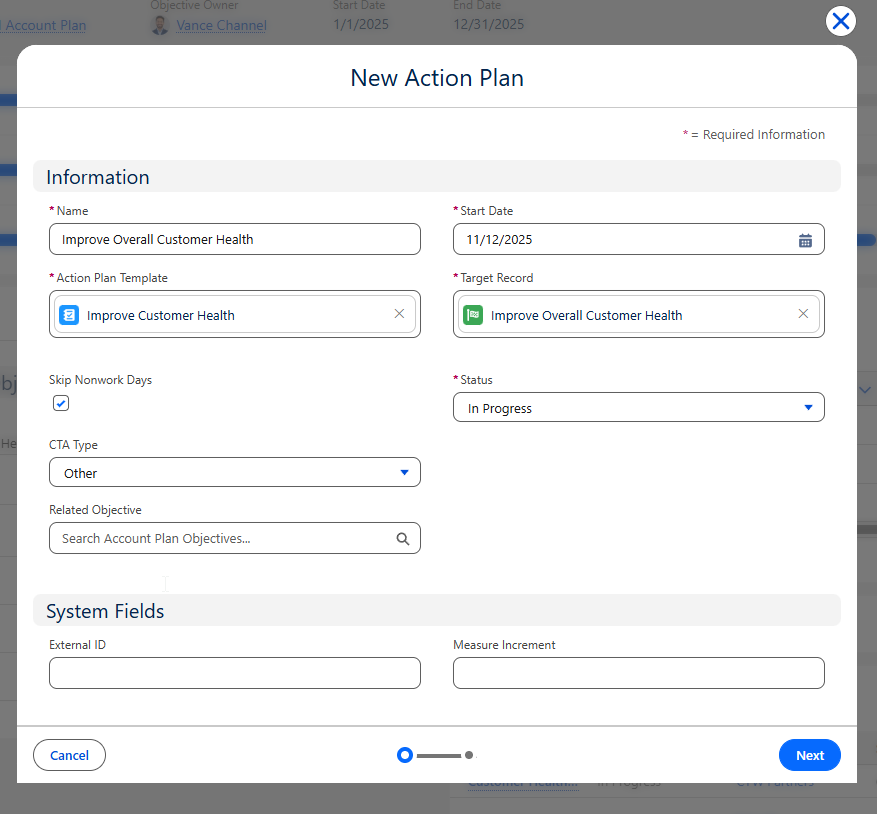
- This opens a window where they fill in the core details, such as a Name for the plan (e.g., “Understand Energy Spend Drivers”) and a Start Date.
- Next, they must select the required Action Plan Template. This is the predefined set of steps for this type of objective.
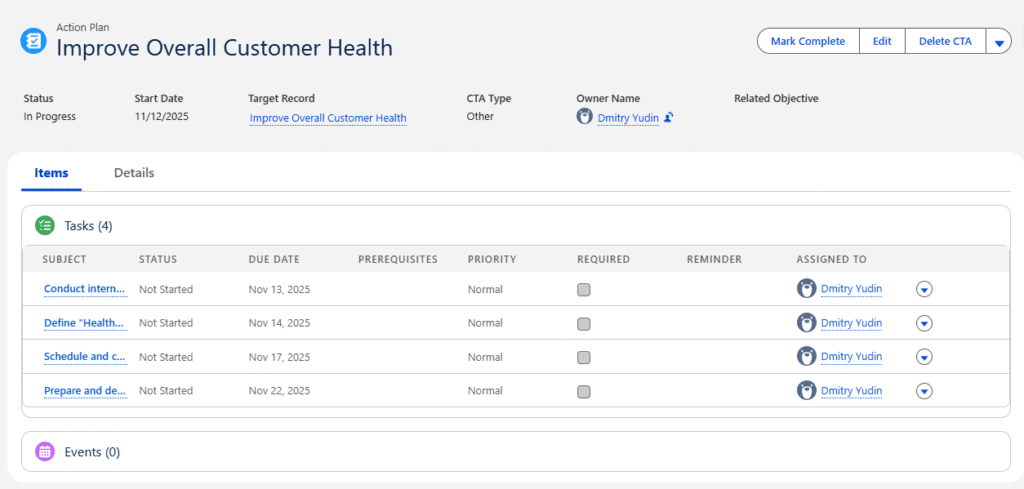
- After clicking Save, the new Action Plan appears within the Strategic Tracker. All default Tasks and Events from the chosen template are automatically populated under the new plan, providing an instant roadmap.
This template provides the baseline, but the plan is not locked. Users can then add additional, ad-hoc tasks and events to the plan by clicking the “New” button in the Tasks or Events section. This flexibility allows the team to add custom items on top of the predefined ones, ensuring the action plan is thorough and fully supports the unique needs of the objective.
Admin Setup: How to Enable Action Plans
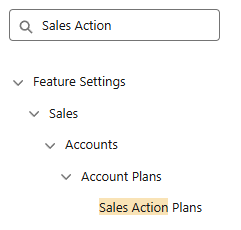
Setting up Action Plans is a straightforward process for administrators. You can find the main setup page by navigating to Setup, using the Quick Find box to enter “Sales Action Plans”, and then selecting the Sales Action Plans option.
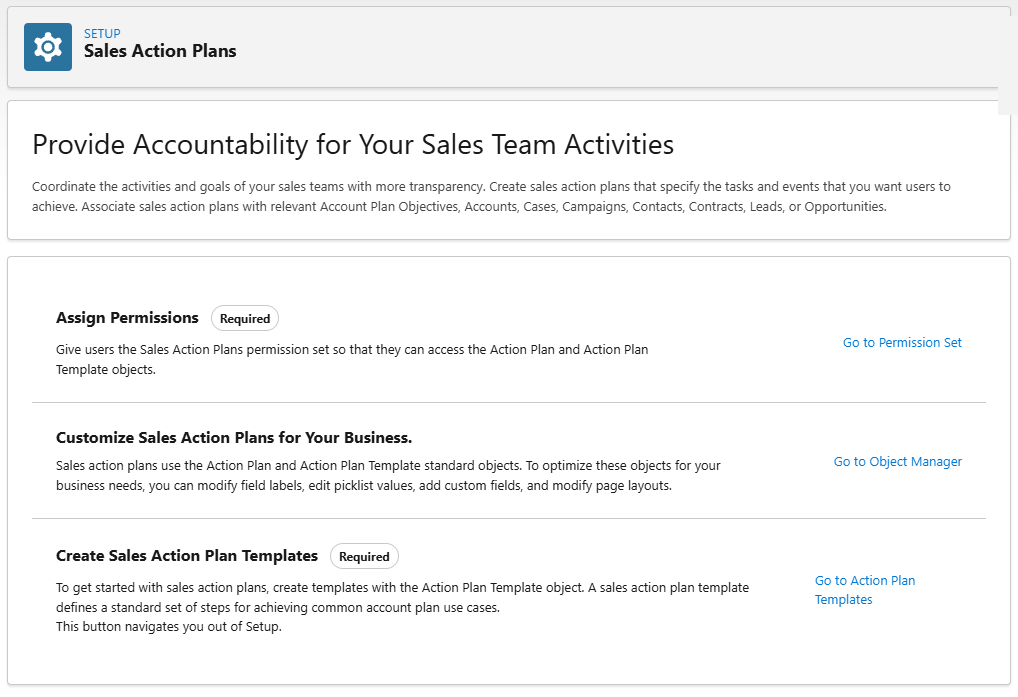
From this setup page, there are three core steps to get your team started:
- Assign Permissions: You must give users access to the feature. The simplest way is to assign the “Sales Action Plans default permission set” to all users who need to access sales action plans.
- Create Templates: As detailed previously, you must build the necessary Action Plan Templates. This is a required step, as users cannot create an individual action plan without first selecting a template.
- Customize Layouts: To help users access sales action plans more easily, add the “Action Plans” related list to the page layouts for all relevant target objects. This can include Account, Case, Campaign, Contact, Contract, Lead, or Opportunity page layouts.
Conclusion: From “What If” to “What’s Next”
Action Plans are the critical bridge between a high-level strategic objective and the daily work needed to achieve it. They are the execution component of your strategy, outlining the concrete steps your team must take to turn an ambitious goal into a reality.
By embedding a trackable list of tasks and events directly onto an Account Plan Objective using the Strategic Tracker, the feature gives partner managers clear accountability and transparency. This ensures all team members are aligned and effectively turns a long-term goal into a focused, manageable, and measurable step-by-step process.
Salesforce Partner Cloud offers many more features to enhance your experience, and we’re proud to be one of the top Salesforce partners for PRM, delivering full Partner Cloud implementations.
Reach out to us today to see how Partner Cloud can elevate your partner strategy.