
How Associations Can Structure Membership Types and Tiers in Salesforce
Every association eventually hits the same set of questions. Which members belong in which segment? What does each segment get, and what does it pay? Who is allowed to join at a reduced rate, and how do you check? When a membership expires, what happens next, and can a member move up a level without calling your office?
Answering those questions on paper is the easy part. Keeping the answers consistent across thousands of member records, dues invoices, renewal cycles, and portal pages is where most membership models start to drift. Staff end up applying rules by memory, and members see options that don’t match what they’re actually eligible for.
This guide walks through how to structure membership programs, tiers, and types for an association, how to turn those decisions into rules your Salesforce org can enforce, and how to present the result in a member portal where people can join, renew, and upgrade on their own.
Membership Programs, Tiers, and Types: How They Fit Together
These three terms get used interchangeably, which is how a lot of messy membership models begin. In an association they work as layers, and each one answers a different question.
Membership program is the umbrella offer: the reason someone joins your association at all, such as professional membership, organizational membership, or an affiliate program. Most associations run one to three programs.
Membership tier (or level) sets how much a member gets within a program. Tiers usually differ by benefits and price, and they’re the natural path for upgrades.
Membership type defines who the member is: an individual practitioner, a student, a retiree, a company. Types are where eligibility rules live, because each type usually requires some proof that the person or organization qualifies.
Here is how the layers combine in a typical professional association:
| Program | Tier / Level | Membership Type | Business decision | Example in an association |
|---|---|---|---|---|
| Professional membership | Standard | Individual – Practicing | Who counts as a core member, what dues they pay, whether they vote | A licensed engineer joins at the standard annual rate with full voting rights |
| Professional membership | Premium | Individual – Practicing | Which added benefits justify a higher price | The same engineer upgrades to get free CE courses and a conference discount |
| Professional membership | Standard | Student | What proof of eligibility you require and when the reduced rate ends | A full-time student uploads proof of enrollment and pays reduced dues until graduation |
| Organizational membership | Gold / Silver / Bronze | Organization | How many seats each tier includes and who manages them | A firm buys Gold, which covers 10 employees managed by one primary contact |
| Affiliate program | Single level | Affiliate | Which benefits non-practitioners get and which they don’t | A vendor joins to appear in the directory and sponsor events, without voting rights |
Read across a row and you get one sellable membership. Read down a column and you see the decisions your system has to support. The next section covers how to make those decisions.
How to Design an Association Membership Model
A workable membership model comes down to five decisions. Write each one as a rule someone else could apply without asking you, because that’s exactly what your association management system will have to do.
1. Member segments
Start with the groups you actually serve, then decide which differences matter enough to become separate types. Career stage, employment status, and individual versus organizational membership are the usual splits. Keep the list short. Each extra type adds a price point, a renewal path, and a set of portal rules to maintain. If you’re unsure where the real differences lie, look at what members need from you first. Our guide to being member-centric is a good place to begin.
Being Member-Centric: What Does It Mean in 2025?

2. Eligibility
For every type, define who qualifies and what evidence you accept: a license number, proof of enrollment, an employer domain, years in practice. Then decide what happens when eligibility lapses. A student who graduates should move to an early-career rate automatically instead of keeping a student discount for three more years.
3. Benefits and access
List what each tier unlocks, in concrete terms: event discounts, CE credits, publications, directory listing, voting rights, committee access. Mark which benefits are digital, because those become access rules in your portal. If two tiers differ by only one minor benefit, members won’t see a reason to upgrade.
4. Dues and pricing
Set dues per type and tier, and decide the billing logic before you pick a number. Annual or monthly? Calendar-year or anniversary renewals? Prorated dues for mid-year joins? Seat-based pricing for organizations? These choices shape your data model far more than the price itself.
5. Renewal and upgrade rules
Define the renewal window, grace period, and reminder schedule. Spell out how upgrades work mid-term (pay the difference, or start a new term?) and which downgrades you allow. Clear rules here protect retention, since renewal is the moment members most often get confused or drop off.
How to Operationalize Membership Rules in Salesforce
Once the five decisions are written down, the job shifts to making your system apply them the same way every time. Many associations already run fundraising, events, or sales in Salesforce, so keeping membership rules on the same platform means one record per member and no syncing between tools. Here’s what that looks like at a high level.
- Data. Store types, tiers, benefits, and dues as structured data instead of free-text notes or values someone updates by hand. When a price or benefit changes, you change it in one place and every new invoice and portal page picks it up.
- Member records. Each member’s record should show their current type and tier, membership dates, status, and history in one view. Individual members and organizations need to be linked, so a company’s Gold membership and its 10 covered employees stay connected.
- Automation. This is where written rules start doing the work. Salesforce Flow and similar tools can verify eligibility on sign-up, move a graduating student to a new type, send renewal reminders on schedule, and change status when the grace period ends. Staff step in for exceptions instead of routine tasks.
- Payments and dues. Dues should be calculated from the member’s type and tier, with proration and renewal logic built in. Payments recorded in the same org as member data let you see who has paid, who is in grace, and which tiers bring in the most revenue without exporting spreadsheets.
- Self-service. The last layer is what members can do on their own: update a profile, renew, pay, upgrade. Every self-service action should run through the same rules as a staff-entered change, which is why the portal and the AMS need to share one data model. More on the portal side below. If you’re weighing the bigger picture, see how we approach Salesforce for associations.
Running Tiers, Benefits, and Dues with AC MemberSmart
AC MemberSmart is a Salesforce-native AMS built for exactly this setup. Membership rules live in the same org as the rest of your member data, and members interact with them through an Experience Cloud portal. For the membership model described above, that covers four areas:
- Membership tiers and types. Configure the programs, tiers, and types your association offers and show members the options that apply to them.
- Benefits. Tie access to member status, so portal content, directory listings, and member pricing follow the tier a person holds.
- Dues. Accept membership payments, subscriptions, and renewals through the portal, with automated renewal reminders and the payment record kept in Salesforce.
- Member self-service. Let members join, renew, update their profiles, and manage their organization’s membership without contacting staff.
Live 7-Day Demo Trial!
Get full access to a working member portal with no setup, no sales pressure, and no waiting. Explore AC MemberSmart at your own pace and see how your members would experience it in real life.
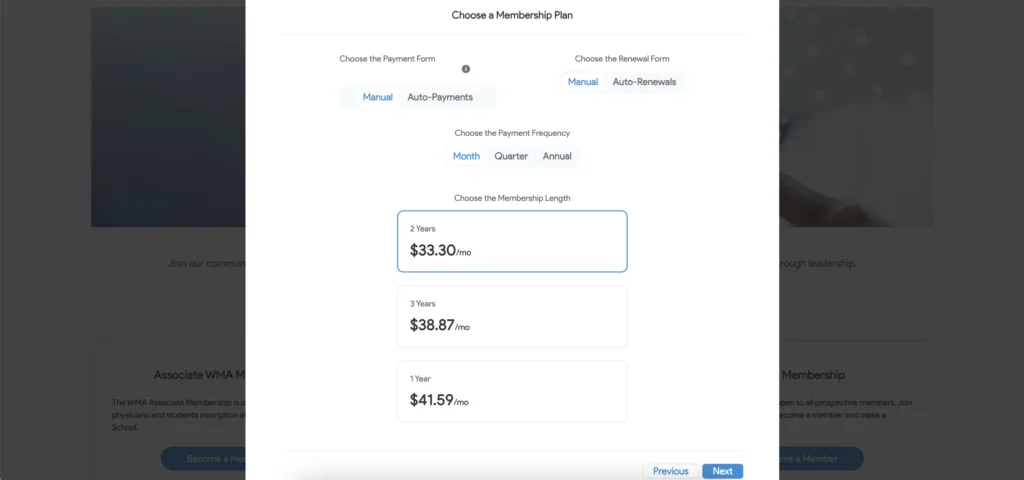
The subscription flow looks like this from the member’s side: they see the plans available to them, pick one, and pay in a single process.
How to Present Membership Options in a Member Portal
A well-designed membership model still fails if members can’t tell which option fits them. A member portal on Experience Cloud reads the same rules your AMS stores, so what people see always matches what they can actually buy. Here’s what the portal should handle.
Compare membership options. Show tiers side by side with price, term, and the benefits that differ. A plain comparison table usually beats a long page of descriptions.
Show eligibility up front. Display the requirements for each type next to the option itself, and hide or gray out types a visitor doesn’t qualify for. If a student type needs proof of enrollment, ask for it during sign-up so nobody pays first and gets rejected later.
Make benefits visible. List what each tier includes in plain language, and once someone joins, surface those benefits in their account: the discount code, the CE catalog, the member-only resources.
Support join. A prospect should be able to pick a type, confirm eligibility, pay dues, and get portal access in one session.
Support renew. Logged-in members should see their expiration date, renew in a few clicks, and get a receipt automatically. Reminders should link straight to that page.
Support upgrade. When a member is close to the next tier’s value, for example registering for enough paid events that Premium would save them money, show the upgrade option with the price difference already calculated.
Show relevant content. Experience Cloud can personalize pages by audience, so a student, an early-career member, and an organizational contact each land on content that fits their membership.

If you want to go further with onboarding once someone joins, our new member orientation guide covers the first weeks of membership.
Salesforce Donation Management for Nonprofits: Complete Guide

Final Words
A membership model holds up over time when three things stay connected. The rules for segments, eligibility, benefits, dues, and renewals are stored in your AMS, where they can be applied the same way to every record. Members see a short, clear set of options that match who they are. And the portal lets them join, renew, and upgrade on their own, using those same rules.
When any of the three slips, staff start patching gaps by hand and members start calling to ask what they’re paying for. Building on Salesforce keeps the rules, the records, and the member experience in one place, so a change to a tier or a price shows up everywhere at once.
Reach out to Advanced Communities if you’d like help structuring your membership model in Salesforce and putting it in front of members through an Experience Cloud portal.
FAQ
1. How should an association structure membership types?
Start with programs (why people join), then tiers (how much they get), then types (who they are). Keep types to the segments that genuinely need different eligibility rules or dues, such as practicing professionals, students, retirees, and organizations. For each type, document eligibility, benefits, dues, and renewal rules so your AMS can apply them consistently.
2. What is the difference between a membership type and a tier?
A type describes who the member is and whether they qualify, for example a student or a company. A tier describes how much the member gets within a program, usually with a different price, such as Standard or Premium. One person can change tiers through an upgrade, while a type change usually follows a change in their situation, like graduating.
3. How can an AMS manage eligibility, benefits, and dues?
An AMS stores each rule as structured data tied to the membership type and tier. Eligibility can be checked at sign-up and rechecked on renewal, benefits can be granted or removed automatically based on member status, and dues can be calculated from the member’s type and tier. On Salesforce, these rules sit in the same org as the member record.
4. Can members join, renew, or upgrade in a portal?
Yes. A member portal built on Experience Cloud lets prospects pick a membership type, confirm eligibility, and pay dues in one flow. Existing members can see their expiration date, renew online, and upgrade to a higher tier, with payments and status changes recorded in Salesforce automatically.
5. When should membership rules be automated in Salesforce?
Automate a rule once it’s applied the same way every time and staff are spending real hours on it. Renewal reminders, grace-period status changes, student-to-professional transitions, and dues calculations are common first candidates. Keep judgment calls, such as eligibility exceptions, as manual review steps.