How to Use Salesforce OmniStudio for LWC Development on Experience Cloud
Salesforce OmniStudio for Experience Cloud is quickly becoming the go-to toolkit for admins and developers who want to build polished, branded external user interfaces without writing a single line of Apex. Whether you’re setting up guided registration flows, contextual service portals, or dynamic self-service journeys, OmniStudio dramatically speeds up the process and raises the quality bar.
This guide walks through what OmniStudio actually is, when to use it (versus Screen Flows), how its building blocks fit together, a real implementation example, and how to prep for the OmniStudio Consultant exam.
Quick Answer
- OmniStudio is Salesforce’s no-code/low-code toolkit for building dynamic, branded UI components for Experience Cloud
- Use it when external users need guided, visually polished journeys instead of simple internal forms
- Key building blocks: FlexCards, OmniScripts, DataRaptors, Integration Procedures
- Typical flow: Define data sources → Build DataRaptor → Wire up OmniScript or FlexCard → Publish to Experience Cloud site
- Not sure where to start? See how we can help.
What Is Salesforce OmniStudio for Experience Cloud?
OmniStudio is a suite of declarative tools built into Salesforce that lets you design, build, and deploy interactive UI components — all from a drag-and-drop interface. No Apex, no raw JSON manipulation, no custom LWC from scratch.
It’s available across multiple Salesforce clouds (Sales, Service, Nonprofit, Education) and integrates deeply with Experience Cloud, where it powers everything from member portals to customer registration flows and service dashboards.
Where OmniStudio Fits in Experience Cloud Projects
OmniStudio shines in scenarios where the standard out-of-the-box components fall short. Typical use cases include:
- External user registration flows: Multi-step forms with conditional logic, Google Maps integration, and save-for-later capability
- Guided service requests: Customers walking through a structured path to submit issues or requests
- Dynamic contextual cards: FlexCards that surface relevant account, case, or membership data based on the logged-in user
- Custom onboarding journeys: Step-by-step wizards for new members, applicants, or customers
- Data-driven self-service portals: Pulling and displaying real-time Salesforce data in a visually branded format
Salesforce Screen Flows VS OmniStudio
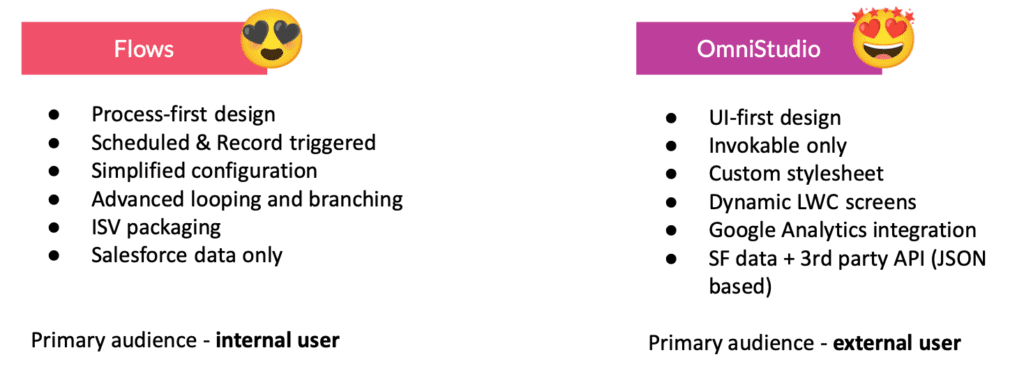
People often compare OmniStudio with Salesforce Screen Flows. The main difference between them lies in the visual appeal of the solutions built with the help of these two tools. Screen Flows offer simple visual solutions with precise styling, while OmniStudio provides enhanced UI/UX capabilities, allowing for the creation of flows that can be visually customized and look stunning, delivering better experiences. This makes OmniStudio the best choice for creating components for external sharing via an Experience Cloud site.
In the table below, we’ve compiled some key OmniStudio vs Screen Flows differences that make OmniStudio stand out as the go-to tool for effortless LWC development.
When Screen Flows are Enough
- Internal process automation (e.g., case triage, approval flows for employees)
- Simple data capture with no branding requirements
- Quick prototypes or low-volume internal forms
When OmniStudio is the Better Choice
- The end user is external (customer, partner, member), and branding matters
- The flow involves multiple steps with conditional logic, media, or maps
- You need users to save progress and return to complete it later
- You want to reuse or export the LWC across orgs or external platforms
- The component needs to pull and display data dynamically in real time
Bottom Line
For anything customer-facing on Experience Cloud where UX quality matters, OmniStudio consistently delivers better results than Screen Flows.
OmniStudio Building Blocks: The Practical Breakdown
FlexCards
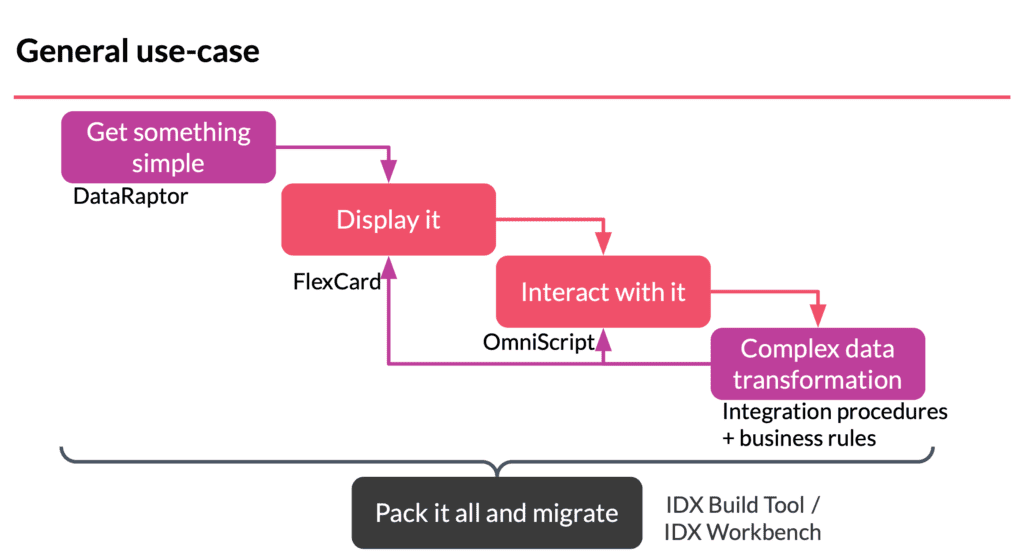
FlexCards display contextual information and quick actions in a clean, scannable card format. Think of them as smart, data-aware display panels that adapt based on who’s logged in and what records they’re associated with.
Best use: surfacing account summaries, membership status, open cases, or upcoming events on a portal homepage.
OmniScripts
OmniScripts provide a guided, step-by-step path through a business process. They’re the equivalent of a wizard UI: multi-step, conditional, and fully brandable.
Best use: registration flows, service requests, onboarding journeys, any process where the user needs to move through sequential steps with branching logic.
DataRaptors
DataRaptors are the data services layer. They handle extracting, transforming, and loading data between Salesforce objects and your OmniStudio components.
Best use: feeding data into OmniScripts and FlexCards, mapping fields from complex object relationships, writing data back to Salesforce after a flow is completed.
Integration Procedures
Integration Procedures are server-side orchestration tools. They execute multiple actions in a single server call (querying Apex, calling external APIs, running DataRaptors) and return the results to the front-end component.
Best use: any scenario where you need to aggregate data from multiple sources, hit external systems, or run complex logic without hammering the server with multiple individual calls.
Expression Sets & Decision Matrices
These are advanced tools for dynamic rules and calculations. Useful if your flows involve pricing logic, eligibility rules, or tiered decisions that change based on input data. Not always needed, but powerful when the business logic is complex.
Typical data flow in an OmniStudio implementation
- Define your data model: What Salesforce objects and fields are involved?
- Build DataRaptors: Extract (read) and load (write) configurations for each data operation
- Set up Integration Procedure (if needed): Orchestrate multi-step server-side logic
- Build OmniScript or FlexCard: Wire up the UI, drag in components, map data sources
- Add branding & styling: Apply your Experience Cloud theme and custom CSS
- Publish to your Experience Cloud site: Add the component via Experience Builder and test with real users
What You Can Do With OmniStudio and Experience Cloud
- Easily and quickly create good-looking, user-friendly LWC components and add them to your Experience Cloud site to meet your client’s specific needs—no need for any coding, just drag and drop.
- Customize and brand your components exactly the way you want.
- Download the code of the component you made without writing any code yourself. Just use the ‘Download off-platform LWC’ option, and OmniStudio takes care of the code for you! Use the code over and over, tweak it if necessary, and place it on other Experience Cloud sites in a different org with the minimal assistance of dev tools. With OmniOut, you can even use the code externally on various cloud platforms outside Salesforce.
Example of Using Salesforce OmniStudio on Experience Cloud
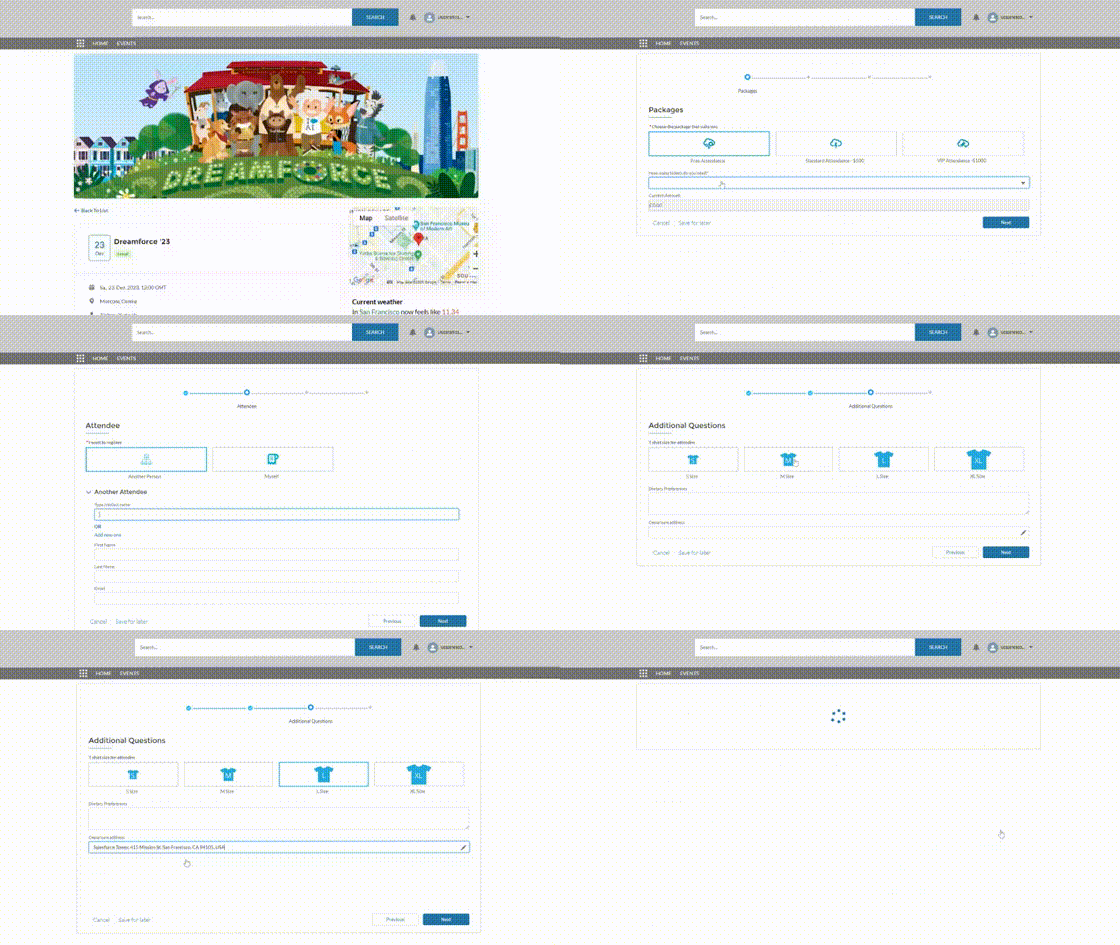
Let me give you an example of how we used Salesforce OmniStudio on Experience Cloud. I’ll show you how we built a custom event registration flow using OmniStudio with the AC Events Enterprise app.
The Goal
We wanted to replace the default registration button with a fully custom, multi-step registration experience, including package selection, attendee details, T-shirt sizing, and departure options linked up with Google Places.
Components Used
- OmniScript — drove the multi-step registration flow
- DataRaptor Extract — pulled event details, available packages, and existing attendee data
- DataRaptor Load — wrote completed registration data back to Salesforce
- Integration Procedure — handled the Google Places lookup for departure options
How Data is Handled
First, we turned off the regular registration button that comes with the Advanced Communities’ AC Events Enterprise app for Experience Cloud. Then we used OmniStudio to create a new OmniScript that provided the exact steps users needed to follow for registration.
The registration can be customized whenever you want. You can add more fields, actions, or change the look, all from OmniStudio with clicks – no coding required!
OmniStudio made it possible for us to integrate maps and add images – something Salesforce Screen Flows can’t do. Another handy feature is that OmniStudio lets users save their registration progress and come back to it later. You can’t do that with Screen Flows.
What to Test Before Launch
- Step navigation with all conditional branches
- Data mapping — confirm all fields write to the correct objects
- Mobile responsiveness on the Experience Cloud site
- Behavior for returning users (pre-populated fields, saved state)
- Error handling when required fields are missing or API calls fail
Common Pitfalls
- Skipping the backend design: Even though OmniStudio is all about the front-end for external users, it’s super important to grasp the backend processes and integration steps before you jump into FlexCards and OmniScript to build anything. Think about the behind-the-scenes logic in your LWC component — what data you’re extracting, transferring, and saving, where it’s going, what filters you’re using, and so on.
- Overcomplicating DataRaptors: Keep each one focused on a single operation; nest them via the Integration Procedure instead
- Not testing with an external user profile: What works in a System Admin context often breaks for Experience Cloud guest or member profiles
- Ignoring object-level permissions: OmniStudio components respect sharing rules. Test it with realistic user profiles
- Poor naming conventions: Components multiply fast, so use a consistent prefix/naming system from day one
- No versioning strategy: Always version OmniScripts and Integration Procedures before editing live components
If you’re using Salesforce to manage your events, you might find this guide on event management in Salesforce helpful:
Salesforce Event Management Guide

Best Practices Before You Dive In
Security & access
- Always test your components while logged in as an Experience Cloud external user profile, not as an admin
- Review object and field-level security before going live. OmniStudio respects all Salesforce sharing settings
- Use Integration Procedures for elevated data access rather than exposing permissions at the user level
Performance & Maintainability
- Minimize the number of DataRaptor calls per page load — consolidate via Integration Procedures
- Avoid deeply nested OmniScript logic. Break complex flows into sub-OmniScripts where possible
- Keep FlexCards lean. Don’t overload a single card with too many data sources
Naming Conventions & Versioning
- Adopt a project or client prefix for all components (e.g.,
ACE_Registration_OmniScript) - Always create a new version before editing a live OmniScript or Integration Procedure
- Document DataRaptor field mappings. They become impossible to debug six months later without notes
Pre-launch testing checklist
- Test all conditional branches in OmniScript
- Verify DataRaptor field mappings against the actual object schema
- Test with an Experience Cloud community member profile (not admin)
- Check mobile layout in the Experience Builder preview
- Validate error messages and required field behavior
- Test save-and-return functionality (if enabled)
- Confirm data writes correctly to all target objects
- Review page load speed with real data volumes
Salesforce OmniStudio Consultant Exam: What to Expect and How to Pass it Successfully?
Salesforce OmniStudio Consultant credential is designed for individuals with experience in consulting on cloud application development using OmniStudio tools in a customer-facing role. As a candidate, you should be able to explain the purpose of OmniStudio tools and design solutions that meet customer business requirements.
Exam Format
- 60 multiple-choice / multiple-select questions
- Passing score: 63%
- Questions are scenario-based and often lengthy — you’ll need to read carefully to identify the right tool for the situation described
Expect realistic situations with subtle differences between answer choices. Two answers will often both sound plausible; the key is knowing when one tool is more appropriate than another.
How to Prepare (Phased Approach)
Phase 1: Understand the tools (Days 1–5)
Work through the OmniStudio Trailmix on Trailhead. Focus on FlexCards, OmniScripts, DataRaptors, and Integration Procedures — these make up the bulk of the exam.
Phase 2: Hands-on practice (Days 6–12)
Register for a free practice org and build something real. Don’t just read, but build a FlexCard, wire up a DataRaptor, and create a basic OmniScript. Hands-on experience is the single most effective exam prep.
Phase 3: Review & mock exams (Days 13–14)
Review the official OmniStudio documentation, take practice tests, and focus on any component types you haven’t worked with directly. Pay particular attention to Expression Sets and Decision Matrices. They’re commonly tested but easy to overlook in prep.
Good luck on your Salesforce certification exam!
Need Help with OmniStudio + Experience Cloud?
Our team specializes in Salesforce implementations, and Experience Cloud is one of our main areas of expertise. Advanced Communities team can help you with everything, from architecture and OmniStudio component development to UX design, Salesforce integration, and ongoing troubleshooting. Whether you’re starting a new portal build or trying to untangle an existing setup, we can help you move faster and avoid the common pitfalls.
If you want to explore what’s possible, get in touch with our team or learn more about our services.
FAQ
1. What is Salesforce OmniStudio used for in Experience Cloud?
OmniStudio is used to build dynamic, branded UI components for Experience Cloud sites including guided forms, registration flows, service request wizards, and contextual data cards. It lets admins create polished external user experiences without custom code.
2. Is OmniStudio better than Screen Flows for external user journeys?
For external-facing Experience Cloud sites, yes. OmniStudio offers significantly better visual customization, save-for-later capability, map and image integration, and LWC export.
Screen Flows are better suited for simpler internal processes where branding isn’t a priority.
3. What are FlexCards, OmniScripts, and DataRaptors?
FlexCards display contextual data in a card format. OmniScripts guide users through multi-step processes. DataRaptors handle reading and writing data between Salesforce objects and your OmniStudio components. Together, they form the core of any OmniStudio implementation.
4. Do I need a developer to use OmniStudio?
Not for most use cases. OmniStudio is designed for admins with a drag-and-drop interface and no coding required. You will need a developer if you’re integrating with external APIs, building complex Integration Procedures, or customizing exported LWC code for use outside Salesforce.
5. How hard is the OmniStudio Consultant exam?
It’s moderately challenging. The format is scenario-based with long questions and close answer choices. Most people who pass have hands-on experience building with OmniStudio, not just reading documentation. A focused 2-week prep plan with practical org time is the most effective approach.
6. Can OmniStudio work with existing LWC components?
Yes. OmniStudio can generate LWC code via the “Download off-platform LWC” option, and that code can be extended or combined with existing components. You can also embed OmniStudio components alongside standard LWCs on the same Experience Cloud page.