
How to Create Custom Emoji Reactions in Chatter on Salesforce Experience Cloud
You’ve been asked many times to implement custom emoji reactions in Salesforce Chatter but didn’t know how to do it? Unfortunately, out of the box, Salesforce doesn’t provide support for custom emoji reactions. However, the Advanced Communities team found the solution. Excited to know more? Keep reading our article and we’ll show you how it can be achieved.
Custom reactions may look like a small UX detail, but in Salesforce Experience Cloud they can support a more engaging community experience. For member portals, partner communities, customer communities, and internal collaboration spaces, lightweight interaction features can help users respond faster, participate more actively, and make the portal feel more dynamic.
This article shows one example of how Salesforce Experience Cloud implementation can be extended when standard Chatter functionality does not fully meet business or user experience requirements.
Why Custom Reactions Matter in Salesforce Experience Cloud
In Experience Cloud portals, engagement often depends on how easy it is for users to interact with content. Standard Chatter functionality can be enough for simple collaboration, but some communities need a more branded, flexible, or interactive experience.
Custom emoji reactions can be useful when organizations want to make Chatter interactions more intuitive, track lightweight feedback, or create a community experience that feels more aligned with their brand and user expectations.
Custom emoji reactions in SFDC Chatter: Implementation Guide
We were asked to implement сustom emoji reactions for Salesforce Chatter in the Experience Cloud site. Considering that Salesforce Chatter does not support reactions by default and that Feed as a standard component can’t be customized, we started searching for a more creative solution to extend the capabilities of the community we were working on.
So, the solution was to create and add a Rich Publisher App to the Chatter Feed in order to add a payload to FeedItem we needed.
After enabling and setting up the Rich Publisher App, users can use Chatter Publisher to add payload via the “Composer” component. But in our case, we decided to skip this step by automating the payload creation. Using Connect API, we provided FeedElement with ConnectApi.ExtensionsCapability. We indicated which extension needs to be used by the Feed component for this FeedItem. The “Renderer” component (part of the RPA), in its turn, shows the component we’ve chosen to implement. In our case, it’s custom emoji reactions.
Needless to say, all emoji reactions “know” what FeedItem they’re linked to.
As a result, the emoji reactions picker is now available for each FeedItem in the standard Feed component to be used by Experience Cloud site users.
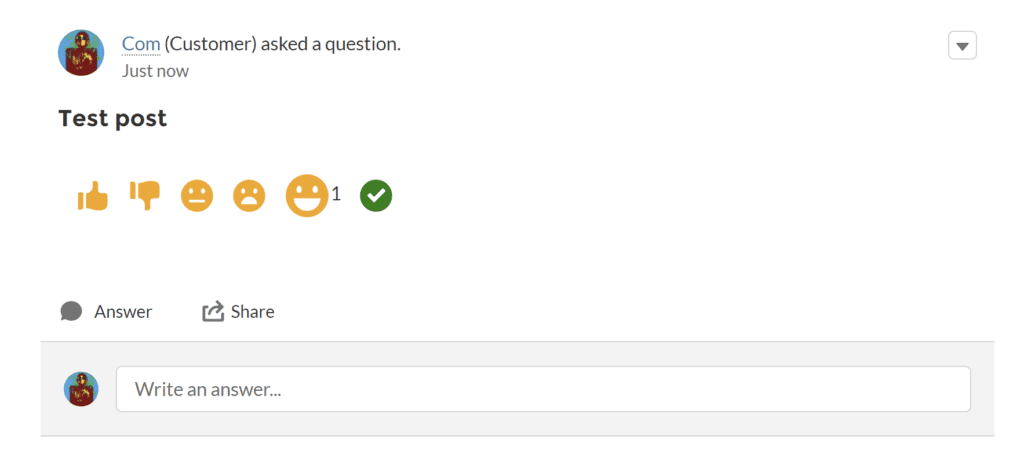
In order to implement emojis support in Chatter posts, follow the simple steps below:
- Create a Rich Publisher App https://www.youtube.com/watch?v=kgKfy2QS6Tk&t=99s
- Enable Rich Publisher App for your Experience Cloud site. To do it, go to Experience Workspaces, click Administration, and choose the app you want to add to your site https://help.salesforce.com/s/articleView?id=sf.networks_chatter_rich_publisher_apps.htm&type=5
- Automate the creation of ConnectApi.ExtensionsCapability for FeedItem with the help of trigger
The following code example shows how the custom reaction logic can be connected to Chatter Feed items. This part is technical and should be reviewed or implemented by a Salesforce developer.
trigger FeedItemTrigger on FeedItem(after insert) {
  Id communityId = '0DB5g000000CeUmGAK';

  List<FeedItem> feedItems = (List<FeedItem>) Trigger.new;

  FeedItem currentFeedItem = feedItems[0];

  ConnectApi.FeedEntityIsEditable isEditable = ConnectApi.ChatterFeeds.isFeedElementEditableByMe(
    communityId,
    currentFeedItem.Id
  );

  if (isEditable.isEditableByMe == true) {
    ConnectApi.FeedItemInput feedItemInput = new ConnectApi.FeedItemInput();

    ConnectApi.ExtensionInput extensionInput = new ConnectApi.ExtensionInput();
    extensionInput.alternativeRepresentation = new ConnectApi.AlternativeInput();
    extensionInput.alternativeRepresentation.textRepresentation = 'alternativeRepresentation';
    extensionInput.alternativeRepresentation.title = 'alternativeRepresentation';

    extensionInput.payload = '"' + currentFeedItem.Id + '"';
    extensionInput.extensionId = '0MY5g000000oLkj';
    extensionInput.payloadVersion = '1';

    ConnectApi.FeedElementCapabilitiesInput feedElementCapabilitiesInput = new ConnectApi.FeedElementCapabilitiesInput();
    feedElementCapabilitiesInput.extensions = new ConnectApi.ExtensionsCapabilityInput();
    feedElementCapabilitiesInput.extensions.itemsToAdd = new List<ConnectApi.ExtensionInput>();
    feedElementCapabilitiesInput.extensions.itemsToAdd.add(extensionInput);

    feedItemInput.capabilities = feedElementCapabilitiesInput;

    ConnectApi.FeedElement editedFeedElement = ConnectApi.ChatterFeeds.updateFeedElement(
      communityId,
      currentFeedItem.Id,
      feedItemInput
    );
  }
}
- With CSS styles, hide the button in Chatter Publisher that runs the “Composer” component. Also hide the standard Likes statistics from the ‘My Profile’ page
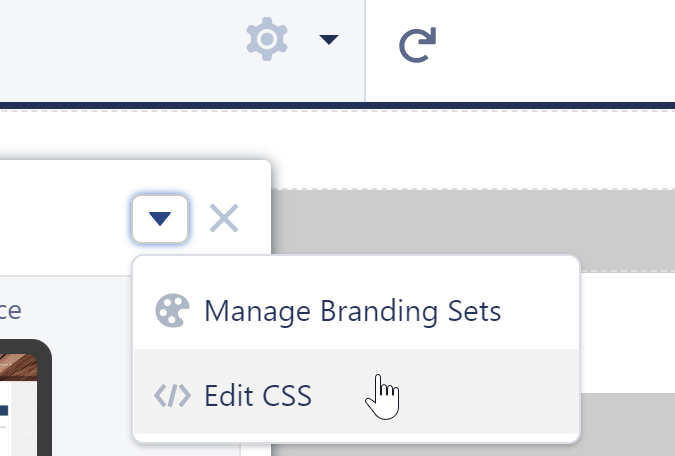
.forceChatterToggleLike, .forceChatterChatterExtensionButton{
    display:none;
}
.forceCommunityUserProfileStats table .slds-has-dividers--top td:nth-child(3) {
    display:none;
}
- Put the LWC into the Aura “Renderer” component (part of RPA)
<aura:component implements="lightning:availableForChatterExtensionRenderer">
  <c:likePublisherContainer payload="{!v.payload}" />
</aura:component>
- Add all the necessary logic into the LWC container in accordance with your specific needs
<template>
  <div class="publisher-container likes-block">
    <template for:each={counter} for:item="item">
      <span key={item.label}>
        <lightning-icon
          icon-name={item.icon}
          class={item.class}
          alternative-text={item.label}
          title={item.label}
          data-id={item.label}
          onclick={handleClick}
          size="Small"
        >
        </lightning-icon>
        <span class="slds-text-body_x-small"
          ><template if:true={item.value}>{item.value}</template>
        </span>
      </span>
    </template>
  </div>
</template>

import { api, LightningElement, track } from "lwc";
import getLikesByFeedId from "@salesforce/apex/LikePublisherController.getLikesByFeedId";
import addFeedLike from "@salesforce/apex/LikePublisherController.addFeedLike";

export default class LikePublisherContainer extends LightningElement {
  @api
  payload;
  @track
  counter = [
    {
      icon: "utility:like",
      label: "like",
      value: 0,
      class: "pub-icon slds-m-left_small orange"
    },
    {
      icon: "utility:dislike",
      label: "dislike",
      value: 0,
      class: "pub-icon slds-m-left_small orange"
    }
    //add more icons if you need
  ];

  connectedCallback() {
    getLikesByFeedId({ feedItemId: this.payload })
      .then((result) => {
        let counter = this.counter;
        for (let i = 0; i < counter.length; i++) {
          if (result[counter[i].label]) {
            counter[i].value = result[counter[i].label];
          }
        }
        this.counter = [...counter];
      })
      .catch((error) => {
        console.log(error);
      });
  }

  handleClick(event) {
    let iconType = event.target.dataset.id;
    addFeedLike({ feedItemId: this.payload, type: iconType })
      .then(() => {
        let counter = this.counter;
        for (let i = 0; i < counter.length; i++) {
          if (iconType === counter[i].label) {
            counter[i].value = counter[i].value + 1;
          }
        }
        this.counter = [...counter];
      })
      .catch((error) => {
        console.log(error);
      });
  }
  //add other handlers if you need
}
Benefits of using Rich Publisher App for custom emoji reactions implementation
Our custom solution for implementing Salesforce Chatter emoticon reactions gives you unlimited customization and setting-up capabilities. From a business perspective, this type of customization can help Experience Cloud communities feel less generic and more aligned with the way users actually interact. It can also support engagement tracking, branded community UX, and more flexible interaction patterns than the standard Chatter experience provides out of the box.
You are free to:
- Choose the style, type, and quantity of reactions you’d like to implement
- Allow your users to select multiple Chatter emoticons or emoji reactions at the same time. The emoji picker is no longer closing, making it much easier to react with numerous emojis
- Add custom reactions that are in perfect harmony with your brand identity
- Configure, remove or add custom emoji reactions, smileys, and reactions you’d like
- Track emoji analytics and see the most popular and highly reacted posts
- Let your users react to any posts published on the Chatter Feed of your Experience Cloud site.
When Custom Experience Cloud Development Makes Sense
Custom Experience Cloud development may be needed when standard Salesforce components do not fully support the experience you want to provide. This can include custom Chatter interactions, branded portal features, advanced user flows, custom components, integrations, or functionality designed for specific customer, partner, or member communities.
In these cases, the goal is not to customize Salesforce for the sake of customization. The goal is to improve the portal experience, remove friction for users, and support business processes that standard components cannot cover well enough.
Custom development may be relevant when:
- Standard Experience Cloud components are too limited
- Users need a more interactive community experience
- The portal requires branded or role-specific functionality
- Chatter, feeds, or collaboration tools need additional behavior
- Partners, members, or customers need a smoother way to interact with portal content
- The organization wants to extend Experience Cloud without moving to disconnected
third-party tools
How can we help?
If you need custom Salesforce Experience Cloud functionality that goes beyond standard components, Advanced Communities can help design and implement it.
Our team works with Experience Cloud sites, Salesforce online communities, Salesforce PRM portals, support portals, and member portals. We can help you extend Chatter, improve community engagement, build custom components, and create a more user-friendly portal experience aligned with your business needs.
Whether you need a small UX enhancement or a more complex Experience Cloud customization, we can help you choose the right technical approach and implement it properly. Talk to a Salesforce Experience Cloud consultant today.