What Is CRM Analytics for Salesforce Experience Cloud?
CRM Analytics for Salesforce Experience Cloud brings powerful, interactive dashboards directly into your partner portals, customer portals, and self-service sites, giving external users access to the data that matters to them, without requiring them to log into Salesforce itself.
Whether you’re running a partner program, managing customer relationships through a self-service portal, or building a shared visibility layer between your internal teams and external stakeholders, CRM Analytics makes it possible to surface real-time insights exactly where decisions happen.
In this guide, you’ll learn what CRM Analytics is, how it integrates with Experience Cloud, the most common use cases, what you need before getting started, and how to embed dashboards in Experience Builder.
What Is CRM Analytics in Salesforce?
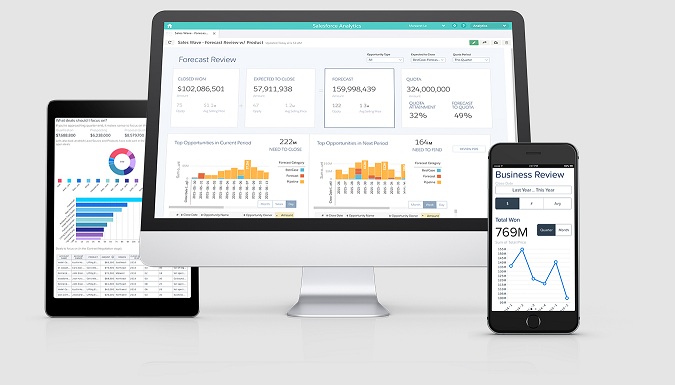
CRM Analytics (formerly known as Tableau CRM, and originally launched as Wave Analytics) is Salesforce’s native analytics platform. It allows you to connect, explore, and visualize data from across your Salesforce org and beyond through interactive dashboards and data apps.
Unlike standard Salesforce reports, CRM Analytics dashboards are dynamic and highly visual. They support filtering, drill-downs, and exploration, making them well-suited not just for internal analysts but also for business users who need quick, clear access to relevant metrics.
In the context of this article, the key capability is this: CRM Analytics dashboards can be shared with and embedded inside Salesforce Experience Cloud sites, meaning external users like partners or customers can view and interact with analytics without needing a full Salesforce license.
How CRM Analytics Works with Experience Cloud
Experience Cloud (formerly Community Cloud) is Salesforce’s platform for building digital experiences such as portals, communities, and sites for external audiences. It powers everything from partner portals and customer self-service hubs to branded microsites and event platforms.
CRM Analytics integrates with Experience Cloud through a dedicated component in Experience Builder: the CRM Analytics Dashboard component. Here’s the basic flow:
- A CRM Analytics dashboard or app is built and configured inside your Salesforce org
- Sharing settings are configured to grant appropriate access to Experience Cloud users
- In Experience Builder, you add the CRM Analytics Dashboard component to a page
- The component renders the dashboard inline within the Experience Cloud site
- External users interact with the dashboard within their assigned access level. They see only what they’re permitted to see, governed by Salesforce’s sharing and row-level security
This means your partners or customers get a seamless, branded analytics experience inside the portal without a separate BI tool, manual exports, or email attachments.
Typical Use Cases for Experience Cloud
Partner Portal Analytics
Partner-facing portals are one of the strongest use cases for embedding CRM Analytics. Partners often need visibility into their pipeline, performance, and joint opportunities, but sharing that through spreadsheets or email creates lag, inaccuracies, and friction.
With CRM Analytics embedded in a partner portal, you can give partners access to:
- Pipeline visibility — opportunities in progress, deal stages, forecast data
- Partner performance dashboards — revenue attainment, activity metrics, target vs. actual
- Lead and opportunity monitoring — what’s been assigned, what’s moving, what’s stalled
- Joint planning views — shared data between your team and the partner, scoped to their accounts
This reduces the back-and-forth between partner managers and partners, and helps partners make faster, more confident decisions.
Need help setting up analytics in your partner portal?
Contact us to discuss your project.
Customer Portal Analytics
Customer-facing portals are increasingly expected to do more than just host support tickets and FAQs. Customers want transparency, and they want to see how their account is performing, what they’re using, and where there may be room to grow.
CRM Analytics in a customer portal can surface:
- Usage trends — product adoption, feature usage, consumption metrics
- Service KPIs — case resolution times, SLA performance, open issues
- Account insights — spend history, renewal status, engagement scores
- Customer-facing reports — data that helps customers understand the value of your product or service
This kind of transparency builds trust, reduces support volume, and supports retention and upsell conversations.

Internal + External Shared Visibility
One underrated benefit of embedding CRM Analytics in Experience Cloud is alignment between internal teams and external stakeholders. When both sides work from the same underlying data logic, even if they see different slices of it, decisions get faster and more consistent.
Common scenarios include:
- A channel operations team and their partners viewing the same pipeline data, scoped by region or partner tier
- A customer success team sharing account health dashboards with customers
- A sales team providing deal progress visibility to a strategic partner without sending exports
The result is less manual reporting, fewer “what does this number mean?” conversations, and a shared foundation for planning.
Key Benefits of CRM Analytics in Experience Cloud
- Centralized insights — One source of truth for your data, accessible across internal and external audiences
- Better decision-making — Partners and customers act on current data, not stale exports
- External user visibility — Give the right people access to the right dashboards, scoped by their role and permissions
- Interactive dashboards — Users can filter, explore, and drill down
- Mobile-friendly access — Dashboards work across desktop, tablet, and mobile devices
- Stronger collaboration — Shared data reduces friction between your team and your partners or customers
What You Need Before Launch
Before you embed CRM Analytics dashboards in an Experience Cloud site, it’s worth checking a few things:
- CRM Analytics is enabled in your Salesforce org (requires an appropriate license or add-on)
- Sharing settings are configured for your analytics content (dashboards and apps need to be shared with the right user profiles or permission sets)
- Your Experience Cloud site is set up and live, or at least in a testable state
- External user access model is defined (which user profiles will see which dashboards)
- Row-level security is configured so users only see data relevant to their account or territory
- Experience Builder is ready to accept the CRM Analytics Dashboard component
Availability of specific features and sharing capabilities can vary depending on your Salesforce edition, CRM Analytics license type, and how your org is configured. Always verify against your specific setup.
How to Embed CRM Analytics in Experience Cloud
The embedding process is not deeply technical, but it does require the right configuration across a few areas. Here’s the high-level setup logic:
- Enable CRM Analytics sharing for Experience Cloud — this is done at the org level and is required before any external embedding will work
- Prepare your dashboard or app — make sure it’s configured and scoped correctly for external users
- Set up access — assign the appropriate permission sets or sharing rules so your Experience Cloud user profiles can see the relevant content
- Open Experience Builder — navigate to the page where you want to embed the dashboard
- Add the CRM Analytics Dashboard component — drag it onto the page from the component panel
- Configure and assign the dashboard — select the target dashboard and set any filtering or context parameters
- Test with an external user session — verify that the right data appears and that row-level security is working as expected
This is intentionally a high-level overview. The specifics of setup, especially around sharing, security, and license requirements, depend on your org configuration and are worth reviewing with a Salesforce consultant before launch.
Common Watchouts
The most frequent mistake when embedding CRM Analytics in Experience Cloud is simply pointing the wrong dashboard at the wrong audience. Dashboards built for internal analysts are often too dense, too jargon-heavy, or too broad in scope to be useful or appropriate for external users. Before anything goes live, it’s worth pressure-testing each dashboard against the actual needs of the people who will see it.
Sharing configuration is another area where things quietly break. If the sharing model is too restrictive, users get locked out or see empty dashboards. If it’s too permissive, sensitive data becomes visible to people who shouldn’t have access. Neither outcome builds trust. Getting row-level security right from the start matters far more than the visual design of the dashboard itself.
Finally, not every piece of data belongs outside your organization. Some internal dashboards contain commercially sensitive or operationally confidential information that should never reach a partner or customer view. Part of the planning process is deciding what external users genuinely need to see — and being deliberate about what stays internal.
How Advanced Communities Can Help
Advanced Communities specializes in Salesforce Experience Cloud implementation and portal strategy. If you’re looking to bring CRM Analytics into your partner or customer portal, we can help you to plan your Salesforce portal analytics strategy, design the embedding and UX, build audience-specific analytics experiences for your portals, and provide ongoing Salesforce implementation support.
Whether you’re starting from scratch or looking to upgrade an existing portal, we can help you get it right. Contact us to talk through your use case.
FAQ
1. What is CRM Analytics in Salesforce?
CRM Analytics is Salesforce’s native analytics platform for building interactive dashboards, exploring data, and surfacing insights across your org. It supports both internal users (via the Salesforce app) and external users (via Experience Cloud embedding).
2. Can CRM Analytics be used in Experience Cloud?
Yes. CRM Analytics dashboards can be embedded directly into Experience Cloud sites using the CRM Analytics Dashboard component in Experience Builder. External users, such as partners or customers, can view and interact with dashboards based on the access they’ve been granted.
3. Can external users view CRM Analytics dashboards?
Yes, with the right configuration. You need to set up appropriate sharing rules, permission sets, and row-level security to ensure external users see only the data relevant to them. License requirements may also apply depending on your Salesforce edition.
4. How do you embed CRM Analytics in Experience Builder?
The process involves enabling CRM Analytics sharing for Experience Cloud, preparing your dashboards and access model, then adding the CRM Analytics Dashboard component to a page in Experience Builder. See the embedding section above for the full high-level steps.