How to Migrate from Salesforce PRM to Partner Cloud
Most partner portals are not badly built. They are simply built for a partner program that no longer exists.
The setup made sense at the time: a handful of resellers, a Partner Community site, a few custom objects for deal registration, an approval flow someone wrote in an afternoon. Then the ecosystem grew. New partner types arrived: referral partners, distributors, ISVs, implementation partners, and each one got bolted onto the same access model. Onboarding stayed manual. Reporting fragmented. Partners stopped logging in.
At that point, teams usually start looking at a migration. And the first thing worth clarifying is what is actually being migrated. Partner Cloud is the current name for the product Salesforce previously marketed as Salesforce PRM, and it still runs on Experience Cloud. If the Partner Cloud terminology is new to your team, the glossary covers the core terms in one place.
So in most cases this is not a move from one vendor to another. It is a move from an aging, over-customized implementation to the current-generation partner management model: with Agentforce, Slack collaboration, and Revenue Cloud quoting available as part of the partner experience rather than as side projects.
That distinction matters, because it changes what the project has to fix. A new portal skin will not repair partner segmentation, unclear deal registration rules, or a permissions model nobody owns. This guide covers what to assess before you migrate a partner portal on Salesforce, a practical migration path, and the risks that quietly derail these projects.
Why Companies Revisit Their Salesforce PRM Setup
In our partner portal and PRM implementation work, the trigger for a migration is rarely a single broken feature. It is an accumulation:
- Adoption has flatlined. Partners log in to submit a deal and leave. Everything else (content, training, dashboards) goes unused.
- Onboarding is a human process. Someone manually creates users, assigns permission sets, sends credentials, and answers the same twelve questions.
- Deal registration does not scale. Conflict rules live in someone’s head, approvals stall, and channel conflict gets resolved over email.
- Reporting is fragmented. Channel leadership cannot answer “which partners are actually producing?” without a spreadsheet.
- Partner segmentation was never really designed. Tiers exist in a picklist but not in the access model, so every partner sees roughly the same portal.
- UX reflects internal org structure, not partner tasks. Navigation mirrors departments; partners want three things and cannot find them.
One diagnostic we run early is deliberately unglamorous: pull login frequency and page-level engagement for the last two quarters and compare it with what the portal actually contains. The gap is usually dramatic: a large share of published pages carry almost no traffic, while a small handful of pages absorb nearly all partner attention. That gap, not the visual design, is the real brief for the migration.
What Changes When You Move to Partner Cloud
The interface is the least interesting part of the change. What actually shifts:
Partner management becomes a product, not a collection of customizations. Deal registration, lead distribution, onboarding, enablement, and incentives exist as supported capabilities on the platform instead of bespoke objects and flows you maintain forever.
CRM proximity gets tighter. Partner-submitted deals, leads, and quotes live in the same data model your internal sales team works in, which is what makes shared pipeline visibility possible at all.
Collaboration moves to where partners already are. Slack and Slack Connect let partners register and update deals in conversation rather than logging into a portal to change a field. If you also run internal channel comms in Slack, our PRM for Slack breakdown covers the workflow patterns.
For many channel ecosystems, the messaging habit that actually matters is WhatsApp, not Slack. Which is why we built our PRM Agent for WhatsApp. Partners message the agent in plain English to see their current leads and opportunities, or to create a new lead. It collects any missing details through a short follow-up and writes the record straight into Partner Cloud, no portal login required. The same functionality is available over SMS. Shortening the distance between the conversation and the CRM record is usually the fastest adoption win in a channel program, and it is worth designing for during migration rather than bolting on afterwards.
AI handles the repetitive layer. Agentforce agents can answer partner questions from approved knowledge, route leads, trigger MDF requests, and support quoting, which mostly matters because it removes the queue that partners currently wait in.
Quoting can be part of the partner experience. Integrating Revenue Cloud gives consistent pricing and quoting across direct and channel motions instead of partners working from a stale PDF price list.
Worth being blunt: none of this is automatic. These are capabilities you configure against a designed process. Turn them on over an undesigned process, and you get faster chaos.
What to Assess Before Migration
This is the block most teams skip and later regret. Before any design work, audit:
| Area | What to establish |
|---|---|
| Partner types | How many real segments exist, and what genuinely differs between them |
| Data structure | Account/contact hierarchy, partner account records, duplicates, orphaned records |
| Access and roles | Which licenses are in use, how sharing is configured, what each profile actually needs |
| Deal registration | Submission rules, conflict logic, approval chains, SLA expectations |
| Lead sharing | Assignment criteria, ownership rules, what happens to leads partners ignore |
| Enablement content | What exists, what is current, what is duplicated, who owns updates |
| Support workflows | How partner cases are raised, routed, and escalated today |
| Integrations | PIM, ERP, marketing automation, LMS, incentive tools |
| Reporting | The questions leadership needs answered, expressed as questions first |
| Adoption evidence | Login data, page engagement, support ticket themes, partner complaints |
Two audit findings tend to reshape scope more than anything else. The first is data: partner accounts created inconsistently over several years rarely survive contact with a new access model without cleanup. The second is ownership. If no one can name the person accountable for deal registration rules or content freshness, the migration will reproduce that vacuum in a nicer interface.
A Practical Migration Path
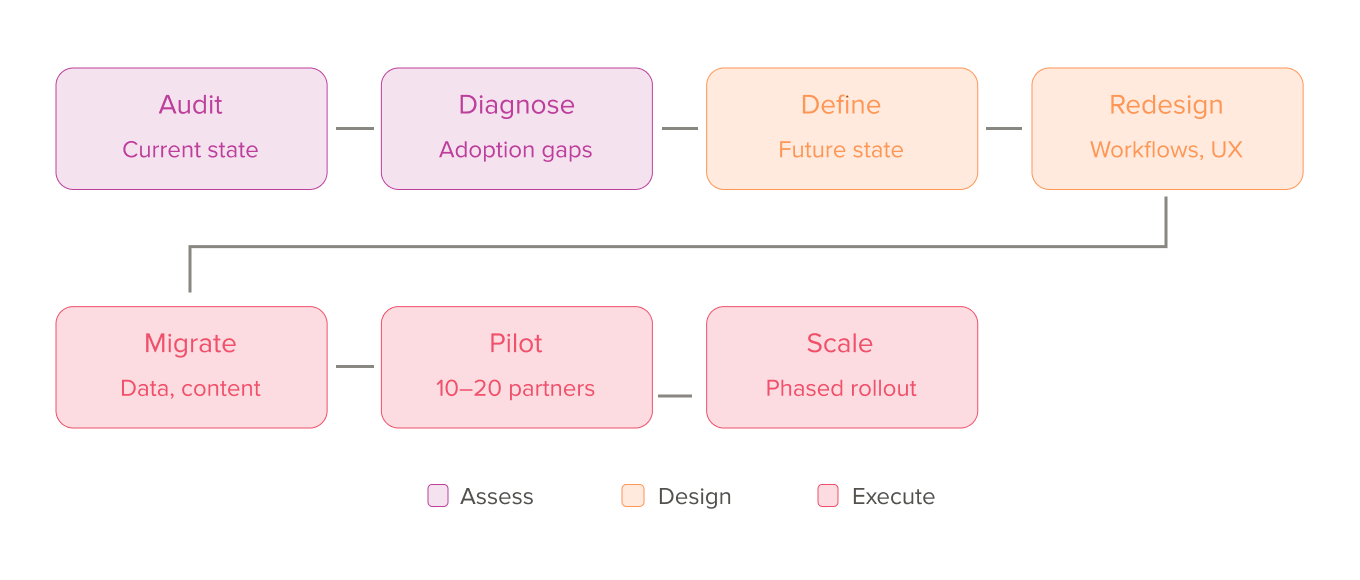
A phased path that works in practice:
- Audit the current setup. Data, permissions, workflows, integrations, and adoption evidence as described above. Treat it as a fixed deliverable, not a warm-up.
- Identify pain points and low-adoption areas. Separate “partners hate this” from “internal teams find this inconvenient.” Both matter, but they lead to different fixes.
- Define the future-state partner model. Segments, what each segment can see and do, and the three to five tasks the portal must make effortless. Decide this before touching layouts.
- Redesign workflows, access, and navigation. Rebuild partner onboarding workflows and deal registration in Salesforce as designed processes with named owners, then map navigation to partner tasks.
- Migrate data, content, and partner-facing processes. Clean, deduplicate, and consciously decide what does not come across.
- Pilot with a limited partner group. Ten to twenty partners across at least two segments, including one demanding partner and one low-engagement partner. Their behaviour tells you more than internal UAT.
- Scale in phases. By segment, region, or workflow. Big-bang partner portal launches concentrate every unresolved question into one week.
Common Migration Risks
- Duplicated or inconsistent partner data carried into a stricter access model, producing visibility bugs that look like permissions bugs.
- Broken permissions, especially around record sharing between partner accounts. It’s the failure mode with real commercial consequences.
- Weak adoption after launch, because partners were told about the new portal instead of being involved in it.
- UX designed around internal logic, so partners cannot complete their top tasks without training.
- Old problems, new portal. The most common outcome when the audit is skipped.
- No process ownership, leaving rules to erode within two quarters.
- Unstructured enablement content: migrated wholesale, never rationalized, immediately stale.
- Over-customization without a business case, which is how today’s modern portal becomes the legacy setup you migrate away from in four years.
What Not to Copy From the Old PRM Setup
Migration is an unusually good excuse to retire things. Strong candidates:
- Over-customized workflows that replicate standard capability with custom code.
- Cluttered navigation: every menu item that survived because someone once asked for it.
- Manual approval logic where approvals exist for visibility rather than governance.
- Duplicated content: four versions of the same battlecard, none clearly current.
- Dashboards nobody can explain. If no one can define the metric, it does not move.
- Outdated onboarding flows built for a partner type you no longer recruit.
- Per-partner record exceptions: the one-off sharing rules that make the model unmaintainable.
- Inconsistent segmentation, where tiers are labels rather than differentiated experiences.
A useful rule during scoping: anything that cannot be justified by a current business process does not get migrated. It gets documented and dropped.
When a Full Migration Makes Sense and When a Partial Redesign is Enough
A full migration is usually justified when:
- The partner program has structurally changed (new partner types, new regions, new motions like co-selling)
- The current setup is heavily customized and expensive to maintain
- The access and sharing model no longer matches how partners work
- You need channel quoting, incentives, or AI-supported enablement the current build cannot support
A partial redesign or partner portal redesign is often enough when:
- The architecture is sound, but UX and navigation have drifted
- Adoption problems are concentrated in one or two workflows
- Reporting is the main gap
- The platform is current, and the issue is process discipline
And sometimes neither comes first. If partner data is inconsistent and no one owns deal registration rules, the highest-value first phase is cleanup and process definition. Launching a new experience on unresolved data chaos simply makes the chaos more visible to partners.
If your current Salesforce PRM setup is slowing onboarding, reporting, or partner adoption, it may be time to rethink the architecture rather than the interface. Contact us to see how we can help.
How Advanced Communities Can Help
We work on Salesforce partner experience projects at exactly this stage, where a working setup has stopped scaling. That typically includes:
- Assessment of the current PRM setup, data model, and permissions
- Future-state partner segmentation and access design
- Experience Cloud consulting and Partner Cloud implementation
- Workflow rebuild for onboarding, deal registration, and lead sharing
- Partner UX, navigation, and content architecture
- Reporting and ongoing partner operations support
Because we also build products on Experience Cloud, our assessments tend to be opinionated about what should be configured, what should be custom, and what should simply be removed.
Conclusion
Migrating from Salesforce PRM to Partner Cloud is not a page-by-page transfer, and it is not primarily a design exercise. It is a chance to rebuild partner operations (segmentation, access, workflows, content ownership, and reporting) on a current-generation foundation.
The teams that get the most out of it treat the portal as the output, not the project. They audit honestly, decide what not to bring across, define ownership, and roll out in phases. The result is less friction for partners, cleaner control over channel workflows, and visibility leadership can act on.
Talk to Advanced Communities about assessing and redesigning your Salesforce partner portal for the next stage of channel growth.
FAQ
1. What does it mean to migrate from Salesforce PRM to Partner Cloud?
Partner Cloud is the current name for Salesforce’s native PRM product, running on Experience Cloud. In practice, “migrating” means moving from a legacy or heavily customized partner setup to the current-generation model, and redesigning segmentation, access, workflows, and reporting in the process.
2. When should a company rethink its existing partner portal?
When partner adoption stalls, onboarding stays manual, deal registration creates conflict instead of resolving it, or channel reporting cannot answer basic performance questions. Growth in partner types is another strong signal, since it usually breaks an access model designed for one segment.
3. What should be audited before partner portal migration?
Partner types, account and contact data quality, licenses and sharing rules, deal registration and lead routing logic, enablement content, support workflows, integrations, reporting requirements, and real adoption data. The adoption data matters most, as it shows what partners use versus what merely exists.
4. Is migration always better than optimizing the current PRM setup?
No. If the architecture is sound and problems are concentrated in UX or one workflow, a targeted redesign delivers faster results at lower risk. Migration makes sense when the underlying model (access, segmentation, data structure) no longer fits the program.
5. What are the biggest risks in a PRM to Partner Cloud migration?
Dirty partner data, broken sharing and permissions, weak post-launch adoption, and copying existing problems into the new portal. Missing process ownership is the risk that persists longest, because rules without owners degrade regardless of platform.
6. How long does a partner portal migration on Salesforce usually take?
It depends on partner segments, data condition, integrations, and how much process redesign is required. A focused rebuild for a single segment moves considerably faster than a multi-tier program with regional variations and multiple integrations, which is why the assessment phase should precede any timeline commitment.