Salesforce PRM for Slack App: Key Considerations and Requirements
Managing a partner program across email threads, spreadsheets, and disconnected portals is a familiar pain for channel teams. The PRM for Slack App in Salesforce directly addresses this problem by bringing vendor-partner collaboration into the communication tool most teams are already using every day.
This guide explains what the PRM for Slack is, how it works within the Salesforce PRM and Experience Cloud ecosystem, what you need to get it running, and when it genuinely makes sense for your partner program.
PRM for Slack App: What It Is and How It Works
PRM for Slack app is an innovative tool, part of the Sales Cloud partner relationship management, designed to revolutionize how vendors and partners work together. By connecting vendors and partners directly within Slack, it allows for seamless communication, information sharing, and collaboration, bringing everyone on the same page.
It operates at the intersection of three key systems:
- Salesforce PRM — the underlying partner data model (accounts, opportunities, leads, deal registrations)
- Experience Cloud partner portal — where partners access their full portal experience, manage records, and consume enablement content
- Salesforce for Slack integrations — the technical layer that connects Slack actions and notifications to Salesforce data
Imagine having a centralized space where vendors and partners can easily share updates, collaborate on opportunities, and speed up approval processes. Well, that’s exactly what the product offers! It brings your internal sales teams and partners into a single partner channel, making it a breeze to access, update, and share important records. Plus, you can automate key business processes, saving time and effort. Integrating the PRM for Slack app with Sales Cloud and the partner portal takes partner management and collaboration to the next level.
With the PRM for Slack partner management software at your disposal, as a vendor, you gain the ability to:
- Collaborate effectively with your partners, promoting synergy and joint efforts.
- Sell together with your partners, leveraging combined strengths for increased success.
- Automate processes to enhance efficiency and reduce manual effort.
- Ultimately, drive partner sales as a cohesive team, maximizing results and achieving shared objectives.
Why use PRM for Slack?
The practical value comes down to reducing friction in daily workflows. Instead of chasing updates across email and portal messages, vendor and partner conversations happen in a single channel tied to real Salesforce data. Partners can act on leads and opportunities without switching between systems, automated flows replace manual follow-ups, and deal registration or escalation workflows can be triggered directly from Slack. The result is better alignment between internal teams and partners, and everyone working in the same space where the actual deal activity is happening.
5 Key Features of the PRM for Slack App
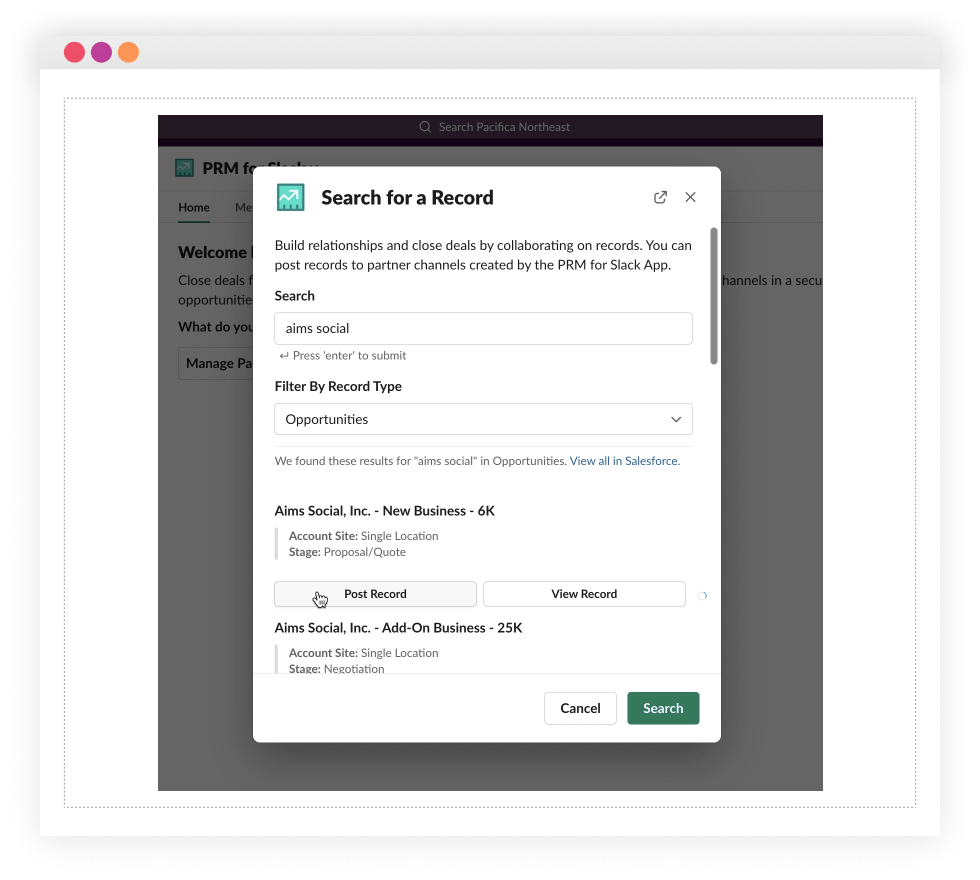
- Seamless integration. Search and post Salesforce records (opportunities, leads, accounts) directly into partner Slack channels. Teams stay current on deals without logging into Salesforce separately for every update.

- Streamlined partner channels. Create and manage partner channels from either Salesforce Lightning Experience or directly in Slack. The app can automatically include all partners associated with a given Salesforce account, keeping the right people connected without manual setup.
- Real-time collaboration. Partners and vendor teams receive live notifications and can collaborate from any device. Whether someone is at their desk or mobile, they stay in the loop without missing deal-critical updates.
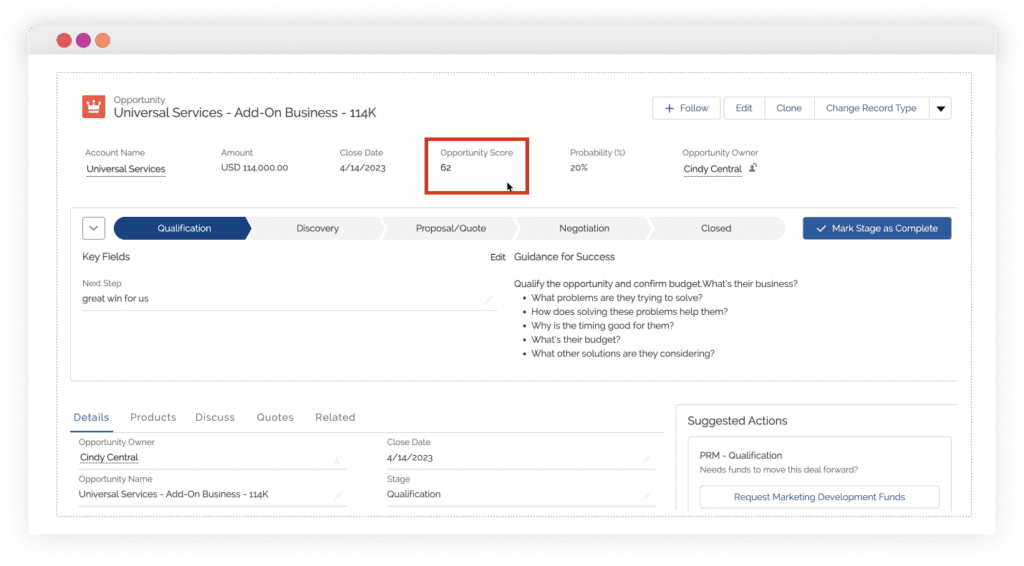
- Lead acceleration. The Lead & Opportunity Scoring feature within the PRM for Slack helps teams qualify leads faster and prioritize the deals most likely to close, reducing the time from lead assignment to active pursuit.

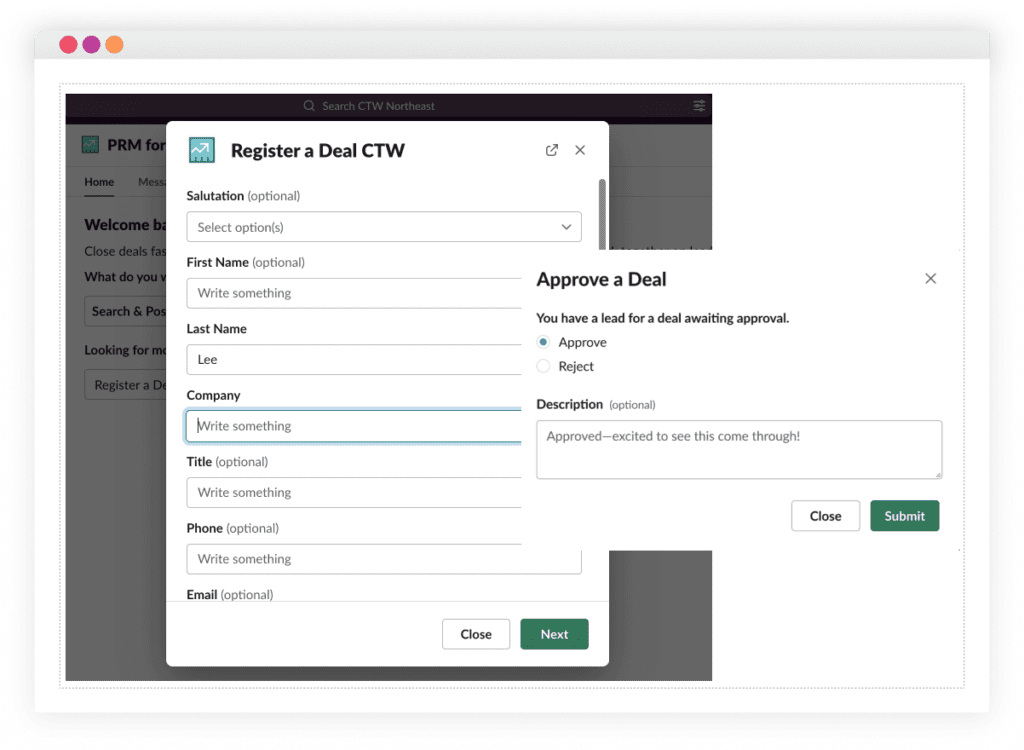
- Automated business processes. Deal registration and lead distribution workflows, typically built on Salesforce Flow and global actions, can be triggered and managed from within Slack. This reduces manual steps and keeps processes consistent across the partner base.

Need help connecting your partner portal and Slack workflows?
Advanced Communities helps companies design and implement PRM portals on Salesforce Experience Cloud, including Salesforce + Slack integration support. Get in touch to discuss your setup.
Looking for ways to enhance your strategic relationship management with partners and drive lead generation for your business? This is the blog you need to read to learn how to enhance the capabilities of your partner portal.
Salesforce Partner Marketplace for PRM: Guide

Key Considerations to Keep in Mind
The PRM for Slack App isn’t simply switched on. It requires a specific combination of licenses, Slack configuration, and Salesforce setup before it works. Understanding these requirements upfront saves significant rework later.
To use the app, customers need a Slack Enterprise Grid edition and Partner Community Licenses.
Required editions:
Available in: Lightning Experience with Salesforce for Slack Integrations Enabled
Available in: Enterprise and Unlimited Editions with Salesforce for Slack Integrations Enabled
Available in: Slack Enterprise Grid
Core requirements checklist:
- You must enable the PRM for Slack app in Initial Slack Setup.
- You must be a Salesforce PRM customer and use Slack Enterprise Grid.
- Partner users need a Partner Community license. This requirement can be fulfilled by either the Logins and Members or the Partner Relationship Management SKUs.
- Partners must have a Slack workspace before they can work with the application.
How does it work?
Well, the solution uses Slack Connect, which allows channels in Slack to be made with people from different organizations. So, a company can link its workspace with its partner organizations. The company then connects the PRM for Slack app to its Salesforce account, while partner users connect the app to their partner portal. Once these connections are established, all the data is shared between the company and its partners.
What do partners want? It’s an age-old question for vendors, suppliers, and those involved in sales or managing partnerships. We’ve made an effort to answer it for you. Check out our latest blog to learn more about Salesforce partner management and discover the top three things partners desire and see what a partner portal as a PRM system can offer.
Partner Portal for an Effective Partner Program

Typical Use Cases for PRM for Slack
Deal collaboration. Vendor and partner teams work on a joint opportunity in a shared Slack channel, posting deal records, discussing strategy, and tracking status, all linked to the Salesforce opportunity.
Lead distribution. Inbound leads are assigned to partners via automated flows, with notifications sent directly to the relevant partner’s Slack channel for immediate follow-up.
Partner account coordination. Account teams stay aligned with their partner counterparts through shared channels organized around accounts, reducing handoff delays and miscommunication.
Approval and escalation flows. Deal registrations, discount approvals, and exception requests can be routed through Slack-based workflows, with approvers acting on requests without leaving the conversation.
Strategic joint planning, Quarterly business review prep, co-sell planning, and partner enablement discussions can happen in dedicated Slack channels with full access to relevant Salesforce data.
When PRM for Slack Makes the Most Sense
This integration delivers the most value in specific partner program contexts:
- Distributed partner ecosystems where partners are geographically spread and async communication is the norm
- Partner-led or co-sell sales motions where close collaboration between vendor and partner is required on individual deals
- High-velocity deal environments where the speed of response to leads and approvals directly affects close rates
- Programs trying to reduce portal friction by meeting partners in the tools they already use daily
- Organizations where internal teams and partners need to collaborate on the same record simultaneously
It’s less compelling for programs with a small number of partners, low-frequency deal activity, or partner bases that are already highly engaged through the portal.
Common Limitations and Watchouts
Being clear-eyed about the constraints helps set realistic expectations:
- Slack Enterprise Grid is mandatory. There’s no workaround for lower Slack tiers, and the licensing cost is meaningful.
- Partners need their own Slack workspace. If partners are primarily email-based, adoption becomes a change management challenge, not just a technical one.
- Permissions and access need planning. Who can see what in shared channels, and how that maps to Salesforce record access, requires deliberate design instead of simple default settings.
- Channel governance matters. Without clear naming conventions, ownership rules, and archiving policies, shared channels can become difficult to manage at scale.
- Slack doesn’t replace a well-designed partner portal. The PRM for Slack App enhances collaboration around specific workflows, but partners still need a portal for onboarding, enablement content, deal registration forms, and reporting. The two systems complement each other.
Explore how a well-structured partner portal fits into the broader partner program picture in our blog post about the role of a partner portal in delivering an effective partner program.
How Advanced Communities can help
Setting up the PRM for Slack App is as much a strategy and design exercise as it is a technical one. Getting the most from Salesforce partner collaboration in Slack requires a solid underlying PRM portal, a well-configured Experience Cloud environment, and clear workflows for how Slack interactions connect to Salesforce data.
Advanced Communities is an award-winning Salesforce Experience Cloud consultancy with deep specialization in PRM portal strategy and implementation. We help channel teams build and scale partner programs on Salesforce, including PRM portal design and build on Salesforce Experience Cloud, partner UX, permissions, and access model configuration, and ongoing Experience Cloud support as your program grows.
Need help setting up partner collaboration in Salesforce and Slack? Book a demo to see what’s possible.
FAQ
1. What is the PRM for Slack App in Salesforce?
It’s a Salesforce feature that connects partner relationship management workflows (deals, leads, approvals) with Slack channels, allowing vendors and partners to collaborate directly in Slack while keeping data synced with Salesforce.
2. Do you need a PRM add-on license to use it?
Yes. You must be a Salesforce PRM customer, running either Enterprise or Unlimited Edition, with Salesforce for Slack Integrations enabled. Slack Enterprise Grid is also required.
3. Does PRM for Slack work with Experience Cloud partner portals?
Yes. Partner users connect the app to their Experience Cloud partner portal, and vendor teams connect it to their Salesforce org. The two systems work together: Slack handles real-time collaboration, while the portal handles structured access to records, enablement, and reporting.
4. Do partners need their own Slack workspace?
Yes. Partners must have an existing Slack workspace to use Slack Connect and participate in shared channels. This is a prerequisite that needs to be confirmed before planning a rollout.
5. When is the PRM for Slack App worth implementing?
It’s most valuable for partner programs with active co-sell or partner-led sales motions, distributed partner ecosystems, and a need to reduce handoffs between communication and CRM tools. It’s less suited to small programs or partner bases that rely primarily on email.