Salesforce CRM: More Than Just a CRM
When most people think of a Customer Relationship Management (CRM) system, they picture a database of contacts, deal histories, and support tickets. Salesforce CRM started there, but it has evolved into something far broader. Today, Salesforce is a complete business platform that combines sales, service, marketing, analytics, automation, and app development under one roof.
Whether you’re a small business exploring your first CRM or an enterprise looking to unify customer data across every touchpoint, understanding what Salesforce actually does helps you decide how, and whether, to use it.
Quick Answer
- Salesforce is a CRM and also a full business platform (an ecosystem of clouds, tools, and extensions).
- “More than CRM” means: unified customer data, workflow automation, advanced analytics, community portals, and third-party integrations.
- It serves businesses of all sizes, from SMBs to global enterprises, across sales, support, marketing, and operations.
- Core modules (clouds) map to specific needs: Sales Cloud for revenue teams, Service Cloud for support, Marketing Cloud for engagement, Experience Cloud for portals.
- AppExchange offers thousands of pre-built apps and components to extend Salesforce without building from scratch.
Not sure which Salesforce cloud you need?
Our team can help you assess your options. Contact us for a personalized consultation
Is Salesforce a CRM?
A CRM (Customer Relationship Management) system is software that helps organizations manage interactions with current and prospective customers. It centralizes contact data, communication history, and deal tracking in one accessible place.
Salesforce is a CRM, but it goes well beyond that definition. Built around the Customer 360 concept, it connects customer data from every stage of the journey: marketing, sales, service, and commerce, into a single, unified view. Instead of separate tools for each department, Salesforce gives all teams access to the same data, enabling more consistent and personalized customer experiences.
What is Salesforce, then? It’s best described as a cloud-based CRM platform with native AI capabilities, extensive automation tools, and a developer-friendly ecosystem for building custom apps. The result: far more than a contact database.
What Does Salesforce Do Exactly?
Salesforce connects the teams, tools, and data that businesses rely on every day. Here is what it actually delivers:
- Centralized customer data. All customer interactions, from first click to post-sale support, are stored in one place, accessible across departments.
- Sales pipeline management. Track leads, opportunities, and revenue forecasts in real time with configurable dashboards.
- Customer service and case management. Agents can resolve issues faster with full customer history, knowledge bases, and AI-assisted recommendations.
- Marketing automation and personalization. Build segmented campaigns, automate email journeys, and measure engagement, all tied to CRM data.
- Portals and community experiences. Create self-service portals, partner hubs, or member communities with Experience Cloud.
- Process automation. Eliminate manual tasks using built-in automation tools like Flow, saving time and reducing errors.
- Analytics and reporting. Real-time dashboards and reports help leadership make data-driven decisions quickly.
The Salesforce platform also supports three delivery models: SaaS (Software as a Service) for ready-to-use applications, PaaS (Platform as a Service) for building custom apps and workflows, and IaaS (Infrastructure as a Service) for hosting and storage needs.
Benefits of Salesforce CRM
Salesforce CRM is an invaluable tool for long-term growth. The technology helps organizations better understand what their customers are looking for and shapes the roadmap to a better future. We’ve prepared the main advantages so you can see how this platform may help your company.
All Your Data in One Place
Salesforce consolidates customer data from every channel and department into a shared database. Teams stop working in silos and start making decisions from the same source of truth.
Optimized Processes
Built-in tools like Flow, Approvals, and Process Builder let you automate repetitive tasks, from lead routing to approval workflows. The result: faster service and fewer manual errors.
Simplified Collaboration
When sales, service, and marketing teams share a single customer view, they can coordinate more effectively. This reduces duplicated effort, improves customer experiences, develops efficient engagement strategies, and enables accurate forecasts.
Real-Time Reporting and Dashboards
Customizable dashboards surface key performance metrics the moment they change. Managers can track pipeline health, team productivity, and customer satisfaction — all in one screen.
Enterprise-Grade Security
Salesforce provides robust data security with role-based access controls, field-level permissions, audit logs, and compliance tools that are important for regulated industries like healthcare and finance.
Extensibility via AppExchange
Need functionality that is not native? AppExchange offers thousands of pre-built apps and integrations that extend Salesforce for specific industries and use cases.
Which Companies Use Salesforce?
Salesforce is used by organizations of all sizes across industries worldwide, from startups running their first sales process to global enterprises managing millions of customer records.
Key industries where Salesforce is widely adopted include:
- Healthcare and life sciences
- Financial services and insurance
- Retail and e-commerce
- Manufacturing and distribution
- Nonprofits and member associations
- Higher education
- Technology and SaaS companies
Salesforce Membership Management Solution – AC MemberSmart

Top Salesforce Features Overview
Salesforce offers top CRM integrations and tools to help companies of all sizes and industries build strong relationships with customers and partners, increase sales, and enhance productivity. We’ve compiled the key features for you to explore before getting started with Salesforce.
Sales Cloud
One of the core Salesforce products, Sales Cloud is designed to help sales team manage the full sales cycle from lead to close.
It’s best for sales representatives, sales managers, and revenue operations teams who need visibility into pipeline and performance.
Common use cases:
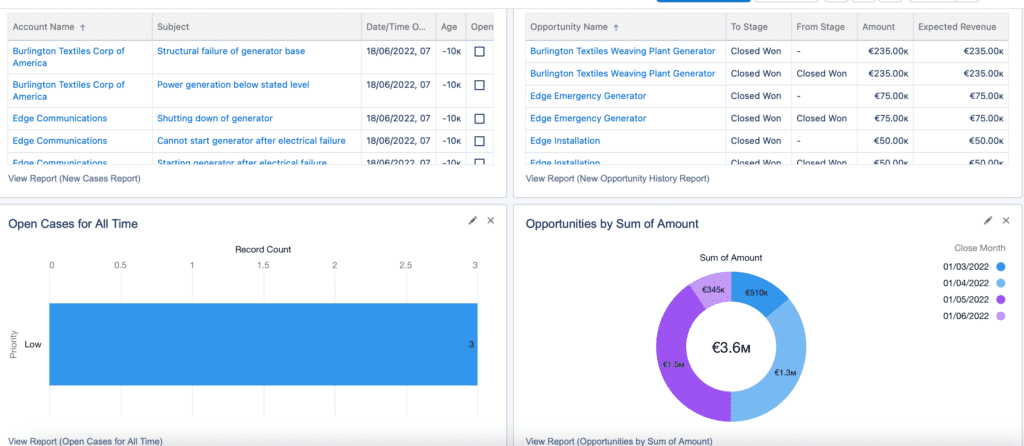
- Real-time performance dashboards for managers
- Lead and opportunity management
- Sales forecasting and quota tracking
- Activity logging and follow-up reminders
- Mobile sales productivity via the Salesforce app
Service Cloud
Service Cloud is Salesforce’s customer support platform, built for service agents to resolve cases faster and with more context.
It’s best for customer support teams, contact centers, and field service operations.
Common use cases:
- Service team productivity reporting
- Case tracking and escalation management
- Knowledge base creation for self-service
- Chatbot and AI-assisted response tools
- Omni-channel support (email, chat, phone, social)
It’s no secret that service team employees can help sales teams close deals. With the sales and service solutions on the same powerful, integrated platform, you’ll be able to let your sales and service teams operate as one! Teamwork is always the best way to boost sales and improve customer experience.
Experience Cloud
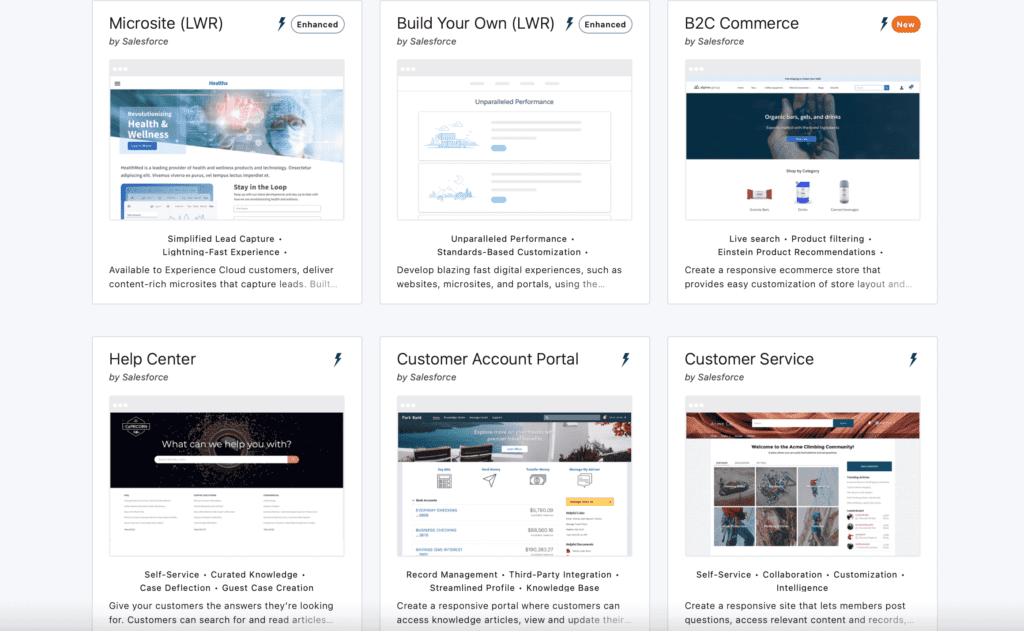
Experience Cloud (formerly known as Community Cloud) is a digital experience platform (DXP) for building branded websites, portals, and mobile apps connected directly to your CRM data.
It’s best for organizations that need partner portals, customer self-service sites, member communities, or employee intranets — all with real-time CRM integration.
Common use cases:
- Employee-facing internal hubs
- Customer self-service and support portals
- Partner relationship management (PRM) portals
- Member portals for associations and nonprofits
- Online storefronts and branded community sites
Note! One of the main Advanced Communities specializations is Salesforce Experience Cloud implementation. Feel free to contact us for more information or professional assistance.
Marketing Cloud
Marketing Cloud is a customer engagement platform with a suite of products for email, mobile, social, advertising, and web personalization.
It’s best for marketing teams that want to orchestrate personalized campaigns across channels using live CRM data.
Common use cases:
- Automated email journeys with Journey Builder
- Mobile push and SMS campaigns with Mobile Studio
- Paid advertising management with Advertising Studio
- Real-time personalization on websites and apps
- Marketing analytics and ROI reporting
Marketing Cloud helps you reach your users in a more personalized way, building trust and cultivating long-lasting relationships.
AppExchange
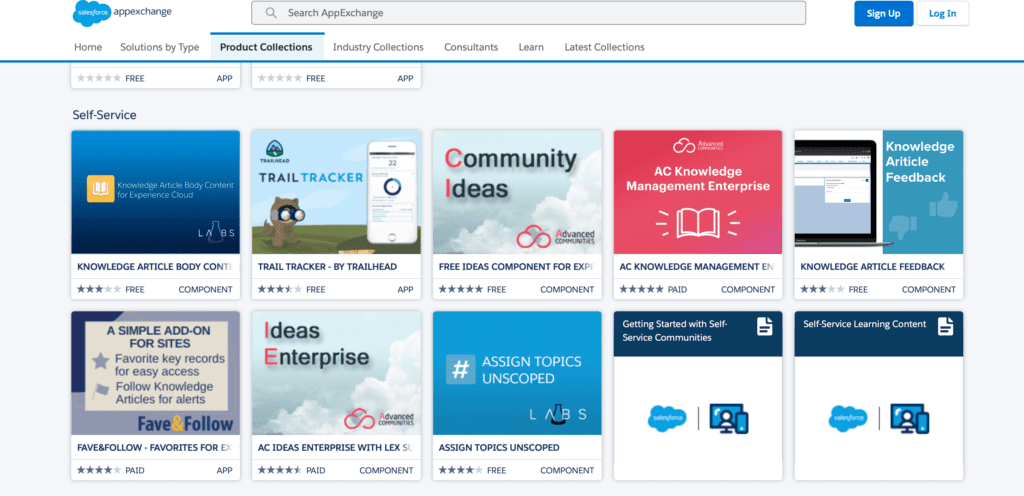
AppExchange is the official Salesforce marketplace for apps, Lightning components, Flow templates, and consulting services, all built on top of the Salesforce platform.
It’s best for teams that want to extend Salesforce functionality quickly, without building custom solutions from scratch.
Common use cases:
- Installing pre-built industry-specific apps
- Adding Lightning components to existing pages
- Finding certified Salesforce implementation partners
- Accessing free tools, utilities, and flow templates
- Evaluating apps with free trials before purchase
Advanced Communities has many apps and solutions for your business. Visit our listing page on AppExchange to see our complete range of apps, including AC MemberSmart (Salesforce member management app), AC Events Enterprise, AC Ideas Ultimate, AC Knowledge Management Enterprise, our one-of-a-kind AC Partner Co-Branding, AC Partner Marketplace, and many others.
Force.com Platform
Salesforce Platform is the underlying development and deployment environment that powers all Salesforce products, and lets organizations build their own cloud-based apps on top.
It’s best for development teams and IT departments that need custom applications that connect directly to Salesforce data.
Common use cases:
- Connecting Salesforce to external systems via APIs
- Building custom internal business apps
- Extending standard Salesforce objects and workflows
- Deploying apps across the organization without managing infrastructure
6 Ways You Can Use Salesforce for Your Business
Here are the most common ways organizations put Salesforce to work along with the outcomes they typically achieve:
- Grow sales revenue. Use Sales Cloud to track every lead and opportunity, assign follow-up tasks automatically, and give managers live visibility into pipeline. For example, a sales team that moves from spreadsheets to Sales Cloud typically reduces lead response time and improves forecast accuracy.
- Automate repetitive processes. Use Flow, Approvals, and Process Builder to eliminate manual steps like data entry after a call or sending a confirmation email after a deal closes. Automation frees up time for higher-value work.
- Improve customer support quality. Deploy Service Cloud to centralize all cases, automate routing to the right agent, and give every agent the full customer history before they pick up the phone. The result: faster resolution and higher CSAT scores.
- Build self-service portals and partner hubs. Use Experience Cloud to give customers, partners, or members their own branded portal, where they can submit cases, find resources, track orders, or collaborate. This reduces inbound support volume while improving satisfaction.
- Run personalized marketing campaigns. Connect Marketing Cloud to your CRM data and send each customer the right message at the right moment based on their behavior, preferences, and lifecycle stage. For example, an e-commerce brand can automate cart-abandonment emails that convert significantly better than generic blasts.
- Analyze performance in real time. Build dashboards that surface the metrics that matter most: open cases, conversion rates, campaign ROI, and share them automatically with stakeholders. Teams make better decisions when they all see the same live data.
Need help implementing Salesforce Experience Cloud?
We handle everything from portal design to full platform deployment. Talk to our specialists.
How can Advanced Communities Help You?
Advanced Communities is a certified Salesforce partner specializing in Salesforce implementation, portal development, and membership solutions. We help organizations design and deploy customer portals, partner hubs, member communities, and self-service sites, tailored to your brand and integrated with your Salesforce data.
Whether you’re starting from scratch or looking to improve an existing setup, our team provides consulting, configuration, and ongoing support. Contact us to discuss your project or request a demo of our Salesforce apps.
FAQ
1. Is Salesforce a CRM or something more?
Salesforce is both. At its core, it is a CRM that manages customer relationships and data. But the platform also includes tools for automation, app development, community portals, marketing, and analytics, making it a complete business operating system rather than just a contact database.
2. Which Salesforce Cloud should I start with?
It depends on your primary need. Sales teams typically start with Sales Cloud; support-focused organizations often begin with Service Cloud. If your goal is building a customer or partner portal, Experience Cloud is the right starting point. Most businesses expand to additional clouds as they grow.
3. What is AppExchange and why does it matter?
AppExchange is Salesforce’s official marketplace for apps, components, and consulting partners, all built on the Salesforce platform. It matters because it dramatically extends what Salesforce can do out of the box, often without requiring custom development. You can find ready-made solutions for specific industries, use cases, or integrations.
4. Is Salesforce only for large enterprises?
No. While Salesforce is widely used by large enterprises, it is also adopted by small and mid-sized businesses. The platform is modular, so you can start with just the features you need and scale over time. There are pricing tiers designed for organizations at different stages of growth.
5, Do I need developers to use Salesforce?
Not necessarily. Many Salesforce features, including dashboards, workflows, automation, and even portal building, are available through no-code or low-code configuration tools. However, for complex customizations, integrations, or custom app development, having access to a Salesforce developer or a certified implementation partner makes a significant difference.
6. How does Salesforce pricing usually work?
Salesforce pricing is subscription-based and varies by product (cloud), edition, and number of users. Each cloud has multiple tiers, from essentials-level plans to full enterprise editions with advanced AI and automation features. Add-ons, AppExchange apps, and implementation services are priced separately. For accurate pricing, consult the official Salesforce website or speak with a Salesforce account executive.