Salesforce Experience Cloud for Coworking Spaces
Coworking spaces are communities first, and offices second. Members expect to feel connected, informed, and supported from day one, and not just rent the desk. But as spaces grow, that experience often breaks down fast: messages get buried in Slack threads, requests land in inboxes and disappear, and new members struggle to find basic information on their own.
If your team is constantly answering the same questions, chasing down requests, or trying to coordinate member communication across a patchwork of tools, that’s a signal of a digital experience gap.
A well-built coworking space member portal changes that. And Salesforce Experience Cloud gives you the foundation to build one that actually works for members and for the team running things behind the scenes.
What Is a Coworking Space Member Portal?
A coworking space member portal is a centralized digital space designed specifically for your residents. It’s where members can log in, access the information they need, submit requests, stay up to date on community news, and engage with the space and each other in one place.
It’s not a website. A website is public-facing and static. A member portal is personalized, authenticated, and functional. When a member logs in, they see their information: their account details, relevant announcements, open requests, and community content relevant to their membership tier or location.
Think of it as the working layer between your team and your members, reducing friction on both sides. A good coworking member portal gives members:
- A single place to find everything they need
- Self-service access so they’re not dependent on staff for routine tasks
- A sense of belonging to something larger than just a shared desk
And it gives your team fewer repetitive emails and messages, structured, trackable member interactions, and visibility into what’s happening across the community.
Why Coworking Spaces Need More Than a Website
Most coworking spaces start with a website and a group chat. That works fine at 20 members. At 100, it starts to crack. At 300, it’s a daily operational headache.
The real problems tend to look like this:
Scattered communication
Questions come in through email, WhatsApp, Instagram DMs, and Slack simultaneously. There’s no single source of truth for member information, house rules, or announcements.
Manual admin work
Staff spend hours answering questions that could be answered by a well-organized knowledge base. Onboarding new members means sending the same documents over and over.
No visibility into member requests
When a member reports a broken printer or asks about a policy, it’s hard to know where that request stands without digging through inboxes.
Fragmented member experience
Members in different membership tiers may have different rules and resources, but there’s no easy way to serve them relevant information specifically.
This is where coworking space management software, or more precisely, a structured digital layer on top of your operations, makes the difference. Not by adding more tools, but by bringing the right experience together in one place.
How Salesforce Experience Cloud Supports Coworking Spaces
Salesforce Experience Cloud is a platform for building authenticated digital experiences, such as portals, communities, and self-service sites on top of the Salesforce CRM. For coworking spaces, that means you can build a member-facing portal that’s directly connected to your member data, support workflows, and internal processes.
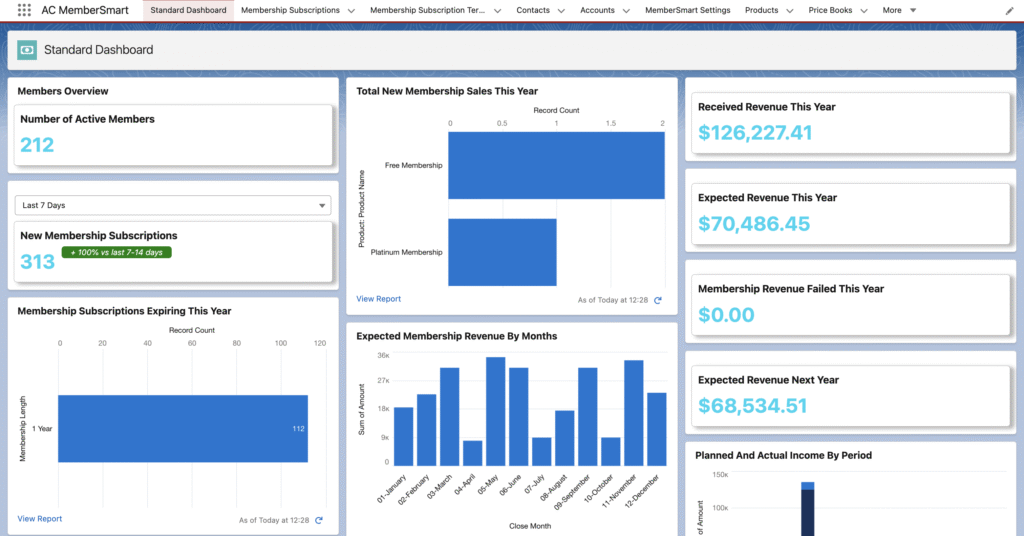
Here’s what Salesforce Experience Cloud for coworking spaces can support:
- Member self-service. Members can find answers, submit requests, and manage their own interactions without needing to reach out to staff.
- Personalized content. Different members can see different content based on their membership type, location, or status so a hot-desk member doesn’t see content meant for private office tenants.
- Announcements and updates. Push news, policy changes, event information, and community updates directly through the portal, where members are already active.
- Support and request handling. Members submit requests through structured forms that route directly into Salesforce where your team can track, assign, and resolve them without losing anything in an inbox.
- Onboarding flows. New members get a guided experience from day one: welcome content, house rules, documents, and resources delivered in a structured sequence.
- Community interaction. Members can connect with each other, discover who else is in the space, and engage with community content.
- Admin visibility. Your team can see member activity, open requests, communication history, and engagement data from within Salesforce.
- Document and knowledge access. Policies, guides, how-tos, and FAQs live in one accessible place, reducing repetitive questions.
- Segmented member communication. Target announcements and content to specific groups (floor, membership tier, company size) without sending mass emails.
Member Portal Use Cases for Coworking Spaces
Here’s how these capabilities play out in practice, broken into the core use cases coworking operators actually need.
1. Member Onboarding
The first week sets the tone. A member portal can deliver a structured onboarding experience that doesn’t depend on staff having time to walk every new member through the basics.
What you can include:
- A personalized welcome page with key information specific to the member’s plan
- An onboarding checklist with clear steps (Wi-Fi setup, door access, billing, etc.)
- House rules and community guidelines in an easy-to-reference format
- Key documents and membership agreements
- Introductory resources about the space, team, and community
Members feel supported from the start. Your team doesn’t have to repeat the same onboarding conversation 20 times a month.
2. Self-Service Support
This is where portals save the most time. When members can find answers on their own or submit structured requests your team handles fewer reactive interruptions and can focus on what actually requires human attention.
What you can include:
- A knowledge base or FAQ covering the most common member questions
- A support request form that routes issues directly to the right person
- Status tracking so members can see where their request stands
- An issue reporting flow for maintenance or equipment problems
The goal isn’t to replace human connection, it’s to make sure staff time goes toward things that actually need it.
3. Member Directory and Community Visibility
One of the genuine advantages of coworking over working from home is proximity to interesting people. But that advantage only works if members can actually discover each other.
What you can include:
- A searchable member directory with profiles
- Filtering by company type, industry, role, or interests
- Opt-in visibility controls so members choose what to share
- A lightweight networking layer that encourages connection
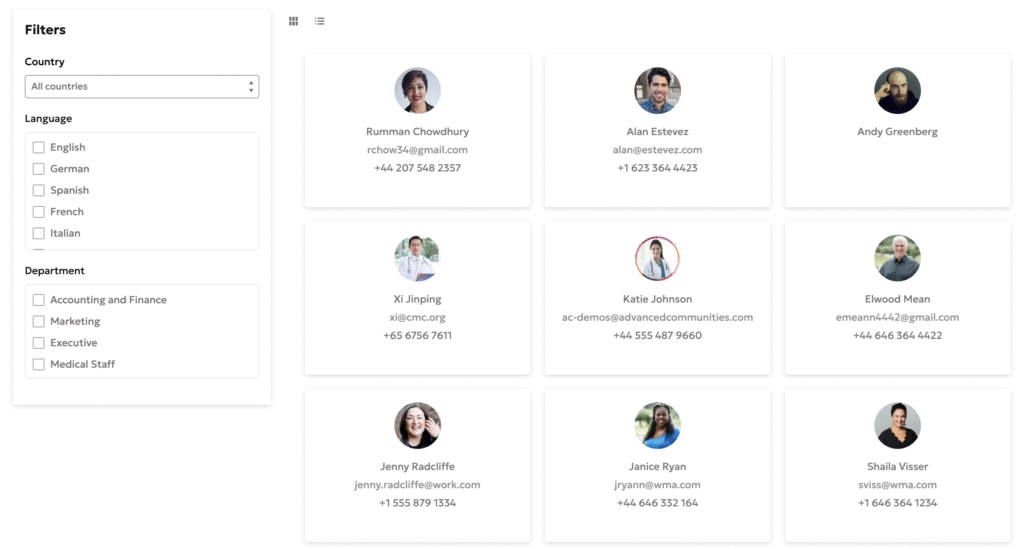
A well-designed member directory turns a shared space into a professional community, and that’s something members genuinely value.
4. Events and Community Communication
Events are one of the strongest tools for building community engagement. But they only work if members actually know about them and can easily register.
What you can include:
- An events calendar with upcoming workshops, networking events, and member meetups
- Registration and RSVP flows directly within the portal
- Community posts and discussion boards
- Targeted announcements for specific groups (e.g., members on a specific floor, or members who joined this month)
When communication lives in the portal rather than a Slack channel, nothing gets lost, and you have a record of what was communicated and when.
5. Documents, Policies, and Shared Resources
Members regularly need access to documents: their membership agreement, the printer setup guide, parking information, the guest policy. Without a portal, these live in email archives or get resent on request.
What you can include:
- A document library organized by category
- Searchable access to all shared resources
- Version-controlled policies (members always see the current version)
- A shared information hub for any space-specific guidance
Thinking about building a member portal for your coworking space?
Advanced Communities specializes in Experience Cloud portals designed around real member journeys. Get in touch to explore what’s possible.
Admin Workflows That Experience Cloud Can Improve
The member-facing experience is only half the picture. Salesforce Experience Cloud also makes a meaningful difference on the admin side by bringing structure and visibility to member-facing workflows that currently run through informal channels.
Here’s what changes for your team:
Fewer repetitive inquiries. When members can self-serve, they stop asking the same questions. Staff energy shifts toward higher-value tasks.
Centralized member communication. Instead of managing conversations across email, Slack, and direct messages, member requests and interactions flow through Salesforce, where they’re tracked, assignable, and visible.
Standardized support flows. Every request follows the same process, so nothing falls through the cracks, and resolution times improve.
Better onboarding consistency. Every new member gets the same structured experience, regardless of which team member is on shift.
Clearer member segmentation. It becomes easy to identify which members need follow-up, which tiers are most active, and where engagement is dropping off.
Reduced dependence on informal communication. Important information stops living in chat threads. It lives in the portal, where it belongs.
What a Good Coworking Member Portal Should Include
If you’re evaluating what to build or assessing what’s missing from your current setup, use this as a baseline checklist:
- Secure, personalized login — members access their own data, not generic content
- A personalized homepage — relevant to their membership type and status
- Announcements and updates — push important information to the right members
- Support and request submission — structured, trackable, routed to the right person
- FAQ and knowledge base — self-service answers to common questions
- Events and community section — discovery and registration in one place
- Member directory or networking block — opt-in connection between residents
- Document and policy access — everything in one searchable place
- Clear navigation — members find what they need without asking staff
- Mobile-friendly UX — because members aren’t always at a desk when they need something
If your current digital setup is missing more than a couple of these, you’re creating unnecessary friction for members and for your team.
Member Experience vs. Admin Experience
It helps to think about these two sides separately, because the wins are different.
| For Members | For Admins |
|---|---|
| Easier access to information without needing to contact staff | Fewer repetitive tasks that consume team time |
| Less friction in the first weeks after joining | More visibility into member activity, requests, and open issues |
| Better self-service across support, documents, and community | More structured communication, less chasing things down across platforms |
| A stronger sense of belonging to an actual community, not just a shared space | Easier workflow management with everything in Salesforce |
The portal isn’t just a convenience. It’s a system that makes the whole operation run more smoothly.
Where Experience Cloud Fits into Coworking Space Management Software
Salesforce Experience Cloud isn’t trying to be an all-in-one coworking platform. It doesn’t position itself as a booking engine or a billing system. What it is and does exceptionally well is the member-facing digital layer in a broader operational stack.
For coworking operators, that distinction matters. Experience Cloud makes the most sense as the part of your coworking space management software ecosystem that handles:
- Portal UX — the experience members actually see and use
- Self-service workflows — requests, support, knowledge access
- Member communication — announcements, updates, segmented messaging
- Admin workflow entry points — where requests come in and get routed
- CRM-connected experience — because it runs on Salesforce, member data stays connected to your CRM without extra integration work
If you’re already using Salesforce for member management or billing, building the portal in Experience Cloud means your member data, support history, and communication all live in the same system. That’s a significant operational advantage.
When Salesforce Experience Cloud Makes the Most Sense for Coworking Spaces
Experience Cloud is particularly well-suited to coworking spaces that:
- Have multiple membership types or tiers that need different content and experiences
- Are growing and finding that informal communication no longer scales
- Are already using Salesforce for any part of their operations
- Want to build stronger self-service capability, so staff aren’t fielding the same questions daily
- Have too many open requests with no clear tracking or resolution workflow
- Want to build a branded digital community that feels like an extension of the physical space
- Need better visibility into member engagement and communication history
If you’re running a small, single-location space with 30 members and everything is manageable, you may not need this yet. But if you’re scaling, expanding to multiple locations, or simply hitting the limits of what email and chat can handle, a member portal built on Experience Cloud is worth the investment.
Common Mistakes to Avoid
A few patterns consistently lead to portals that don’t deliver value:
Building without clear member journeys. If you don’t map out what a member actually needs to do in the portal and in what order, you’ll build something that looks complete but feels confusing.
Copying website content into the portal. Static marketing content doesn’t belong in a member portal. Everything in the portal should be functional and specific to the logged-in member.
Weak navigation. If members can’t find what they’re looking for in two clicks, they’ll email you instead. Navigation is not an afterthought.
No clear support flows. If the request process isn’t obvious, members won’t use it and you lose the operational benefit.
Unclear CTAs. Members shouldn’t have to guess what they’re supposed to do. Every section should have a clear next action.
Trying to build everything at once. Start with the highest-impact use cases (onboarding, support, knowledge base) and expand from there. A focused portal that works well beats a sprawling one that’s confusing.
How Advanced Communities Can Help
Advanced Communities is the largest component provider on Salesforce AppExchange, with deep expertise in Experience Cloud implementation and community portal design.
We help design and build member portals that actually work. Not generic templates, but purpose-built experiences shaped around how your space operates and what your members need.
Our work includes:
- Custom Experience Cloud portal design and implementation
- Member self-service architecture (support flows, knowledge bases, request management)
- Coworking community experience (directories, events, engagement features)
- Admin workflow design (routing, visibility, and reporting inside Salesforce)
- UX strategy and implementation support across the full project
We bring both the technical depth and the portal design experience to build something your members will actually use, and your team will actually benefit from.
Need a better digital experience for your coworking members?
Contact us to discuss what a coworking space member portal could look like for your space.
FAQ
1. What is a coworking space member portal?
A coworking space member portal is a secure, personalized digital environment where members can log in to access information, submit requests, engage with the community, and manage their relationship with the space without needing to contact staff for routine tasks.
2. Can Salesforce Experience Cloud support coworking spaces?
Yes. Salesforce Experience Cloud is well-suited to coworking use cases, particularly when a space needs a structured member portal, self-service capabilities, and admin workflow management. It works especially well for spaces already using Salesforce as their CRM.
3. What should a coworking member portal include?
At a minimum: secure login, a personalized homepage, announcement and update delivery, support request submission, a knowledge base or FAQ, an events section, a member directory, document access, and mobile-friendly UX with clear navigation.
4. How can a member portal improve coworking operations?
A well-built portal reduces repetitive staff inquiries, centralizes member communication, creates traceable support workflows, improves onboarding consistency, and gives admins better visibility into what’s happening across the community, freeing the team to focus on higher-value work.
5. Is Experience Cloud a replacement for coworking space management software?
Not necessarily. Experience Cloud is best understood as the member-facing layer in a broader operational stack, handling the portal UX, self-service workflows, and CRM-connected member experience. It integrates well with other tools rather than replacing them outright.