
Experience Cloud vs Community Cloud: Key Differences
Last Updated: September 10, 2026
Salesforce Community Cloud was renamed Salesforce Experience Cloud, but the change was more than branding. The platform expanded from a product associated mainly with online communities into a broader digital experience platform for customer portals, partner portals, member experiences, help centers and other Salesforce-connected sites.
This article covers what happened to Community Cloud, which terms changed, what stayed the same underneath, and what all of it means if you are planning a new site today.
Salesforce Community Cloud Evolution: from Community to Experience
If we put Salesforce Community Cloud vs Experience Cloud together, the notions often get mixed up. Besides, for those familiar with Salesforce’s offerings, the transition from Community Cloud to Experience Cloud might raise some questions. Indeed, the Salesforce Community Cloud has not disappeared entirely but has rather undergone a metamorphosis from Community Cloud.
Renamed to Salesforce Experience Cloud, Salesforce Community Cloud has received its rebirth and continues to provide the tools and features necessary for creating dynamic Salesforce communities and driving community engagement.
Salesforce’s rationale behind this renaming is clear: the term “Community Cloud” no longer covers the full breadth of possibilities offered by this cloud service. With Experience Cloud, Salesforce aims to emphasize the holistic nature of the digital experiences it enables, spanning interactions with customers, partners, and employees alike.
Salesforce Experience Cloud: Empowering Digital Interactions
So, what is Salesforce Experience Cloud? Simply put, Experience Cloud is a DXP (digital experience) platform designed to empower businesses that use Salesforce to create branded sites and online communities within the Salesforce platform. These communities sit on top of Salesforce and serve as hubs for interaction, communication, collaboration, and engagement across various stakeholders.
In the Salesforce Community Cloud vs Experience Cloud comparison, the Experience Cloud platform site basically serves as a window to your Salesforce CRM data, allowing users to interact with that data through a beautiful site with an intuitive user interface, getting the digital experience they are expecting.
Whether your goal is to connect with customers, empower employees for knowledge sharing, or engage business partners, Experience Cloud provides the tools to tailor your digital presence accordingly. From building interactive websites to Salesforce customer support portals, the possibilities are vast. The platform serves to curate connected digital experiences that provide access to relevant resources and establish meaningful interactions within a Salesforce community.
Salesforce Community Cloud vs Experience Cloud: What Changed and What Didn’t?
So, let’s speak about Salesforce Experience Cloud vs Community Cloud changes.
What Didn’t Change
The underlying Salesforce platform. Sites still run inside your org and still use the same user management, permissions, sharing model, flows and data access. An Experience Cloud site is still a window onto your Salesforce data, which was always the point of Community Cloud. Existing sites kept working through the rename so nothing needed rebuilding.
What Changed
The scope. Experience Cloud covers customer portals, self-service experiences, partner and member sites, help centers and broader digital experiences, not just discussion-led communities. The terminology changed across setup, documentation and training, so anything written before the rename uses names you will not find in the interface today. When you brief a new implementation, use current terminology (Experience Builder, Experience Cloud site) or you will get proposals built around a product name that no longer exists.
| Former term | Current term |
|---|---|
| Community Cloud | Experience Cloud |
| Community | Site / Experience Cloud site |
| Lightning Community | Experience Builder site |
| Lightning Community Builder | Experience Builder |
| Lightning Community template/theme/page | Experience Builder template/theme/page |
Salesforce Experience Cloud: What Is It and How Can It Help You?

Salesforce Experience Cloud Key Benefits
Now that you know the Salesforce Community Cloud and Experience Cloud difference, let’s explore the full potential of Experience Cloud. Comb through the list of benefits you might receive when choosing this platform to build a Salesforce community.
Integration with Salesforce org
The Experience Cloud platform site goes beyond mere website creation. It represents a tightly integrated extension of your Salesforce CRM ecosystem, designed to facilitate interaction between your organization and its stakeholders.
The real difference from other platforms lies in deep integration with your Salesforce org. Unlike standalone website builders, a Salesforce Experience Cloud uses the robust features of the Salesforce platform, including user management, permissions, data access, flows, and more.
This means that the tools and functionalities that make Salesforce so powerful are readily available for use within your community environment.
From managing user permissions to accessing and sharing Salesforce data, the Experience Cloud site streamlines business processes and enhances collaboration. Besides, Experience Cloud sites can be seamlessly integrated with other Salesforce solutions like Sales Cloud, Marketing Cloud, and Service Cloud, enabling the flow of data and information between systems.
Let’s use an example: By using a Salesforce partner portal on Experience Cloud, your partners can access and interact with important data such as leads, opportunities, and deals, make reports, receive support, undergo onboarding, and much more. Moreover, you can design a channel sales community for external sales teams with all the necessary functionalities. With it, the team can keep close tabs on its operations and make sure its sales organization running smoothly.
Now, consider a company website built on an external platform, providing general information about services, products, teams, etc. This website would derive almost no benefit from being tied to your org, thus the high cost would be unjustified.
A no-code development approach
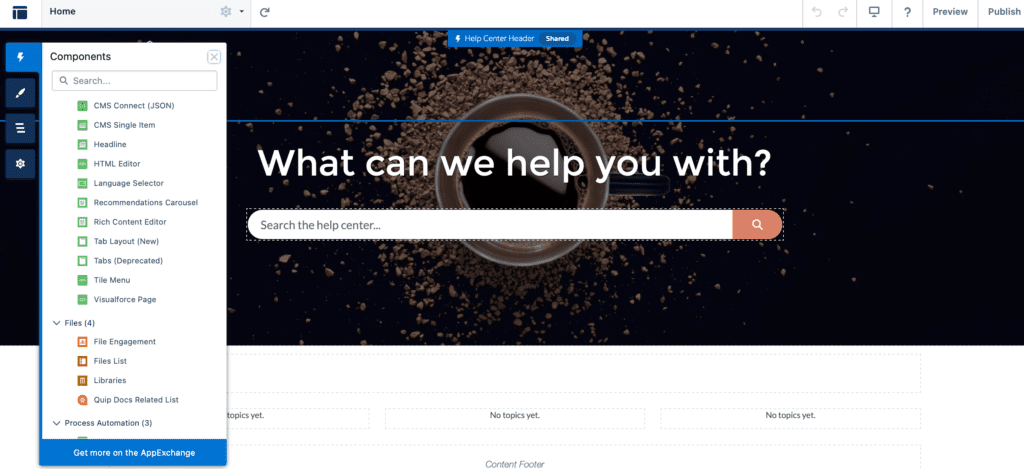
One significant benefit of Experience Cloud lies in its no-code development approach, which allows users to create Salesforce communities and sites without extensive coding knowledge, training, and certification courses. This is all possible with the Experience Builder, a no-code development tool integrated into Experience Cloud.
Experience Builder provides ready-to-use drag-and-drop functionality to develop and customize powerful CRM-driven digital experiences fast, and with very low setup costs. You simply need to utilize drag-and-drop features or a combination of standard and custom components to build a digital experience tailored to your needs. This is a huge advantage of the Experience Cloud platform as you can use the existing development without relying too much on web developers, while ensuring compliance with Salesforce security standards, and seamless integration with the CRM system.
However, it’s important to note that even though Salesforce Experience Cloud is great at making development easier, it may not always deliver pixel-perfect user experiences.
Some may find this limitation to be a drawback, particularly if precision in design is crucial. And here is the solution – custom design done by a Salesforce partner like Advanced Communities. AC has been providing Salesforce UI/UX design services for years creating intuitive digital experiences that users love. Feel free to reach out to get help building your community on Experience Cloud.
Third-party apps integration
Salesforce Experience Cloud digital experiences can be enhanced by custom apps and components known as Salesforce Accelerators that are readily available on AppExchange. These apps expand the out-of-the-box functionality of the site ensuring it gets features previously not available in the platform.
For instance, you can use a powerful Salesforce events app to establish a robust event management system on your site. Or supercharge your Salesforce Knowledge by implementing AC Knowledge Management Enterprise, a powerful Knowledge base solution for Salesforce Experience Cloud.
All these apps will help you improve community engagement and customer satisfaction providing functionality your users expect.
What Does This Mean If You Are Planning a New Site?
If you are planning a new Salesforce portal or community today, you should evaluate it as an Experience Cloud implementation rather than as a legacy Community Cloud project. The right architecture depends on your audience, use case, Salesforce data model, self-service requirements and engagement goals.
Advanced Communities helps organizations design and implement Salesforce Experience Cloud sites for customers, partners, members and other external audiences, from architecture and UX to migration, implementation and ongoing optimization. Explore Salesforce Experience Cloud Services.
Conclusion
Community Cloud has not disappeared as a concept, but evolved into Salesforce Experience Cloud, with broader capabilities and updated terminology. If you are planning a new portal, community or external Salesforce experience, the key question is no longer “Community Cloud or Experience Cloud?” but which Experience Cloud architecture best fits your users and business processes.
If you need help with setting up and configuring your Experience Cloud platform, the Advanced Communities team is here for you.
We’ve been building Salesforce communities and custom solutions for Experience Cloud for years, and that’s what we know best. We can also help with Salesforce data migration and custom design for your site.
Unofficial Salesforce Experience Cloud Migration Guide
See how you can migrate to Experience Cloud and transfer any type of data completely hassle-free.
Q&A
Is the Salesforce Community Cloud the same as Experience Cloud?
Yes, Salesforce Community Cloud is now known as Salesforce Experience Cloud. The rebranding occurred to reflect the broader scope of capabilities offered by the platform, which extends beyond traditional community-building features to encompass a wide range of digital experience creation tools. So, while the name has changed, the core functionalities of the platform remain largely the same, with enhancements and updates under the new branding.
What is Salesforce Experience Cloud?
Experience Cloud is a platform provided by Salesforce that enables businesses to create branded sites for their customers and partners. Formerly known as Salesforce Community Cloud, it offers a range of tools and features to build interactive sites, self-service portals, sites for customer support teams, and online communities. These digital experiences can be tailored to specific audiences and designed to facilitate communication, collaboration, and engagement. Use the power of Salesforce to streamline operations, enhance customer satisfaction, and drive growth in your Salesforce community!
Is Salesforce CMS part of Experience Cloud?
Yes, Salesforce CMS (Content Management System) is indeed part of Salesforce Experience Cloud.
Is Community Cloud still available?
Not under that name. Salesforce Community Cloud became Salesforce Experience Cloud, and the Community Cloud branding no longer appears in Salesforce products, documentation or licensing. Existing sites built under the old name continue to run. They became Experience Cloud sites without any migration. If you see Community Cloud referenced in a proposal or a job description today, it is describing Experience Cloud work using outdated terminology.