How to Start a Nonprofit Organization and Manage It Efficiently with Salesforce

Starting a nonprofit is exciting but it’s also messy, bureaucratic, and, at times, overwhelming. Most founders enter the sector with passion… and quickly discover that passion alone doesn’t get you tax-exempt status, fundraising systems, or a website your beneficiaries can actually use. The most common frustrations appear immediately: no clear structure, no automation, no donor tracking, and spreadsheets everywhere.

This guide breaks down how to start a non profit organization from idea to fully operational entity, and goes a step further. You’ll learn the practical legal steps, the hidden pitfalls first-time founders face, and, most importantly, how modern nonprofits operate efficiently using Salesforce. From membership management to event fundraising and digital community engagement, technology determines whether a nonprofit thrives or struggles.

Why Digital-First Nonprofits Grow Faster

Launching a nonprofit in 2025 is radically different from 10 years ago. The sector became more competitive, more transparent, and more data-driven. Donors want proof of impact, regulators demand compliance, and beneficiaries expect the same digital experience they get from modern commercial apps.

Most organizations begin with the right intention but the wrong infrastructure. They rely on spreadsheets, Gmail folders, fragmented tools, and manual processes that quickly kill productivity. Studies show that nonprofits lose 20–30% of operational capacity due to poor systems, data silos, and manual coordination. The smart nonprofit flips that statistic by investing in unified data and automation from day one, not as an afterthought. Below we walk through actionable steps, technology choices, and bold operational moves you can implement immediately to build a resilient organization.

Seven Core Steps: How to Start a Non Profit Organization

Step 1: Nail the mission, model and measurable outcomes

Craft a short one-line mission and a one-paragraph “what success looks like in 18 months”. Decide which revenue mix you will chase (donations vs grants vs earned income vs membership dues). Frame 3 primary KPIs (e.g., members, recurring revenue, volunteer hours) and three operational guardrails (budget burn, data hygiene, minimum tech stack).

Step 2: Compliance & governance (legal early wins)

Register your legal entity, appoint an initial board, and file for tax-exempt status where relevant. Even if you start as a community project, formalize roles and approval workflows so fundraising platforms and grantors will work with you.

Every country has slightly different steps, but it typically includes:

  • Articles of Incorporation
  • Bylaws
  • Board structure
  • Mission statement
  • Tax-exempt application

For U.S. readers: The IRS publishes simplified checklists for 501(c)(3) registration. (Source: https://www.irs.gov/charities-non-profits/applying-for-tax-exempt-status)

For UK/EU nonprofits: Charity Commission guidelines (https://www.gov.uk/government/organisations/charity-commission

Step 3: Finance & basic ops

Open a bank account, set up basic accounting, and define an approval policy for spending. Early bookkeeping discipline prevents big headaches when you start taking donations or applying for grants.

Step 4: Audience, value prop, and initial offer

Define your target audience segments (donors, members, volunteers, beneficiaries), and for each create a short value statement: Why should they engage? What immediate benefit will they receive? Build one core offer (e.g., membership tier, volunteer program, inaugural event) and a simple signup funnel.

Step 5: Technology foundation (start with one source of truth)

Pick a CRM and commit to it as your single source of truth. Use it to record contacts, donations, memberships, volunteer activities, event attendees, communications, and program metrics. This is the step that separates ambitious founders from the tired, overworked ones.

Practical implementation: For nonprofits, Salesforce Nonprofit Cloud is purpose-built to centralize donors, members, events and program outcomes. If you want to get moving quickly with a membership-first model and event capabilities, check out Advanced Communities’ solutions for nonprofits that extend Salesforce with ready-made features. 

Step 6: Minimum viable digital experience (MVE)

Instead of aiming for a perfect website from day one, focus on a minimum viable experience: a clean landing page, a donation form, and a members’ signup path. The key is to capture data efficiently and integrate it seamlessly into your CRM for follow-up. A site built on Salesforce Experience Cloud is perfect for this because it natively connects every interaction: donations, sign-ups, event registrations, directly to your Salesforce ecosystem. This eliminates manual data entry, ensures accurate reporting, and provides a professional, secure, and scalable platform that can grow with your nonprofit as programs, memberships, and fundraising campaigns expand. With Experience Cloud, your “MVE” is already smart, connected, and ready to deliver results. We’ll dive into this in more detail later. 

Step 7: Launch, measure, and iterate

Run your first campaign (event, fundraising challenge, membership drive), measure against the KPIs, and run a 30-day retrospective. Use small experiments (A/B email subject lines, 2 price points for membership) and keep what works.

Choosing the Right Technology (and Why Salesforce Wins)

Let’s shift from the legal to the operational. Once your nonprofit is legally recognized, the real work begins: running it like a high-performing organization.

Mastering how to start a non profit organization doesn’t end with paperwork. True success comes from learning how to manage it long-term: consistent fundraising, donor engagement, community communication, volunteer management, and event execution.

Common operational mistakes first-time nonprofits make

  • Running donor data in Excel
  • Hosting events with no follow-up strategy
  • Manual membership renewals
  • No automation for communications
  • Poor reporting (or none at all)
  • Relying on volunteers instead of systems
  • Underestimating the importance of a good website

Salesforce solves each of these operational headaches—and this is exactly why so many organizations choose Salesforce for nonprofits as their digital backbone. It provides:

  • A unified database for donors, members, volunteers and organizational contacts.
  • Rich automation with Process Builder, Flow, and now AI-enhanced features for segmentation and personalization.
  • Experience Cloud to deliver members-only portals, event microsites, and resource libraries.
  • An ecosystem of apps and integrators (including Advanced Communities’ product suite) that plug in without fragile point-to-point integrations.

If your first digital move is to centralize contact and transaction data into Salesforce, everything else becomes easier: personalization, reporting, renewals, impact measurement.

Building Your Nonprofit Community on Experience Cloud

A nonprofit without a website is invisible. A nonprofit with a bad website looks untrustworthy.

Salesforce Experience Cloud provides:

  • Secure login areas
  • Volunteer portals
  • Membership directories
  • Donation pages
  • Program pages
  • Event calendars
  • Community spaces for beneficiaries

Experience Cloud turns passive website visitors into active community participants. For nonprofits, that means:

  • Personalized member dashboards showing dues status, upcoming events, and recent donations.
  • Self-service for updating information, downloading receipts, and tracking volunteer hours.
  • Private groups for program cohorts, committees, or regional chapters.
  • Resource hubs (policy docs, recordings, asset libraries) for beneficiaries and staff.

Why custom Experience Cloud sites from Advanced Communities are ideal

Advanced Communities specializes in Experience Cloud website creation for nonprofits, so you can launch a polished portal without reinventing the wheel. That portal can host member/donor directories, volunteer opportunity boards, charity events, programs, community projects and more – all synced with Salesforce for accurate reporting and automation. You can also embed your public Experience Cloud pages directly within your main website (e.g., WordPress, Drupal, Joomla, etc) if needed.

Most nonprofits can’t afford large-scale custom development. AC delivers:

  • Fast implementation
  • Beautiful UX/UI
  • Integrations with AC apps
  • Donation forms
  • Program directories
  • Mobile responsive layouts
  • Community engagement features

Managing Members, Donors & Events Efficiently with AC Solutions

This is the core of operations: once your nonprofit is running, you must engage people effectively. Below is where we tie the apps directly to day-to-day use cases.

Membership Management with AC MemberSmart

Memberships are not just “subscriptions”, they are relationships. AC MemberSmart modernizes and automates that relationship.

Key capabilities include:

  • Automated renewals
  • Tiered memberships
  • Family & group memberships
  • Online applications & self-service updates
  • Payment processing
  • Membership directories
  • Experience Cloud member portal

The system eliminates 80% of the manual admin work nonprofits deal with during renewal season.

Event Management with AC Events Enterprise

Events remain the lifeblood of nonprofit fundraising. But running them manually is exhausting.

AC Events Enterprise helps nonprofits:

  • Publish event pages on Experience Cloud
  • Sell tickets
  • Manage speakers, sponsors, and agenda
  • Track attendance
  • Integrate with Salesforce campaigns
  • Collect donations on event checkouts
  • Automate follow-up emails and segmentation

Case study DFSO block

Automated fundraising with AC Fundraising

Nonprofits can supercharge donations and donor engagement without extra admin work. AC Fundraising enables:

  • Creating targeted native peer-to-peer and standard fundraising campaigns quickly
  • Setting up recurring donation programs
  • Tracking of all-time donations and donation amounts for each donor
  • Tracking campaign performance in real time
  • Automating thank-you emails and follow-ups
  • And more…

If fundraising is your top priority, check out this Salesforce for fundraising toolkit.

Conclusion

Starting a nonprofit requires equal parts heart and systems. By focusing early on a unified CRM, membership-first thinking, and automation, you dramatically increase the odds of mission success. Salesforce gives you the backbone and Advanced Communities provides targeted, nonprofit-ready extensions like AC MemberSmart, AC Events Enterprise, AC Fundraising and fundraising modules that let you operate professionally from day one.

To recap: craft a clear mission, centralize data in Salesforce, launch a minimum viable portal, automate core donor and member flows, measure the right KPIs, and iterate. That’s how you start a nonprofit organization that’s built to last — and built to scale.

Ready to accelerate your nonprofit launch with Salesforce and Advanced Communities? Book a demo with our team to see tailored configurations for members, events and fundraising.

FAQ

How do I start a nonprofit organization with no money?

Start by validating your mission, forming a board, and filing legal documents yourself instead of hiring lawyers. Many countries allow nonprofits to apply for grants even before full operational launch. Salesforce for nonprofits includes discounted tools that help you begin with minimal upfront investment.

How do non-profit owners make money?

Nonprofit founders don’t “own” the organization. They can receive a salary if they take an operational role (executive director, manager, program lead), but all earnings and assets belong to the organization—not individuals.

What requirements are needed to be a non-profit organization?

You need a mission serving public benefit, a board of directors, bylaws, incorporation documents, and compliance with your local charity commission or tax authority. Transparency, reporting, and governance rules vary by region.

How much does it take to start up a non-profit?

Start-up costs vary widely: in some jurisdictions you can begin for under €500 (DIY registration, volunteer help), while more formal launches with legal counsel, branding, and tech setup can significantly increase the cost. Some founders start with almost nothing thanks to grants, volunteers, and discounted nonprofit tools like Salesforce NPSP.

What Is PRM in Salesforce: How the New Partner Cloud Can Completely Change Your Game

Most companies still underestimate the power of their partner ecosystem. According to Canalys, over 70% of global B2B revenue now flows through indirect channels, yet many organizations still lack a modern partner relationship management system, relying instead on spreadsheets or outdated tools.

In today’s interconnected market, partners aren’t just distributors or resellers. They’re growth accelerators. The companies that master partner-led growth outperform those relying solely on direct sales. That’s where a modern Partner Relationship Management (PRM) system comes in, aligning people, process, and data for maximum impact.

In this post, we’ll unpack what is PRM, explore the PRM meaning within the Salesforce ecosystem, and take a closer look at the newly launched Salesforce Partner Cloud – a next-generation evolution set to redefine how you scale through your partners.

Decoding PRM: What Does It Really Stand For?

PRM stands for Partner Relationship Management – a coordinated approach of business processes, systems, and strategy to manage relationships with channel partners, distributors, and resellers.

If CRM (Customer Relationship Management) focuses on end customers, PRM software manages your partner ecosystem, extending your CRM systems to other businesses that sell your products.

Without a structured PRM solution, companies struggle with manual data entry, inconsistent onboarding, and poor partners performance visibility. Many still rely on disconnected business tools and fragmented communication, making deal registration and performance tracking inefficient.

Salesforce saw this challenge early and responded with integrated PRM capabilities on its platform, now taken further through Partner Cloud.

Why PRM Matters More Than Ever

The business case for PRM is clear: scalable growth through trusted partnerships. A robust PRM system lets organizations expand through indirect sales, reaching new markets without building new teams. It also enhances lead management, simplifies partner sales processes, and reduces acquisition costs compared to direct sales. By doing partner relationship management on Salesforce, companies can align their sales and channel managers to drive shared success. A strong PRM strategy improves partner performance, accelerates onboarding, and brings predictability to your revenue engine.

Neglecting your partners means missed deals, frustrated teams, and wasted potential. The right PRM tool eliminates friction and turns your ecosystem into a collaborative network built for growth.

Inside Salesforce’s PRM Offering: A Quick Tour

Salesforce’s long-standing PRM solution built on Experience Cloud has powered thousands of partner portals around the world. It offers capabilities that connect sales teams and channel partners within a single platform, ensuring transparency, accountability, and easy collaboration.

Key features include deal tracking, guided onboarding, and integrated analytics for sales metrics and partner success. These capabilities connect seamlessly with CRM data, allowing for smooth transitions between direct and indirect selling motions.

Yet, as partner networks have grown more complex, the need for deeper automation and real-time engagement has pushed Salesforce to evolve, leading to the birth of Partner Cloud.

Meet Partner Cloud: The Next Evolution

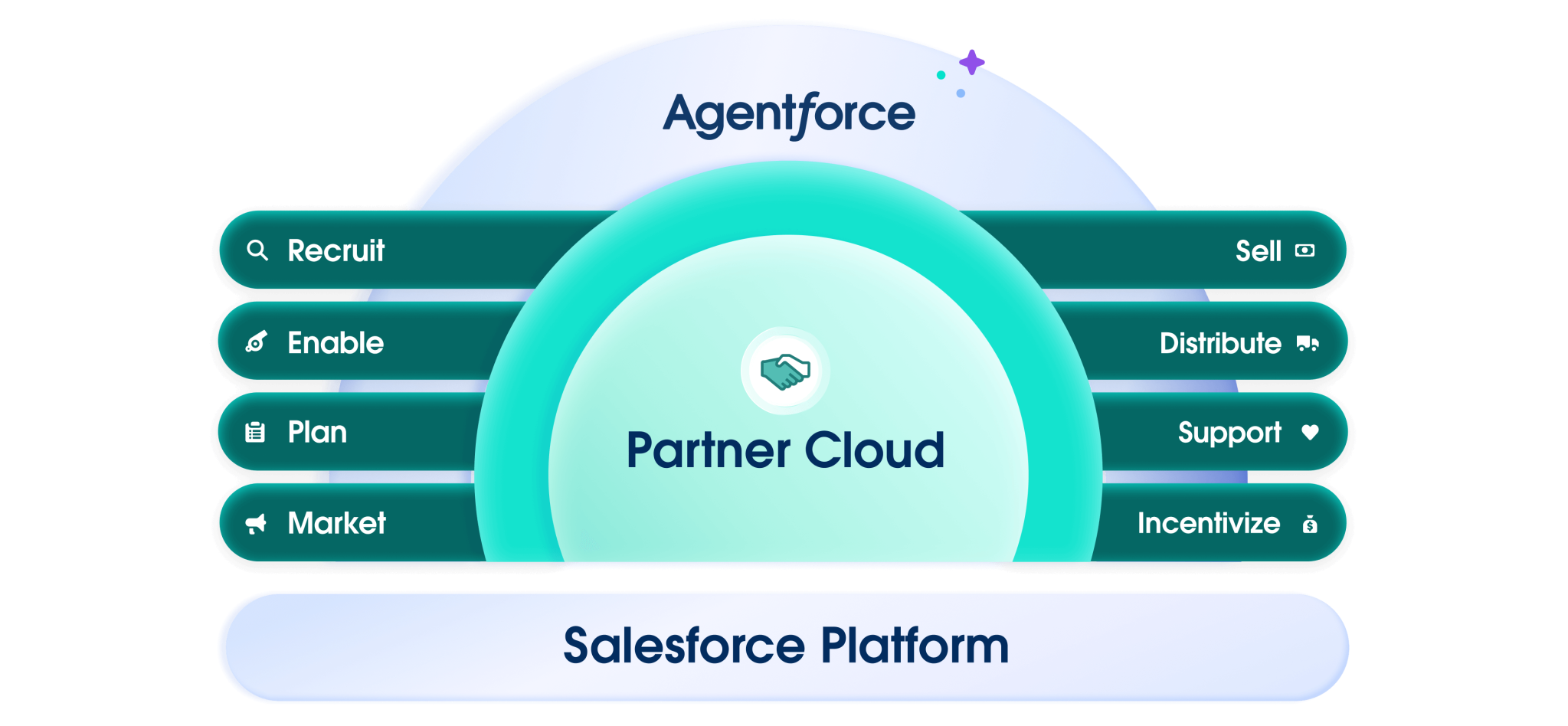
Partner Cloud is Salesforce’s new-generation solution purpose-built for the modern partner economy. As reported by Salesforce Ben, it consolidates traditional PRM capabilities and expands them with advanced partner enablement, incentive and loyalty management, and channel revenue management.

Infographic explaining functionalities of Salesforce Partner Cloud

image source: Salesforce

It’s fully Salesforce-native, offering deep platform integration with Slack, AI-driven insights, and streamlined workflows. This shift represents Salesforce’s commitment to turning partner management into a connected, intelligent, and scalable experience.

To help companies understand and maximize these features, we’ve launched a series of videos and blog posts called Salesforce Partner Cloud Fundamentals. In this series, we dive deep into different Partner Cloud functionalities, from onboarding and deal tracking to rebates and incentive management. Watch the latest episode and explore practical tips for implementing Partner Cloud successfully ⬇️

Salesforce Partner Cloud Fundamentals: Mastering Advanced Commission Structures with Salesforce Spiff

Post image

Game-Changer Features: What Makes Partner Cloud Stand Out

Seamless Onboarding & Partner Journey

Partner Cloud redefines the onboarding process by allowing partners to register through self-service portals and immediately access guided, personalized journeys. Every step, from sign-up to enablement, happens within a unified environment, making it easy for partners to learn, certify, and quickly start engaging with your offerings. The result is a faster ramp-up period and a consistent experience that reflects your brand’s professionalism and support.

End-to-End Deal & Co-Sell Collaboration

With Partner Cloud, vendors and partners can collaborate on opportunities in real time. Deals are registered and tracked within Salesforce, ensuring both internal and partner teams share a unified view of the pipeline. Integrated Slack channels and Salesforce workflows keep communication fluid, reducing silos and improving alignment. This connected experience shortens sales cycles and makes co-selling feel seamless and transparent.

Incentives, Rewards & Channel Revenue Insights

Salesforce built Partner Cloud to handle the complexities of incentive programs and channel revenue management natively. Companies can create and manage rebates, loyalty rewards, and partner tiers while giving partners instant visibility into their earnings and performance. This transparency strengthens motivation, drives accountability, and helps partners understand exactly how their efforts translate into results.

Native Platform + Intelligence

Being fully native to Salesforce gives Partner Cloud a major advantage: all partner data lives within the same ecosystem as your customers, opportunities, and forecasts. Built-in AI provides intelligent scoring and predictive insights, while automated workflows simplify approvals, renewals, and reporting. Instead of managing disconnected tools, teams operate from a single intelligent platform designed to scale partner operations efficiently and strategically.

When Is Partner Cloud the Right Move for Your Business?

Partner Cloud becomes the right choice when your organization already operates a partner program and relies on Salesforce as its core CRM platform. It’s particularly suited for companies that have outgrown basic partner portals and need a more advanced system for managing co-selling, incentives, and real-time visibility into partner activities.

This solution is a natural fit for businesses with established or rapidly expanding partner ecosystems, especially in industries like technology and manufacturing, where collaboration among channel partners directly influences growth. To get the most from Partner Cloud, companies should already have a mature partner strategy, clearly defined partner roles, and a willingness to invest in proper configuration, change management, and adoption planning.

Pitfalls to Watch & Implementation Tips

Even the best partner relationship management system can’t fix an unclear strategy. Many organizations struggle because of poor data hygiene, undefined partner processes, lack of executive sponsorship, or insufficient training for both internal users and partners. According to G2 reviewers, Salesforce Partner Cloud is powerful but requires thoughtful setup and ongoing education to deliver its full potential.

To implement successfully, start by defining measurable goals and segmenting your partners according to their roles and contribution potential. Map out the partner lifecycle in detail before configuring the system, then run a pilot with a small, representative partner group. Involving partners early in the design process ensures buy-in and usability. Once live, track adoption, monitor engagement metrics, and refine your processes continuously to achieve sustainable success.

Looking Ahead: The Future of Partner Ecosystems in a Salesforce World

Partner programs are evolving fast: from transactional relationships to ecosystem alliances. Companies now co-market, co-sell, and co-innovate with their partners.

Salesforce Partner Cloud positions organizations for this future: built for enablement, learning, and shared outcomes, not just deal registration. Future roadmap areas include deeper inventory optimization and manufacturing-specific use cases.

As the partner economy matures, PRM will become as essential as CRM once was.

Time to Re‑Think Your Partner Strategy

Your partners aren’t just resale channels, they’re extensions of your brand and your growth engine.

If you’ve been wondering what is PRM, or what does PRM stand for, the answer is simple: it’s the framework that lets you manage, motivate, and multiply your partner success.

With Salesforce Partner Cloud, you can transform how you work with partners, aligning strategy, data, and collaboration in one connected system. And if you’re looking for expert help to make that transformation happen, Advanced Communities brings years of experience building partner portals, PRM systems, and entire ecosystems on the Salesforce platform.

Evaluate your current partner operations. Identify gaps in engagement, visibility, and incentives. Consider engaging with a qualified consulting partner like Advanced Communities. Book a personalized demo to see how you can empower your partners and empower your growth.

FAQ

What is PRM in business?

PRM, or Partner Relationship Management, is a strategy and system for managing relationships with channel partners, resellers, distributors, and other business collaborators. In practice, a PRM system streamlines partner sales, onboarding, deal monitoring, performance tracking, and collaboration with internal sales teams, helping businesses grow revenue through indirect sales channels instead of relying solely on direct sales.

What is Salesforce Partner Cloud?

Salesforce Partner Cloud is the next-generation PRM software built on the Salesforce platform. It provides an integrated environment for partner sales, onboarding, incentives, and performance tracking, while offering AI-powered insights and automation. Partner Cloud unifies all aspects of partner engagement, making collaboration between sales teams and channel partners seamless and scalable.

How does PRM differ from CRM?

While CRM systems focus on managing relationships with end customers, a PRM solution is designed for partners. It manages leads, co-selling, incentive programs, and partners performance tracking. Together, CRM and PRM provide a unified approach to revenue growth, addressing different audiences and business processes.

Who should use a PRM system?

Any company or organization that relies on indirect sales through channel partners can benefit from a PRM system. It is particularly useful for channel managers, sales teams, and executives overseeing partner engagement, optimizing business processes, and increasing partner sales performance.

Salesforce Partner Cloud Fundamentals: Mastering Advanced Commission Structures with Salesforce Spiff

Introduction: Moving Beyond the Basics

While foundational commission plans are essential, real-world partner compensation strategies often require more sophisticated tools to motivate top performers and reward leadership effectively. Salesforce Spiff provides a powerful suite of advanced features designed for these complex scenarios. Moving beyond basic calculations, Spiff’s advanced capabilities focus on implementing nuanced accelerator models, building team-based commission structures, and providing deep analytical insights.

This guide will explore these core advanced topics, including:

  • Implementing sophisticated accelerators to incentivize over-performance, including both tiered and marginal payout rules.
  • Structuring team-based commissions and rollups to accurately compensate partner managers based on the partners’ performance.
  • Leveraging advanced visual and custom table reports for deeper data analysis and insights.

Supercharging Partners Motivation: A Deep Dive into Accelerators

Accelerators act as the high-performance engines of your commission plans, strategically designed to amplify earnings when your partners achieve outstanding results. When a partner surpasses a key performance threshold, such as 100% of their quota, they can unlock a multiplier that turbocharges their commission for the period. This serves as a powerful incentive, motivating partners to keep selling even after their initial targets have been met.

Spiff offers a variety of options for accelerators, but they are primarily built on two core models:

  • Tiered Accelerators. In a tiered model, the entirety of a period’s channel sales gets the maximum achieved commission rate. The highest tier of attainment a partner reaches dictates the rate that is applied to all deals closed by that partner in that period. For example, if a partner achieves 101% of their goal, they cross into the highest tier, and every deal they closed, from the first to the last, will be commissioned at that top rate.
  • Marginal Accelerators. A marginal accelerator functions more like income tax brackets, where only the amounts that fall within each specific threshold get that tier’s defined rate. In this model, different portions of a partner’s sales are treated individually depending on what tier they fall into. For instance, if a partner achieves 101% attainment, the channel sales that contributed to the 0-50% attainment bucket would be paid at the first tier’s rate, the sales from 50-100% would be paid at the second tier’s rate, and only the final 1% of sales would qualify for the highest rate.

To implement these structures, Spiff’s accelerator rules leverage two main types of tables: the Range Table and the Lookup Table. These tables allow administrators to define the attainment tiers and their corresponding accelerator rates, which can then be referenced by specific commission functions.

Compensating Leadership: Mastering Teams and Rollups

In channel programs, partner revenue doesn’t tell the whole story – effective partner management does. With Salesforce Spiff, you can create commission models that reward partner managers directly for the sales their assigned partners produce.

The Foundation: Building Teams in Spiff

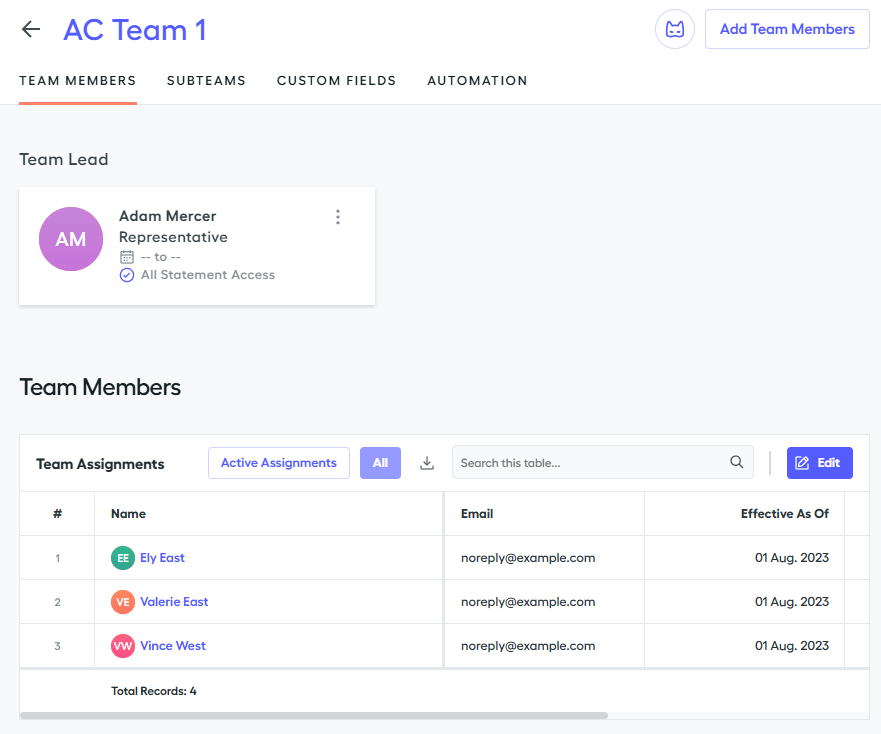
Creating teams in Spiff is a crucial first step, as managers frequently receive commissions linked to partners’ success. The process is straightforward: teams are created and managed within the Teams tab on the main navigation bar. From there, administrators can add team members and assign a manager or Team Lead. Assigning a team lead is a key step, as it not only grants them visibility into their team members’ statements but also enables their compensation to be calculated based on team performance.

Understanding Rollups

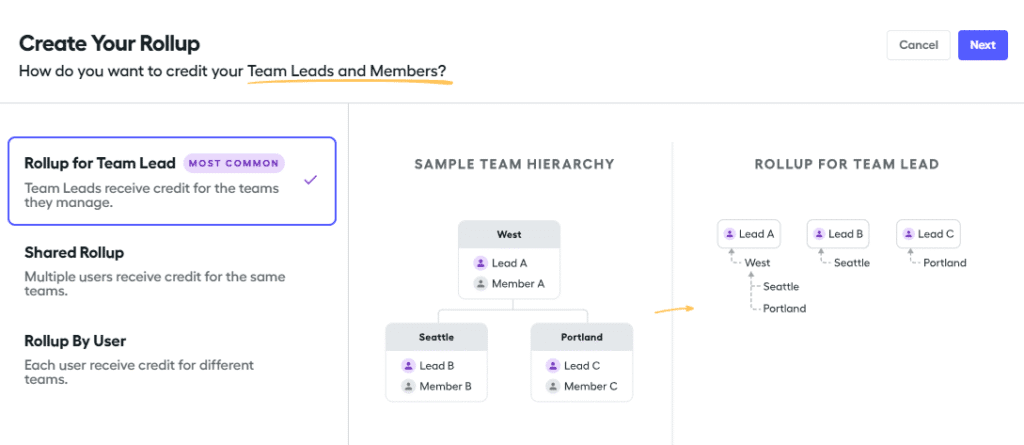
Rollups are a key feature in manager commission plans and involve the aggregation of revenue or other important business metrics generated by a team of partners. In this model, a partner manager receives commission on the sum of the revenue closed by partners they manage. This process is often referred to as a “roll-up” because the revenue generated by the individual team members “rolls up” to the manager.

Using the Guided Rollup Builder

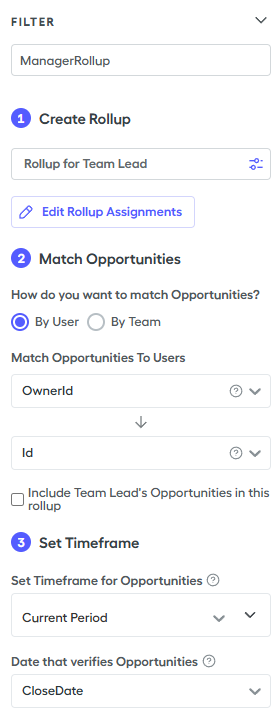
Spiff simplifies the process of aggregating team data through a Guided Roll-up Builder. Instead of creating a standard data filter, an administrator can select the New Rollup Filter option on the relevant data object (such as Opportunities). This builder offers several ways to configure the rollup, with the most common being Rollup for Team Lead. This powerful option automatically gathers the relevant records, such as deals or opportunities, for all direct team members and even members of any sub-teams that fall under the given team lead. This allows for a single, dynamic filter that correctly aggregates data for managers at different levels of a complex team hierarchy.

The “How-To”: Key Functions for Advanced Rules

Translating the concepts of tiered and marginal accelerators into functional commission plans requires using specific functions within the Spiff Designer. These tools are the building blocks for creating sophisticated, multi-layered payout rules.

For Tiered Rules: The tier_payout Function

The tier_payout function is used to implement tiered accelerator payout rules. It works by finding the matching range in a Range Table that a numerical input value (like a partner’s total attainment) falls into, and then returns the corresponding rate from that row. One of its key optional parameters is the tie_break_value, which determines the outcome when an input value falls on the exact boundary between two tiers. Setting this to true will use the lower range, while setting it to false will break upwards and use the higher tier’s rate.

For Marginal Rules: The mpercent Function

For building marginal accelerators, Spiff provides the mpercent function. This function calculates commission amounts in a marginal way, similar to how income tax works. This means that different portions of the input value are treated individually based on the tiers they fall into within a Range Table. For example, instead of applying one rate to the total amount, mpercent can apply a 5% rate to the first 50% of attainment, a 7% rate to the next 50%, and so on.

A Crucial Concept: Accumulated Variables

Marginal payout rules, especially those where attainment accrues over a long period (like a quarter) but pays out monthly, require the use of an accumulated variable. This is necessary because each new deal needs to factor in the progress that has already been made, ensuring the partner is not starting from zero with every transaction. Spiff needs to recognize how much ARR has already been closed at any given point so the partner can move closer to the next tier. This is configured on a calculated field in a datasheet by turning on the Accumulated slider in the “ACCUMULATION” menu. This allows the rule to correctly track progress over time and apply marginal rates accurately.

If you find this article interesting, we also recommend checking out the previous blog post in this series ⤵️

Salesforce Partner Cloud Fundamentals: Spiff Integration & Incentive Management

Commissioning channel partners can feel like walking a tightrope — a few missteps and trust wobbles, confusion ensues, and motivation plummets. Dive in to see how the right incentives architecture can turn administration into a strategic advantage.
Post image

Measuring Success: A Guide to Advanced Reporting

After building sophisticated commission plans, it’s crucial to have robust reporting tools to analyze performance and extract valuable insights. Spiff equips administrators and finance users with a suite of advanced reporting options that go far beyond standard statement exports.

Visual Reports for At-a-Glance Insights

Visual Reports allow users to create visualizations that compare commission metrics across partners. These reports are easily exportable and can be shared or saved for reference.

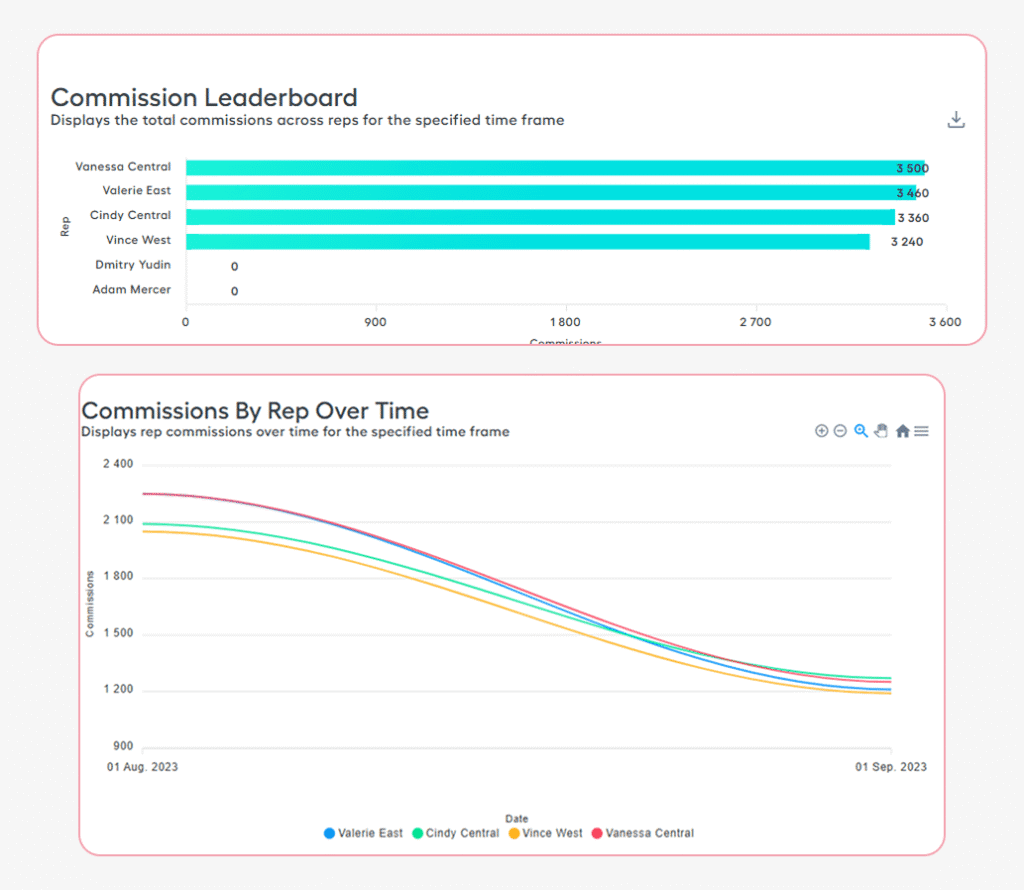
  • Standard Visual Reports: Spiff comes with five pre-built report options, including a Commission Leaderboard, which sorts partners from highest to lowest earner, and Commissions By Rep Over Time, which tracks commission trends. These reports allow for quick analysis with the ability to filter results by a specific date range, plan, or team.
  • Custom Visual Reports: For more specific needs, users can create their own custom visual reports. Spiff offers two visualization types: Bar Charts, which excel at comparing single values (like creating an attainment leaderboard), and Line Graphs, which are ideal for graphing calculated fields and tracking metrics over time.

Custom Table Reports for Granular Detail

Custom Table Reports give users precise control over the data they pull out of Spiff, allowing them to craft tailored tables that go beyond the information available in a standard statement export. There are two main types of custom table reports:

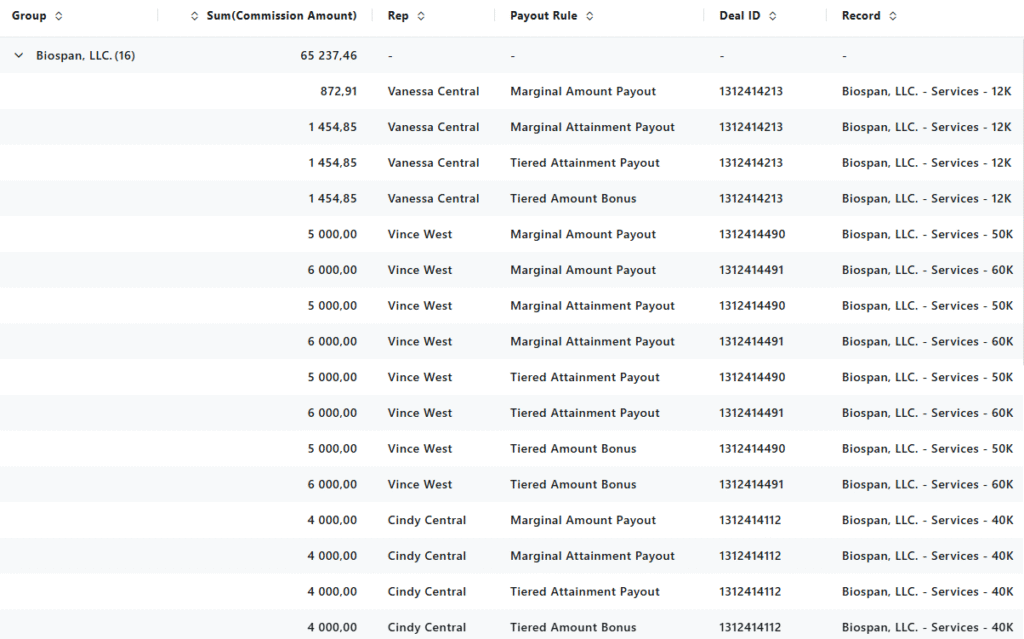
  • Obligations Table Report: This report is the go-to choice when you need detailed, line-by-line information for each individual deal. It is ideal for analyzing line-by-line rules, as it can display attributes for each specific commissionable event, such as the deal’s close date, amount, and the commission rate applied.
  • Statements Report: This report is designed to show aggregated, statement-level totals. It is the preferred option for analyzing lump-sum rules or for reporting on summary metrics that apply to the statement as a whole, such as total commission for the period. 

Conclusion

Salesforce Spiff offers a robust suite of tools that extend far beyond basic commission calculations. As this guide has shown, its advanced capabilities allow organizations to build sophisticated, multi-layered compensation strategies that cater to real-world business needs. By mastering the strategic differences between tiered accelerators (using the tier_payout function) and marginal accelerators (using the mpercent function), businesses can create powerful incentives that precisely motivate individual over-performance.

Furthermore, the ability to structure teams and implement rollups enables the creation of meaningful compensation plans for partner managers based on the aggregated performance of their teams. These complex results can then be analyzed through a powerful reporting suite, from high-level Visual Reports to granular Custom Table Reports, providing deep insights into every aspect of partner performance.

Mastering these advanced features allows an organization to build highly tailored compensation plans that effectively motivate partners, reward leadership, and align the entire channel sales organization with key business objectives.

And Spiff integration is just one of the many features available in Salesforce Partner Cloud. We’re proud to be one of the top Salesforce partners for PRM, delivering full Partner Cloud implementations.
Reach out to us today to see how Partner Cloud can elevate your partner strategy.

Ebook

AI-Powered PRM: Automating Onboarding, Co-Selling & Support with Salesforce

Learn how to turn AI into real impact with practical use cases, smarter self-service, and insights from top channel experts.

Download Now!
img